
-
Theatre Manager Online Help
- Getting Started - Hardware Requirements
- Login / Logoff
- Customizing Theatre Manager
- Overview of the Theatre Manager Workspace
- Accounting
- Attendance Tracking/Ticket Scanning
- Course Management
- Credit Card Authorization Setup
- Donation Management
- Hot Seat Analyzer
- Importing Data to TM
- Cardnet Setup Information for Theatre Manager
- Cardnet Setup Information for Theatre Manager
- Cardnet Setup Information for Theatre Manager
- Cardnet Setup Information for Theatre Manager
- Cardnet Setup Information for Theatre Manager
- Cardnet Setup Information for Theatre Manager
- Cardnet Setup Information for Theatre Manager
- Code Tables - Awards Code
- Code Tables - Personnel Codes
- Code Tables - Volunteer Custom Field 3
- Code Tables - Volunteer Eye Colour
- Commissions - Commission Setup
- Commissions - Deleting a Commission
- Exporting Data From TM
- Installing - Installing From CD - Windows
- Installing - New Macintosh Database
- Installing - New PC Database
- Introduction to Invoices
- Media Management - Editing a Media Member
- NDC Setup Information for Theatre Manager
- Nova Setup Information for Theatre Manager
- Novus Setup Information for Theatre Manager
- PC Authorize - Setup Information
- Patron Management - Season Tab
- Patron Management - Web Tab
- Reports - Solicitor Summary
- Season Subscriptions - Creating a Control House
- Season Subscriptions - Creating a Season Package
- Season Subscriptions - Season Package Detail Window
- Mail Lists - what are they?
- Media Management
- Memberships, Passes, G/Cs
- Order Management
- Outlet Management
- Patron Management
- Payments Management
- Personnel/Volunteer Management
- Season Subscription Management
- System Setup
- Venue Management
- Ticket Management
- Ticket Trove
- Web Sales Management
You are here
Commissions - Deleting a Commission

Deleting a Commission
- Open the Commission Setup window.
Click here to learn how to access the Commission Setup window.

- Select the Commission to be deleted.
Single click on a commission to select it.
- Click the Delete
 button.
The Delete Record confirmation window will appear.
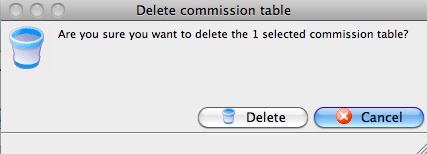
- Click the Delete
 button.
The Commission is now deleted.