
Main menu
You are here
Order/Payment Details Tab

The payment window is used to record the payment method, enter a reason why the patron purchased the tickets, initiate invoicing, print tickets, and record detailed order notes. Each time tickets are sold, a donation is made or a membership purchase a unique Order Number is created. This number is displayed on the title bar of the Payment Window. For more information on:
- Creating a payment, click here.
- Accepting multiple payments, click here.
- Deleting a payment, click here.
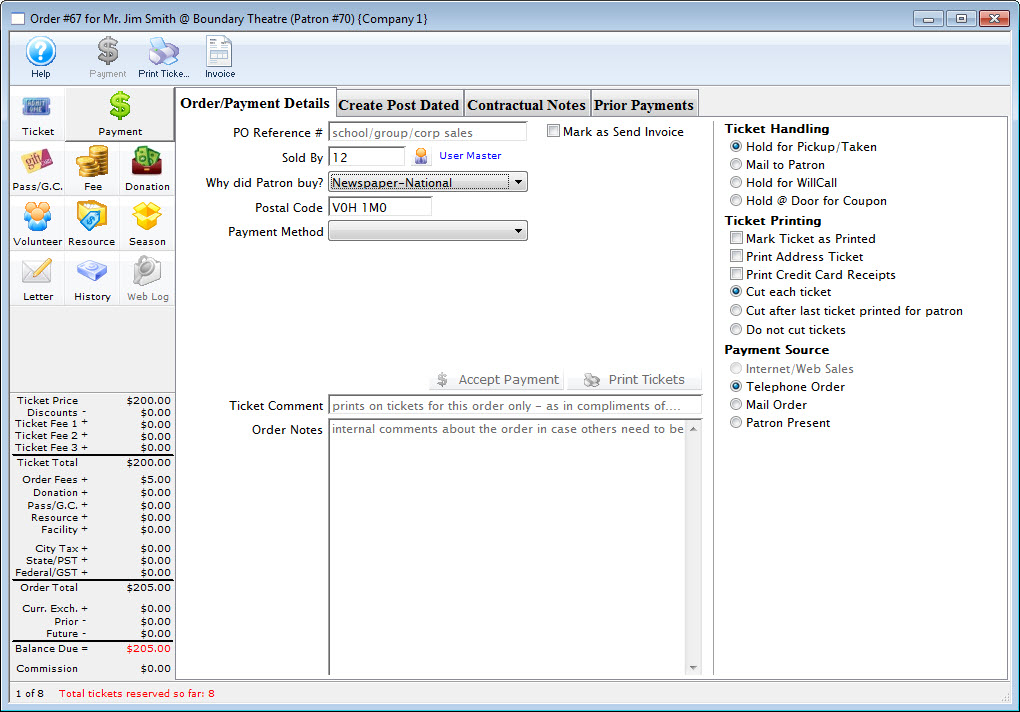
Parts of the Order/Payment Detail Tab
 |
Accepts the entered payment. If the order is paid in full the order window will close without printing tickets in the order. |
 |
Accepts the entered payments. If the order is paid in full the tickets will be printed and the order window will close. |
| Invoice Button | Allows you to print an invoice to the screen for all items on the order and then print it or email it to the patron. |
| PO Reference # | Purchase order reference number. |
 |
If the order is paid in full an invoice will be sent. |
| Sold By | The user who was responsible for initiating the sale of the tickets
ie. a telemarketer. The Patron  icon can be used to select an employee code. icon can be used to select an employee code. |
| Why did Patron Buy? | Reason the patron bought the tickets. These values are setup in the Reasons to Buy Code Table. |
| Payment Method | Method of payment for the order. The values of the list are setup in the Payments Methods Code Table. |
| Payment Amount | The total the patron is currently paying. Partial Payments can be made as needed. |
| Ticket Handling | "Hold for Pickup" is when the patron will visit the Box Office prior to the performance to pickup their tickets.
"Mail to Patron" is when the patron request the tickets be mail. "Hold for Will Call" is when the patron will pickup there tickets at the door. "Hold @ Door for Coupon" is for Promotions that require coupons in order to be valid. |
| Ticket Printing | "Mark Ticket as Printed" displays a printed date for the ticket all though the ticket is never printed.
"Print Address Ticket" prints an additional ticket with the patrons address. The default address ticket can be selected under the Ticket Face tab in Company Preferences. "Print Credit Card Receipts" prints an additional ticket highlighting a summary of the purchase. The default summary ticket can be selected under the Ticket Face tab in Company Preferences. |
| Payment Source | |
| Internet/Web Sales is when the transaction is processed over the internet. A default fee amount can be added to this payment source. | |
| Telephone Order is when the transaction is taken over the internet. A default fee amount can be added to this payment source | |
| Mail Order is when the patron mails in the transaction request. A default fee amount can be added to this payment source. | |
| Patron Present is when the patron is in person to make the transaction. A default fee amount can be added to this payment source. | |
 |
Accepts the entered payment. If the order is paid in full the order window will close without printing tickets in the order.
However, if the "Prompt user if receipt required when no tickets are being printed" option has been selected in the Ticket Faces tab of Company Preferences, You will be prompted to select a credit card/address ticket receipt. Click here for more information on the Print Ticket Options dialog. |
 |
Accepts the entered payments. If the order is paid in full the tickets will be printed and the order window will close. |
| Ticket Comment | Can be used to print special information on the ticket ie. birthday wishes, complimentary tickets from. |
| Order Notes | Any specific notes about the order. |
| Purchase Summary Section | Accepts the post dated payment. The order window will close without printing tickets in the order. |