
Main menu
You are here
Web Page Documentation

A release of Theatre Manager may require that some of the web pages be changed in the htdocs folder. Theatre Manager is designed so that the web pages are fully functional 'out of the box' (with a couple exceptions noted below). In many cases, changing only the style sheets creates a custom look and feel for your venue.
The Web pages are Bootstrap 3. The general principles are:
- A venue can customize the pages as they wish. Generally, this turns out to only be a few.
- Pages that are not modified are automatically 'the most recent' for each new release of Theatre Manager Server
- Customized web pages may need periodic comparisons if features are added within the page. Refer to update Web Pages
Web Page Infrastructure Schematic
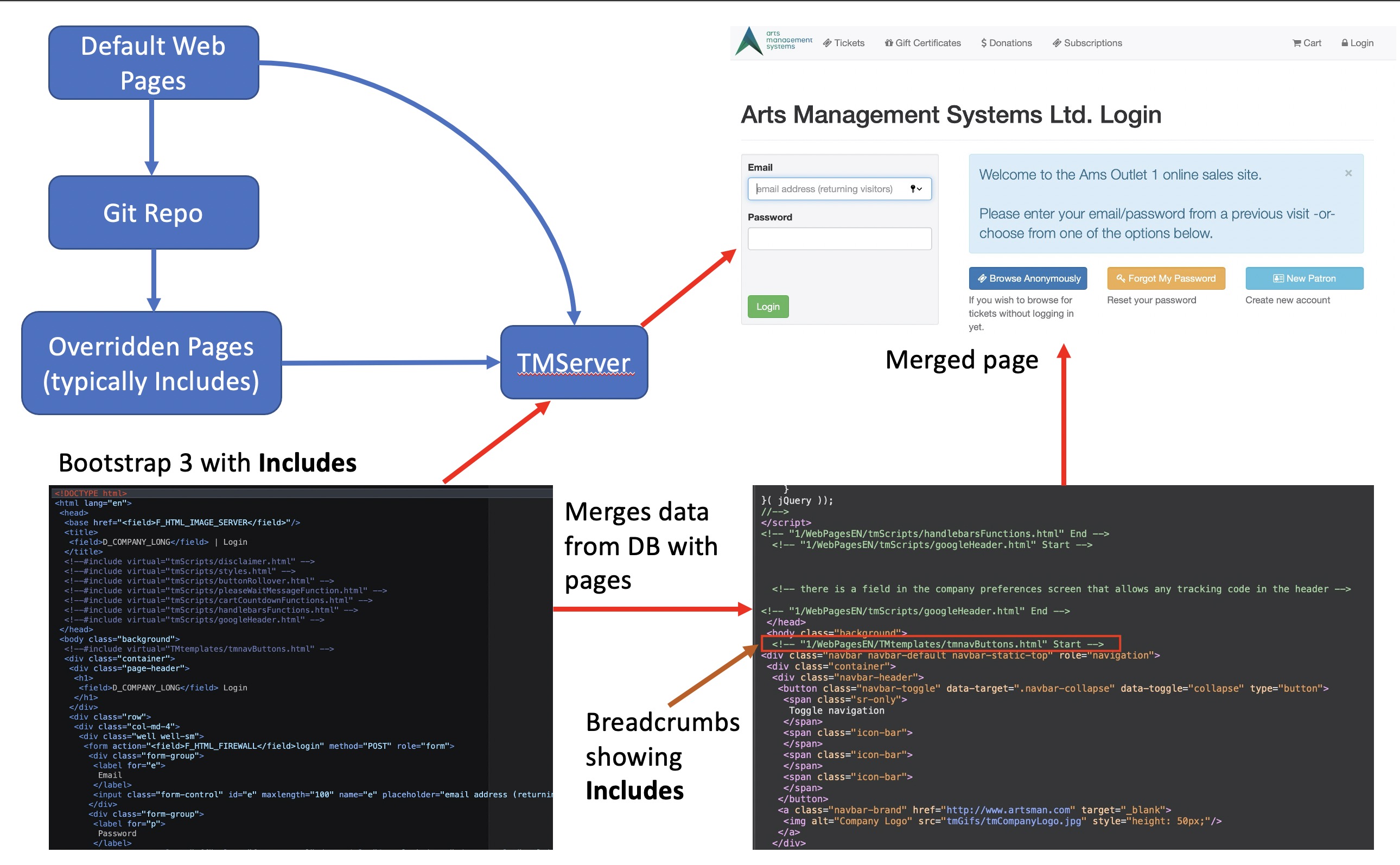
The image below is a brief introduction to how the TMServers merge web pages with data from the database and present it to the patron. To change a web page, a web developer needs to:
- Download a complete set of web pages from the AMS Web page Git repository (and keep this current)
- Identify which web page needs changing by inspecting the completed pages, find the appropriate breadcrumb, looking for the:
- Include to change -or-
- Main page to change -or-
- Identifying if the text change was merge from data in Theatre Manager, in which case the user only need change the text.
- If a page change is required, copying the identified include or main page to your venue's Git Repository
- Making changes as appropriate to the page
- Pushing it into the git repo, which causes theatre Manager to start using the over-ridden page. NOTE: we suggest that any page changes to main pages be added as includes, if possible. It helping if future editing is required
Main Marketing site
You can integrate the main marketing site or social media sites in a few ways:
- You can use links on the main marketing site to redirect the user into almost any area of the web sales, including adding tracking tags that can be seen in Theatre Manager's shopping cart list
- You can use the REST API to pull data and images from theatre manager into word press calendars to create single source of data and more dynamic content on your main marketing site. Note: always cache data from TM's REST API