
Main menu
You are here
Membership, Pass, G/C Details Tab

Most information in the Membership, Pass, G/C Details tab is predetermined during the setup of the Member Type.
For more information on:
- Member Type Setup click here.
- Finding a Member Type click here.
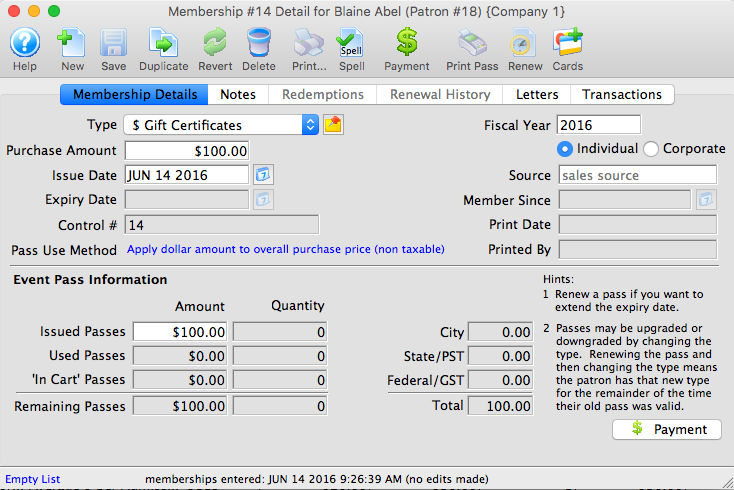
Parts of the Membership Details Tab
Membership Details |
|
| Type | Drop down menu allowing the selection of the pass type to be sold. Click here for more information on setting member types. |
 |
Clicking the button brings up any sales notes about this type of pass. |
| Purchase Amount | Total purchase cost of the membership. |
| Issue Date | Date the membership was purchased or last renewed. |
| Expiry Date | Date the membership is no longer valid. |
| Control # | Unique number used to define the membership. |
| Pass Use Method | The method of redemption for the pass type. |
| Fiscal Year | Fiscal year the membership is associated with. |
 |
Pass recognition status indicating if the pass was purchased by the individual or the company associated with the file. |
| Source | Editable text field defining why the pass was purchased. |
| Member Since | The date that the pass was purchased. |
| Printed Date | Date the pass was printed. |
| Printed By | Employee initial of who printed the pass. |
Play Pass Information |
|
| Full Issued Amount | Cost of the pass including expenses. |
| Issued Passes | Number of admissions issued at time of purchase. |
| Used Passes | Passes previously redeemed. |
| In Cart Passes | Passes currently in carts online. |
| Remaining Passes | Number of admissions still to be redeemed. |
| City | Dollar value of the city tax. |
| State/PST | Dollar value of the State tax or PST. |
| Federal/GST | Dollar value of the Federal tax or GST. |
| Total | Total cost of the membership including expenses and taxes. |
 |
Accesses the Order Payment window. |
Diataxis: