
Main menu
You are here
Marketing Tab

In the Marketing tab, you can configure the Marketing notes for the play. You can also add the play to a mail list and include external and internal notes for your Box Office Staff. Information you enter on this page will appear on your page in the Ticket Trove iPhone and iPad app.
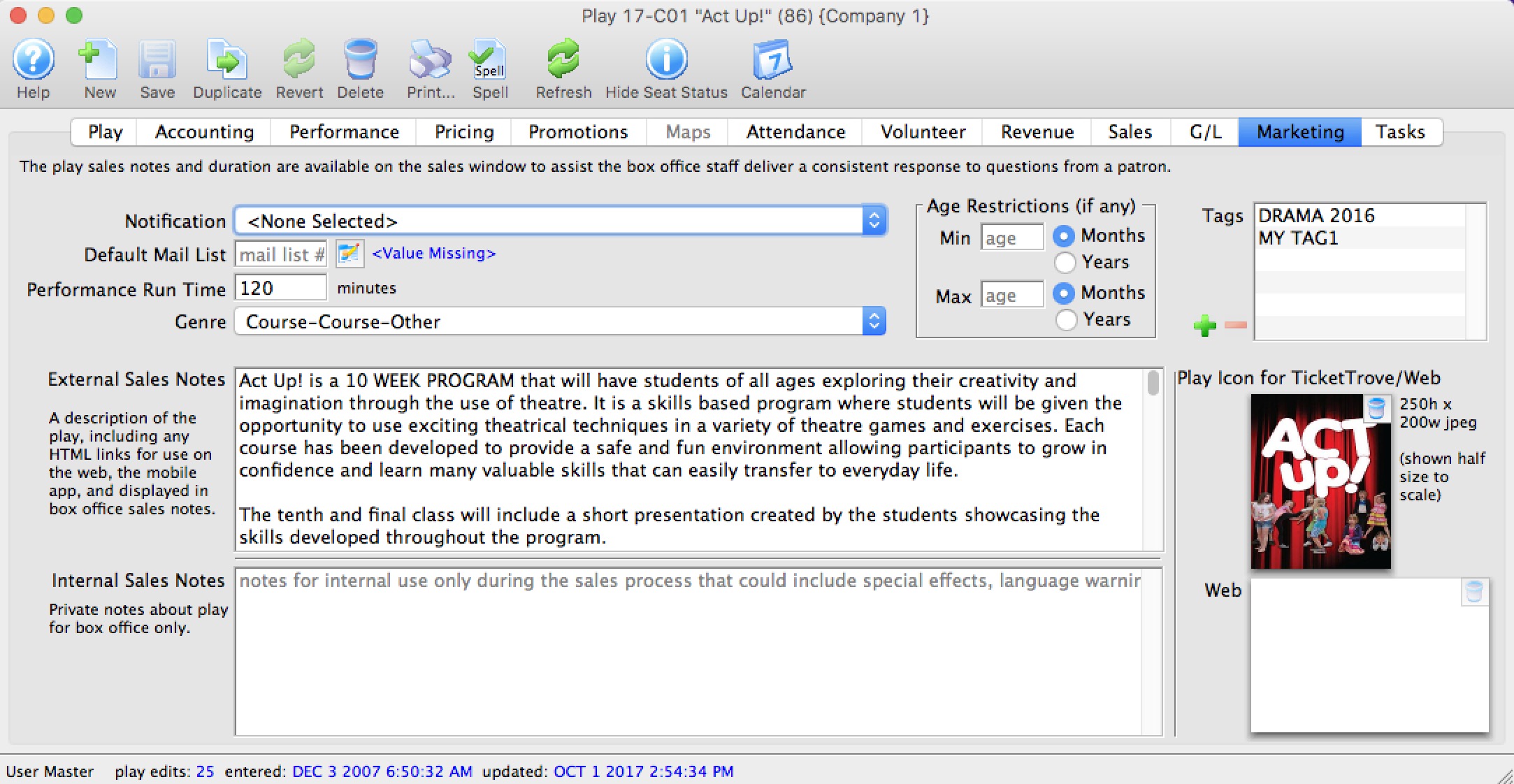
Parts of the Marketing Tab
| Notification | The email notification that will be sent when tickets are purchased to this play. Click here for info on work flow notifications. |
| Default Mail List | Allows you to assign this play to a specific mail list. |
| Running Time | Running time or duration of each performance in minutes. Also displays for Web Sales, facility management calendars and in the calendars exportable in .ics format. |
| Genre | Genre is a setting for events that is common across all Theatre Manager customers. Currently, there are about 30 classifications which will be used in the iPhone/iPad app to help customers find entertainment to their liking. |
| External Sales Notes | Marketing notes for both your Box Office staff and for Web Sales. |
| Internal Sales Notes | Marketing notes that appear to you Box Office staff, but not on the Web. |
| Event Icon for Web/iPhone App | If there is a graphic in the event, entering it here will display the graphic for all performances of the event. |
| Tags | You can add any number of tags to the event. |
Diataxis: