
Main menu
You are here
Box Office Tab

Adjustments to how the Box Office operates can be made from this tab.
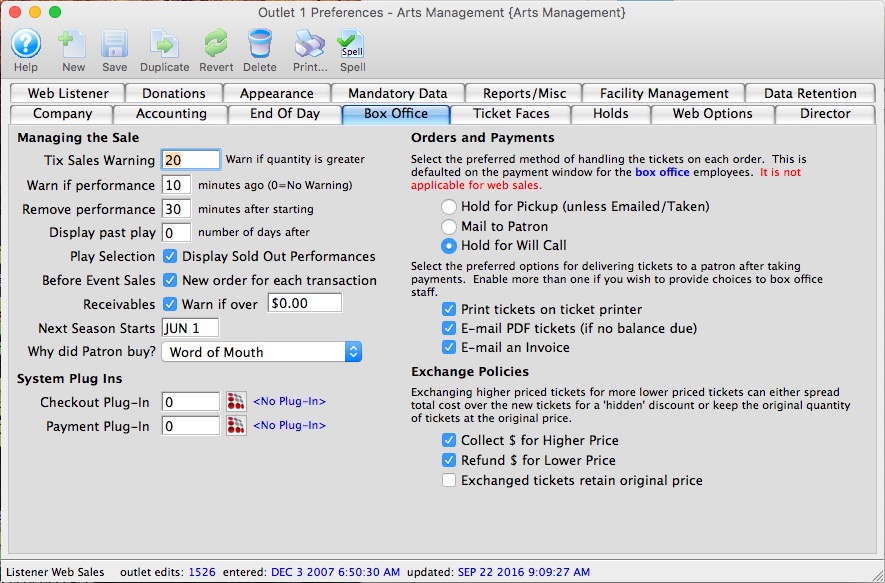
Managing the Sale |
|||||
| Tix Sales Warning | A warning notification is displayed on the screen if the number of tickets being sold is greater than this number. | ||||
| Warn if Performance | Displays a warning on screen once a performance start time has gone past the denoted amount of time. | ||||
| Remove Performance | Removes the performance from the sell list once this much time has elapsed past the start time. Users with past performance access can still sell to this performance. | ||||
| Display past play | Number of days to still list past performances. | ||||
| Play Selection: Display Sold Out Performances | Checking the box will show Sold Out performances from the Buy Window. | ||||
| Before Event Sales: New order for each transaction | Checking the box will create a new order for each ticket transaction (generally each walk up patron).
|
||||
| Warn if Receivables Over | Checking the box will issue a warning to the screen when a patron's receivables exceed the value denoted. | ||||
| Next Season Starts | Denotes when the next season starts. | ||||
| Why did Patron buy? | The option selected from the drop-down will show on the Payment Window of an order as the default option for the patron's reason for buying the order. Options for the drop-down are set in Order reason to buy in Code Tables. | ||||
System Plug Ins |
|||||
| Checkout Plug In | Allows the selection of a plug in to be used for after the
order has been placed. Press the Plug In Search  button
to see all available plug ins. button
to see all available plug ins. |
||||
| Payment Plug In | Allows the selection of a plug in to be used for after the
payment has been taken. Press the Plug In Search button
to see all available plug ins. |
||||
Orders and Payments |
|||||
| Hold for Pickup / Taken | If selected, this option will be the default on the Payment Window and indicates that tickets are generally held to be taken by the patron or are immediately taken by the patron (walk-up). | ||||
| Mail to Patron | If selected, this option will be the default on the Payment Window and indicates that tickets are to be mailed to the patron. | ||||
| Hold for Will Call | If selected, this option will be the default on the Payment Window and indicates that tickets are to be held for Will Call for the door sale of the performance. | ||||
Ticket Delivery |
|||||
| Print tickets on ticket printer | Indicates that people generally print tickets on ticket printers for box office sales. | ||||
| E-Mail PDF tickets | If selected, the print tickets button within theatre manager will change to print/email tickets on all places where tickets can be printed. When the print/email button is clicked on those windows, it will show a list of email addresses for the household, as well as an option to add another email for the patron. Emailing tickets sends out a PDF of the ticket that is exactly the same as if the patron had purchased the ticket online.
When you print tickets form an order or patron window, the options for PDF printing will look like this. |
||||
| E-Mail an Invoice | If selected, the user will have the option to email invoices from the print an invoice screen on the order windows. | ||||
Exchange Policies |
|||||
| Collect $ for higher price | If selected the difference between the exchanged tickets and the new higher priced tickets will need to be collected. | ||||
| Collect $ for lower price | If selected the difference between the exchanged tickets and the new lower priced tickets will need to be refunded. | ||||
| Exchanged tickets retain original price | If selected when tickets are exchanged for lower priced tickets the lower priced tickets adopt the price of the original tickets. | ||||

Diataxis: