
Main menu
You are here
Payment Tab


The payment tab allows the user to view a summary of all payments the patron has made toward previous purchases.
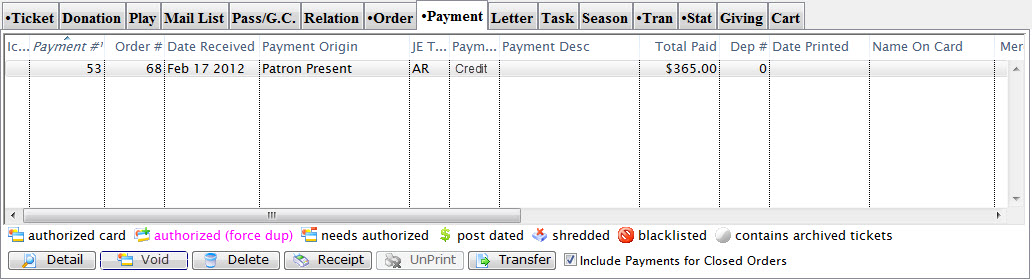
Parts of the Payment Tab
| Payment Order # | The number given to the payment to tie it to the order. |
| Date Received | Date the payment was received. |
| Recd By | Employee who took the payment. |
| Srce | Represents the payment source. |
| Payment Method | Method received for payment. |
| Total Paid | Value of the payment. |
| Deposit | Deposit number for this payment. |
| Date Printed | Date the receipt for this payment was printed. |
| Seq # | Merchant Account number applicable to credit cards processed through Theatre Manager. |
| Merchant | Name of the merchant account used to process the payment. |
| Outlet-Owner | Outlet responsible for collecting the payment. |
 |
Opens the Payment Data window for the selected payment. For more information Click here. |
 |
Voids the selected payments. You can only void two things:
|
 |
Deletes the selected payments. Click here for more information on deleting payments. |
 |
Allows printing a receipt for the payment if a receipt ticket face has been assigned in the Company Preferences. Click here for more information. |
 |
Unprints the receipt for the payment. |
 |
Allows a transfer of a payment. Click here for more information. |
| Include Payments for closed Order(s) | This box should be selected to show orders which have received payment and been closed. |
Diataxis: