
Main menu
You are here
Pass G.C. Tab


The Member Tab tracks data for memberships, gift certificates and/or event passes for a patron. For more information on memberships click here.
|
"Membership" is a broad term meaning "Gift Certificates," "Flex Passes," "Vouchers," "Other Income" or a variety of other forms. Since the name of the field is customizable, some organizations may retain the term "Membership," while others change it to reflect their own terminology such as "GC/Pass," "Gift Certs." or even "Other Income." The nomenclature in your database may be different than "memberships." |

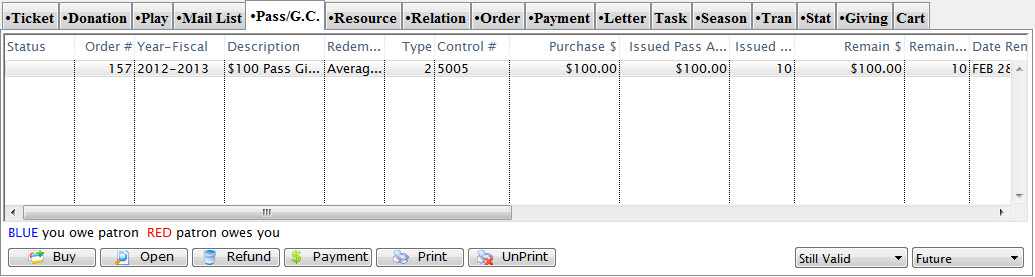
Parts of the Pass / G.C. Tab
| Order | The unique number for this order. |
| Fiscal Year | Fiscal year the membership belongs to. |
| Member Type | The type of membership purchased. Membership types are setup in Code Tables. Click here for more information. |
| Date First Member | Date the membership has been valid since. |
| Control # | The control number for this membership used for redemption purposes. |
| Purchase $ | The value of the membership at the time of purchase. |
| Issued Qty | Number of admissions the membership was valid for at the time of purchase. |
| Remain $ | Remaining dollar value the membership can be redeemed for. |
| Remain Qty | Remaining admissions for the membership. |
| Date Renewed | Date the membership can be renewed on or till. |
| Last Renewed | Date the membership was last renewed. |
| Expire Date | Date that the membership will expire. |
| Notes | This column displays any notes that are pertinent to the membership. |
 |
Clicking this button allows you to buy a new membership. For more information on buying memberships click here. |
 |
Clicking this button allows viewing the membership detail window. For more information on membership details click here. |
 |
Clicking this button allows refunding a membership. For more information on refunding memberships click here. |
 |
Adds a payment to the membership. |
 |
When the membership preferences define, prints the selected membership. For more information on Print Memberships, Click here. For more information on setting up membership types click here. |
 |
When the membership preferences define the ability to unprint, unprints the selected membership. For more information on setting up membership types click here. |
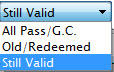 |
Use the Valid/Invalid filter to search for current or expired Memberships. |
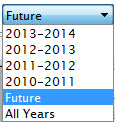 |
Use the Date Filter to search for Memberships in specific years. Use this in conjunction with the Valid/Invalid filter. |
Diataxis: