Refunds and Fraud Prevention
Refunds and Fraud Prevention
How did credit card refunds originally work?
For a long long time, the rules were simple. You needed the entire card in front of you. When sending in a request for a refund, you provided the entire card number, expiry and amount.
About the Refund Rules (as we understand them today)
Credit card providers felt that the simple rule had too much potential for fraud. And it did: bad guys with cards figured out how to create a lot of refunds and steal a lot of money.
Each credit card merchant provider instituted one or more out of a number of rules to thwart fraud, making the refund process difficult. This generally works fine for one off refunds, but hampers the process when trying to do mass refunds to an entire event meaning it may need a lot of manual intervention.
What a Mixture of Rules means for Refunds
Some of the techniques credit card providers implemented that make the refund process difficult to navigate are below. Since the rules have been implemented over time, you may find that mass refunds might encounter one or more of these scenarios:
- Independent Refunds: payment refunds not linked to any order
- Linked Refunds: payment refunds must be the same order as original authorization
- Refunds using Merchant Profiles: payment refunds use an existing profile for the customer without needing card data
- Refunding when card data is shredded or non existent in the database
- Refunds accepted up to a certain amount of money and then stop being accepted
- Refunds Prevented for the first transaction in the day
- Refunds causing End of Day Imbalances due to some timing issues at the bank
 |
NOTE: you can set which type of refund(s) your merchant provider allows in merchant setup
If you are allowed both, Theatre Manager tries Linked refunds. If that fails, you can chose to do an independent refund on the payment window |
Independent Refunds, Payments Not Linked To An Order
Independent Refunds, Payments Not Linked To An Order
- the amount refunded is more that the original authorization
- the card number is different than the one used for original authorization
|
An independent refund means you must supply the full credit card number and expiry. You either have this (because it is encrypted on the database) or you ask the customer for it.
If you have shredded old cards and do not have it encrypted on the database, then you cannot do an independent refund. It will need to be a linked refund (which is generally preferable for the credit card companies) |
|
Bambora and Elavon (Miami-Dade) do not support this feature and only allows linked refunds
To our knowledge, all other merchant providers support independent refunds and some require this permission to be specifically requested. |
| Conditions | Action or Workaround |
You must have:
|
Verify that your PCI Settings in Default Data is PCI Schedule D, with many days of retention since last use of card.
|
| Some merchant providers require you to sign up for INDEPENDENT REFUNDS. | Contact your merchant provider to ensure that you have this feature enabled if you need to do mass refunds. You can call your merchant provider after and disable it when done.
eg: |
| End of day may appear out of balance for Authorize.net | Authorize.net processes refunds right away. If you do a lot of refunds before the sweep time and settle end of day after the sweep time, you may be told that you are out of balance by what seems to be the total amount of your refunds. |
| Refund rejected because card is shredded | If you see a message saying that the card was rejected because no encrypted card is on file, then you are trying to do an independent refund.
Instead, change the setting in your merchant profile to allow linked refunds first. |
Linked Refund: Merchant Provider limits refunds to xx days to same order using tokens
Linked Refund: Merchant Provider limits refunds to xx days to same order using tokens
|
A linked refund does not require the full credit card number. Instead, it uses a token representing a particular authorization that the merchant processor gave Theatre Manager at time of authorization.
This is the only method of refund that can be used if you are shredding credit cards for PCI compliance. |
Linked Refund Rules
Typical rules that merchant providers implemented for linked refunds
- within xxx days since the original authorization. The default we've seen is 120 days.
- by referencing the same order as the original authorization
- using the saved transaction token from the original authorization (instead of the credit card data)
- for no more than the amount of the original authorization (less any other refunds to the card already)
| Conditions | Action or Workaround | ||||
| Refund rejected because card is shredded | If you see a message saying that the card was rejected because no encrypted card is on file, then you are trying to do an independent refund.
Instead, change the setting in your merchant profile to allow linked refunds first. |
||||
| Refund gets rejected because of age |
|
||||
| Refund Rejected because it is too much | In a LINKED REFUND, you can only refund the a maximum amount of the original credit card payment.
If the patron paid with two different payments methods (eg: part in cash and part in credit card), then you will need to:
NOTE: If the message below indicates your merchant setup supports Independent Refunds, AND you know the entire card number, CVV2 and expiry date, you might be able try an independent refund instead.
|
||||
| Refund gets rejected because it is not connected to order | If there are multiple credit card payments for the order and you get this message, you may be affected by the timing of when the payment was authorized. You could have:
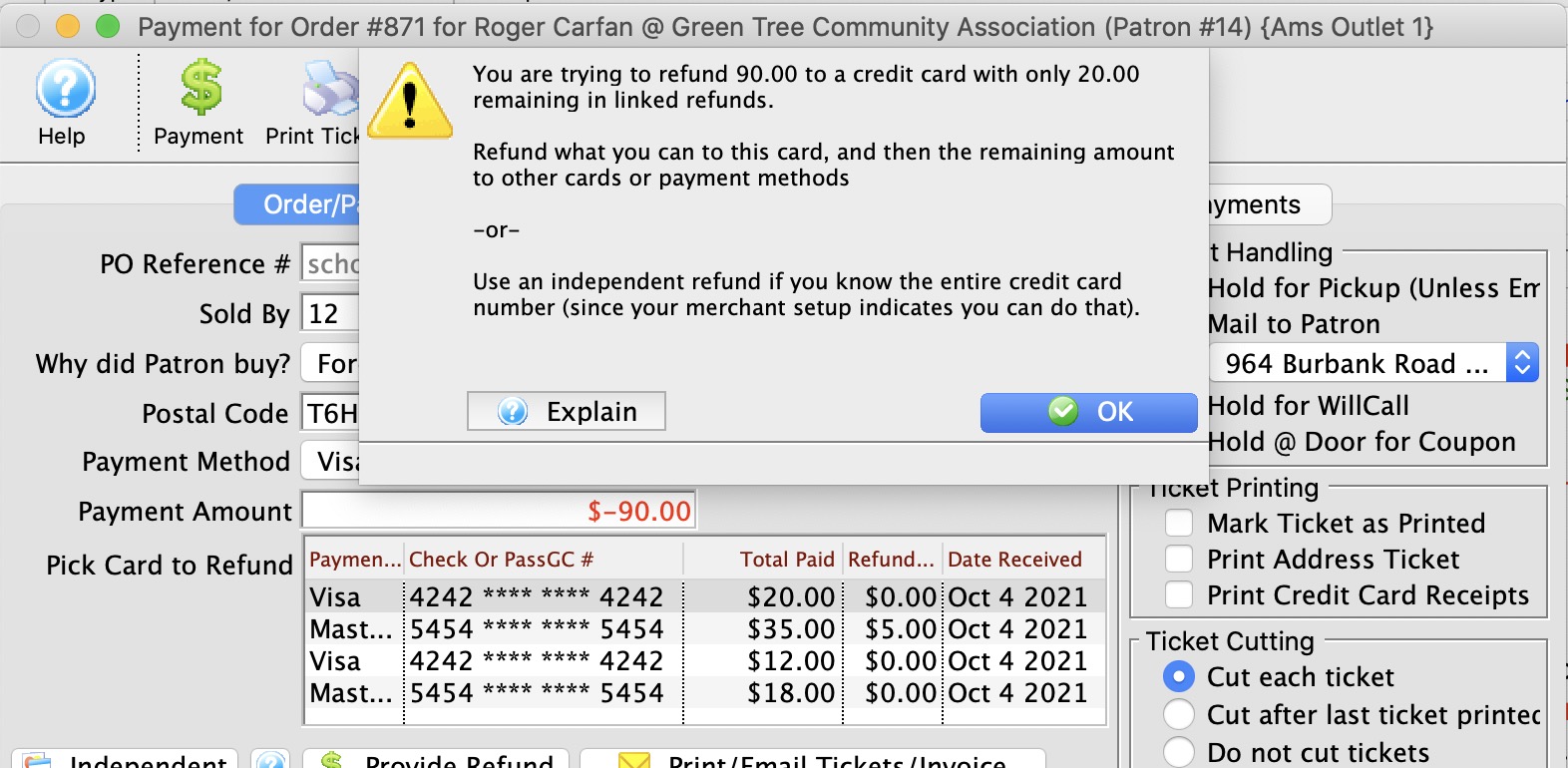
Theatre Manager presents a list of credit cards to refund to - pick the one you want, If you try to refund too much, you'll see an error like the image below. IF this is the case, then break the refund up into smaller amounts.
|
Refunding against Shredded Credit Cards
Refunding against Shredded Credit Cards
| Conditions | Action or Workaround |
| Payments without full card data will be rejected with invalid PAN numbers
or that card number has been shredded |
If your
PCI Settings in Default Data is Schedule C, or D and the retention period for the card has expired, you might see this error.
It means that you attempted to refund to a shredded credit card. The way to refund in this situations is:
|
Refunds accepted to a certain amount and start getting rejected
Refunds accepted to a certain amount and start getting rejected
| Conditions | Action or Workaround |
| You may have daily or weekly limits to the amount that can be refunded | Verify with your merchant provider if there are limits. If so, then when doing a mass refund to an event:
|
| You may have limits based on bank balance | Verify with your merchant provider and bank if there are limits based on balance. If so, then when doing a mass refund to an event:
|
Refunds with merchant profiles enabled
Refunds with merchant profiles enabled
- The patron provides the card data to Theatre Manager during an authorization
- Theatre Manager sends the data to the bank and receives a UNIQUE TOKEN back
- and the unique token can be used for all subsequent authorizations or refunds, without ever needing the card data again, making it suited for post dated payments for schedule 'C' compliance.
| Conditions | Action or Workaround |
| Some cards are accepted and some rejected |
If you have merchant profiles enabled and cards are being rejected:
You cannot create a profile for previously shredded card data. |
First Transaction Cannot be a Refund
First Transaction Cannot be a Refund
| Conditions | Action or Workaround |
| Cannot send a refund after completing an end of day | Some merchant providers instituted a policy that the first transaction after settling batches or the fraud transaction in any calendar day could not be a refund, since that might be considered the first step to fraud.
If Theatre Manager gives you a message that it cannot process a refund as the first transaction, it may be as simple as turning ON setting that first transaction can be a refund in your merchant setup to seeing if your merchant provider still enforces this rule. If they still do, then contact your merchant provider to get that rule waived. |
End of Day Imbalance due to Sweep Time
End of Day Imbalance due to Sweep Time
| Conditions | Action or Workaround | ||
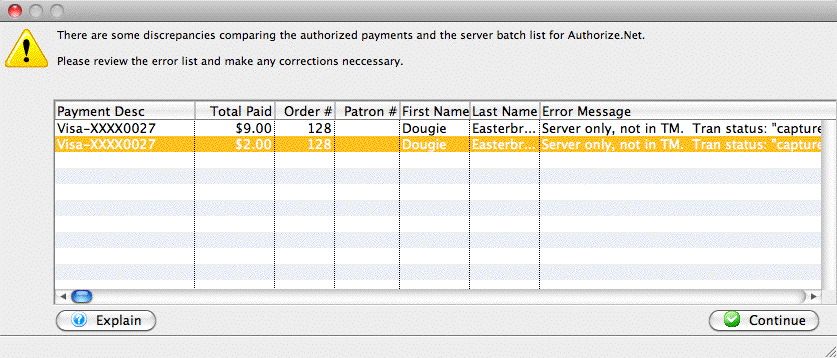
| Refunds appear in Theatre Manager and not in Authorize.net |
|
||
| Transactions in Authorize.net but not in Theatre Manager |
|
Refunds using Full Card Data (stored)
Refunds using Full Card Data (stored)
Individual Refunds
Individual refunds are easiest when you can refund to a credit card on file. This is possible if
- You keep encrypted data in the database for all patrons by using Schedule D with a reasonable retention period -or-
- You are using merchant profiles and a profile has been created for the patron because they used the credit card to buy something -and-
- You are allowed to do independent refunds by your merchant provider.
Mass Refunds of tickets to Events
You can do mass refunds if you have card data stored in the database if the patrons card data meets the individual criteria above.
Possible Errors doing Refunds with Full Card Data
We recommend doing the refunds first, then authorizing during end of day. This gives you more control over the authorization process. Typical issues that can arise are:
- Credit card rejected - you will need to call the patron
- Independent Refunds - you might see these if they are enabled by your merchant provider.
- Linked Refunds - you might see some of these errors if independent refunds are not enabled.
- Shredded Card Errors - the system might create a payment for a shredded credit card. Naturally, this will be declined. The card can be entered manually during end of day.
Independent Refunds using Full Card Data (entered)
Independent Refunds using Full Card Data (entered)
Individual Refunds
Refunding using full card data means that you are able to enter the patron's credit card in full and ask for a refund. You should receive an authorization.
Refunding with no previous card on file requires:
- You are allowed to do independent refunds by your merchant provider.
Mass Refunds of tickets to Events
You cannot do mass refunds unless you have card data (or a merchant profile) stored in the database. If you find that you need to refund a lot of people and have neither, you can still use the mechanisms described in refunding to an entire performance
- The best way is by:
- opening the performance attendance tab
- selecting tickets to an order
- and refund on a case by case basis (described in the above link)
- You can refund all tickets and then create refund payments later -or-
Possible Errors doing Refunds with Full Card Data entered by you
Since you have to be talking to a patron to refund money when typing in the full card data, you are able to ask them for their card data.
Typical issues that can arise are:
- Credit card rejected - you will need to call the patron
- Independent Refunds - you might see these if they are enabled.
- First transaction is a Refund - You might be prevented from refunding as the first transaction of the day - which might need a flag changed.
Linked Refunds using tokens within xx days
Linked Refunds using tokens within xx days
Individual Refunds
Refunding using tokens is like refunding using merchant profiles. It means that you can select a prior card owned by the patron on the payment window based on the last 4 digits. The payment window will appear to show a masked credit card number.
Then submitting the refund for authorization, you are restricted to the rules of Linked Refunds. You must pick a card that belongs to the order, otherwise you will not receive an authorization.
|
 IF YOU RECEIVE A MESSAGE THAT THERE ARE NO PRIOR PAYMENTS... if you receive a message from Theatre Manager there are NO PRIOR PAYMENTS when doing a refund, the root cause is because merchant providers have been forcing venues to use linked refunds, meaning they imposed a typical time limit of having to refund within 120 days of purchase. In these times of crisis, each venue seems to have a different time limit and you can set it in Theatre Manager's Merchant Setup. It may work if you increase the time frame. If not, you may need to talk to the bank to have them raise the timeframe on their end as well. |
Mass Refunds of tickets to Events
Mass refunds of tickets and creating payment at time of refund using tokens is currently not supported.
You can open the attendance window and refund patrons orders one by one, selecting card as the refund method. This will invoke refund by token for that order.
Possible Errors doing Refunds with Merchant Profiles
Typical issues that can arise are:
- Credit card rejected - you will need to call the patron
- Linked Refunds - you might see some of these errors.
Refunds using Merchant Profiles
Refunds using Merchant Profiles
Individual Refunds
Refunding using merchant profiles means that you can select a prior card owned by the patron on the payment window based on the last 4 digits. The payment window will appear to show a masked credit card number.
Then submitting the refund for authorization, your merchant provider subjects you to the same rules depending on whether you can do:
- Independent Refunds: the only difference is you are not typing the credit card and do not need to talk to the patron to get it
- Linked Refunds: if you pick a card that doesn't belong to the order, you will not receive an authorization
Mass Refunds of tickets to Events
You can do mass refunds of tickets using merchant profiles. TM will attempt to use the merchant profile and apply an independent refund. Linked refunds are currently not supported for mass refund of tickets.
Possible Errors doing Refunds with Merchant Profiles
We recommend doing the refunds first, then authorizing during end of day. This gives you more control over the authorization process. Typical issues that can arise are:
- Credit card rejected - you will need to call the patron
- Independent Refunds - you might see these if they are enabled.
- Linked Refunds - you might see some of these errors if independent refunds are not enabled.
- Shredded Card Errors - the system might create a payment for a shredded credit card. Naturally, this will be declined. The card can be entered manually during end of day.