
Main menu
You are here
Ticket Face Detail Window

The Ticket Face Detail window displays all of the information about a ticket.
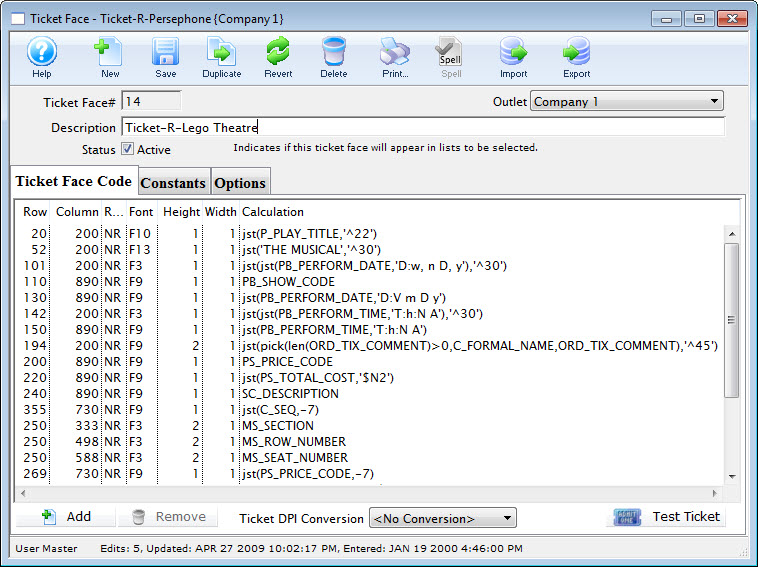
Parts of the Ticket Face Detail Window
 |
Inserts a new ticket face. For more information on creating new ticket faces click here. |
 |
Saves changes made to the current ticket face. |
 |
Creates a duplicate copy of the current ticket face. |
 |
Reverts changes made to the ticket face back to the last saved point. |
 |
Deletes the selected ticket face. For more information on deleting ticket faces click here. |
 |
Generates a report of the ticket faces to the screen or default print location. |
| Ticket Face# | Unique number given to the ticket face by Theatre Manager |
| Outlet | Outlet responsible for the ticket face. |
| Description | Name of the ticket face, if it is for a ticket, receipt, renewal notice etc. |
 |
Code used to create the ticket face. For more information on the ticket face code tab click here. |
 |
Equations calculated prior to printing the ticket. For more information on the constants tab click here. |
 |
Additional options for ticket printing. For more information on the options tab click here. |
 |
Adds a line to the bottom of the ticket parameters and opens the Ticket Face Detail window. For more information on the Ticket Face Detail window click here. |
 |
Removes the currently selected lines from the ticket face. |
| Ticket DPI Conversion | Allows the conversion of the row and column information to a different DPI. |
 |
Enables printing of a sample ticket to the printer. Ensure the printer is correctly set up in the options tab. This is designed to print a sample ticket with sample information. To see an actual ticket with correct information the ticket face number must be entered into the Plays and Dates information for a particular play. Sell tickets to a test patron account and print them as a final test of the ticket design. |