
Main menu
You are here
Pass G/C Types List Window

Through this window you can add, edit, delete, view the details and verify Pass G/C types.
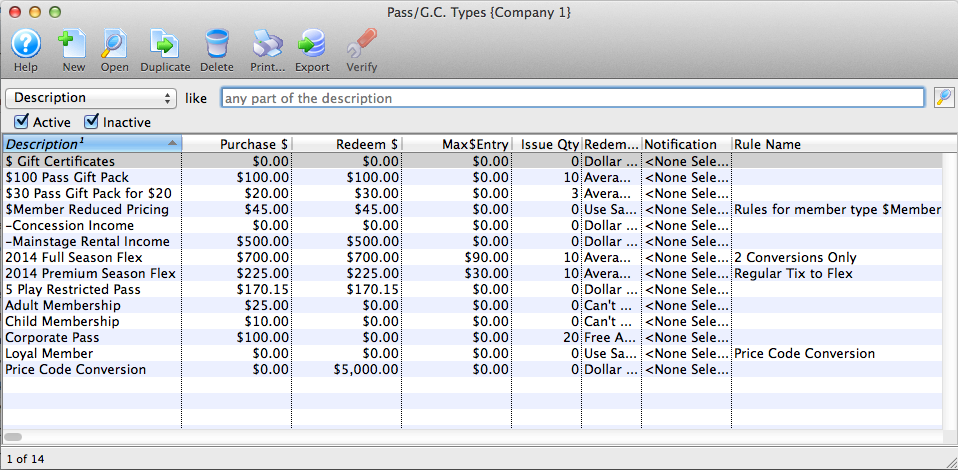
Parts of the Pass G/C Types List Window
 |
Accesses the Help section for this window. |
 |
Inserts new Pass G/C type. For more information on inserting Pass G /C/ types click here. |
 |
Edits the selected Pass G/C type. For more information on editing Pass G/C types click here. |
 |
Copies the selected Pass G/C type. |
 |
Deletes the selected Pass G/C type Click Here to learn how to delete member types. |
 |
Generates a report of the Pass G/C types to the screen or default print location. |
 |
Exports a list of Pass G/C types. |
 |
Verifies the selected Pass G/C type. For more information on verifying member types click here. |
| Description | Description of the Pass G/C type which will be displayed in all Pass G/C pull down menus. |
| Purchase $ | Dollar value of the Pass G/C type at time of purchase. |
| Redeem $ | Dollar value representing how much of the Pass G/C has been redeemed/used (or the value of items for which it has been used) |
| Issue Qty | Number of this Pass G/C type to be sold. |
| Redemption Method | Method of redemption for the selected Pass G/C type. For more on the redemption methods, click here. |
| Notification | Lists any workflow notifications that have been setup for this Pass/G.C. |
| Rule Name | Lists any Sales Rules that may be associated with this Pass/G.C. |
Diataxis: