
Main menu
You are here
Employee Prefs: Box Office

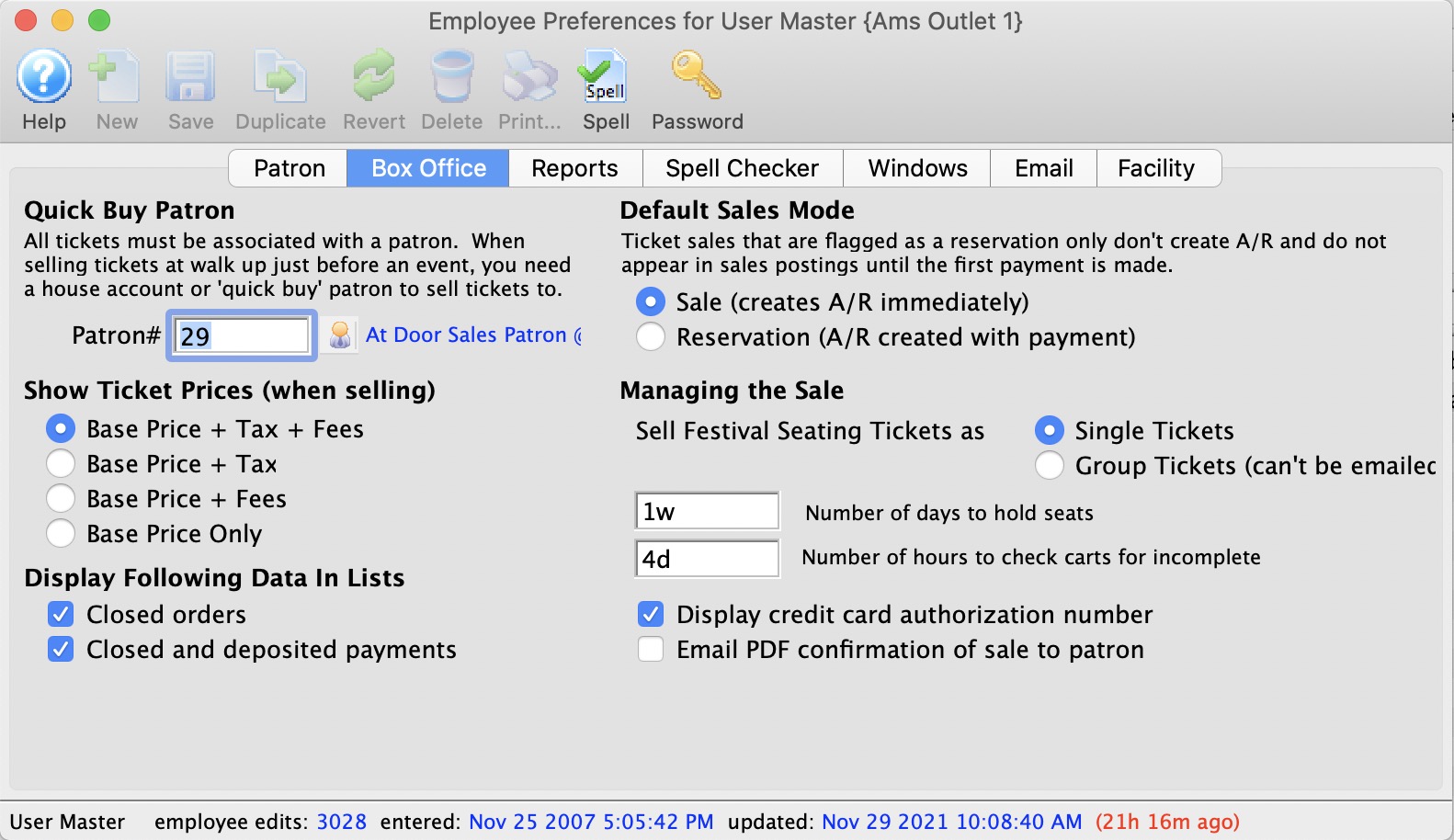
Parts of the Box Office Tab
| Quick Buy Patron | This field requires a valid patron number. The patron number entered should be for a patron who was specifically set up to act as a quick buy / before event sales patron. A quick buy / before event sales patron is a dummy patron account (not a real person), and because the patron is set in user preferences each user can have their own Quick Buy / Before Event Sales Patron. | ||
Show Ticket Prices (when selling) |
|||
| Base Price + Tax + Fee | Ticket price is displayed as the base price plus tax any any fees associated with the sales promotion. | ||
| Base Price + Tax | Ticket price is displayed as the base price plus tax. | ||
| Base Price + Fees | Ticket price is displayed as the base price plus fees associated with the sales promotion. | ||
| Base Price Only | Ticket price is displayed as the base price only. | ||
Display Following Data In List |
|||
| Closed orders | Fully paid orders will be displayed. | ||
| Closed and deposited payments | Payments for fully paid orders will be displayed. | ||
Default Sales Mode |
|||
| Sale | Purchases are recognized as an accounts receivable at the time of purchase. If payment is made the accounts receivable is cleared. If no payment is made the tickets remain on account until payment is received. | ||
| Reservation | Purchase is not recognized as an accounts receivable until the first payment or donation is received. This will only take effect if permitted in accounting setup in company preferences and is not a recommended practice. | ||
Managing the Sale |
|||
| Single Tickets | Festival seating tickets are issued as one ticket per admission. | ||
| Group Tickets | Festival seating tickets are issues as one ticket per event (i.e. one ticket may be good for 10 admissions). This is intended for group sales like bus tours, school performances etc. where the size of the group will vary as the tour operator/teacher firms up their numbers.
|
||
| Default number of days to hold Seats | Default number of days a patron seat request will be held for an event. | ||
| Number of hours to check carts for incomplete sales | Number of hours that must pass before notification of any checked out - but incomplete - carts that might present an issue and need some action. These carts can be seen in the Shopping Cart list. | ||
| Display credit card authorization number | Credit card authorization number is displayed in the payment window before completing a sale. | ||
| Email PDF confirmation of sale to patron | Indicates that the Employee PREFERS to email a PDF copy of the sale confirmation to the patron for a box office or phone order. If this is:
|
Cash Drawer Port | If using an electronic cash drawer, the port on which it communicates. There are some prerequisites for using the cash drawer as it is older style technology:
|
| Delay /60 Sec | The amount of seconds of delay before the cash drawer opens. | ||

Diataxis: