
Main menu
You are here
Employees Currently Logged In

The Employees Currently Logged In windows provides a list of all employees who are currently logged in to Theatre Manager. This can be useful to monitor access to the system at any given time. The window is automatically refreshed every 15 seconds. It operates by polling pg_Admin activity, and reporting that activity to the viewer.
Occasionally someone may get a message that they are already logged in at another computer and this list will identify the IP address of that computer if you need to know it.
The Employees Currently Logged In monitor is accessed via the Setup >> Users and Access >> Employees Currently Logged In menu.
 |
If you really want to kill a session:
|
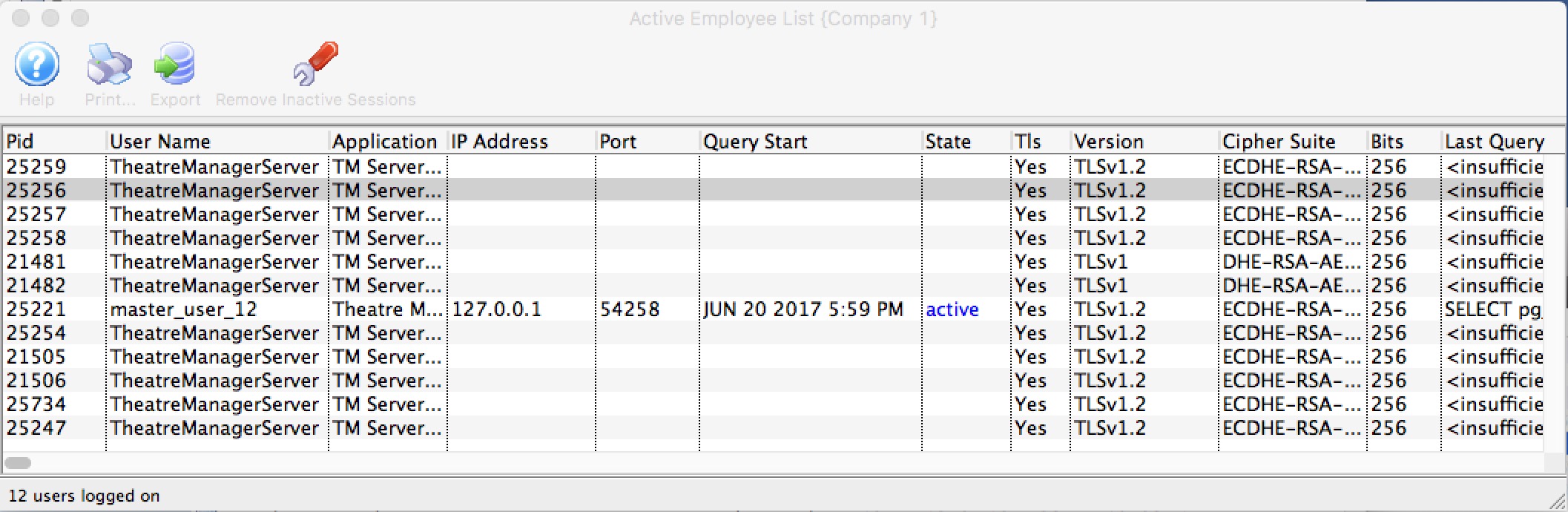
Parts of the Employees Logged In window
 |
Prints the current record. |
 |
Exports the log file in a tab or comma delimited file. |
| Remove Inactive Sessions | This will look for any sessions for any users that have been inactive for 15 minutes or more and send a terminate command to the database to kill their sessions. This should only be used if people seem to be logged in more than once and they are not. |
| Pid | Process ID.This is the process ID assigned to the employee connection to the PostgreSQL database. If a user account becomes stuck in Theatre Manager, AMS Support personnel can remote in to the server and free the User based on the PID. This can also be used if a User is running an unusually large database query and uses up too much of the CPU resources. The PID can be used to stop the query and free the CPU resources back up again. |
| User Name | The Access ID of the User who is logged on. This value is defined in the Employee record. |
| Application | The application the User is logged into. Since this is provided by pg_Admin, the application will always be Theatre Manager. |
| IP Address | The IP address of the machine where the User is logged on from. This is useful to monitor not only what users are logged in, but to which specific workstation. |
| Port | The internal port that the User is currently using to access the database. |
| Query Start | When pg_Admin was last checked for activity status from this User. |
| Waiting | Indicates if the User is waiting for access to the database. |
| Current Query | The code line in pg_Admin used to monitor the log in status of the User. |
TLS connection status (if using Postgres 9.5 or later) |
|
| TLS | Yes, if client is using encrypted connection to the database |
| Version | The version of TLS (encryption being used. |
| Cipher Suite | The encryption/cipher suite being used for the connection |
| bits | the strength of the encryption |