
Main menu
You are here
Step 1: Deposit Detail Window

The Deposit window has many functions. It:
- is used to identify payments made since the last deposit that can be taken to the bank or settled in a credit card batch
- Remove any post dated credit card payments that cannot be authorized or checks that cannot be found.
- Replace the credit card number or expiry date on a post dated credit card payment to allow it to be authorized
- aggregate them into a 'batch' to take to the bank and create a deposit posting/GL entry (DP-xxxxxxxx) that can be used by the end of day process.
 |
The deposit window is designed to match exactly the money put into your bank account -- so that it make it easy to reconcile your bank statement with your accounting program. If you cannot authorize (or find) a post dated payment, or do not want to take specific payment to the bank, REMOVE it from the deposit so that the deposit list matches exactly what will be put into the bank in a single deposit. |
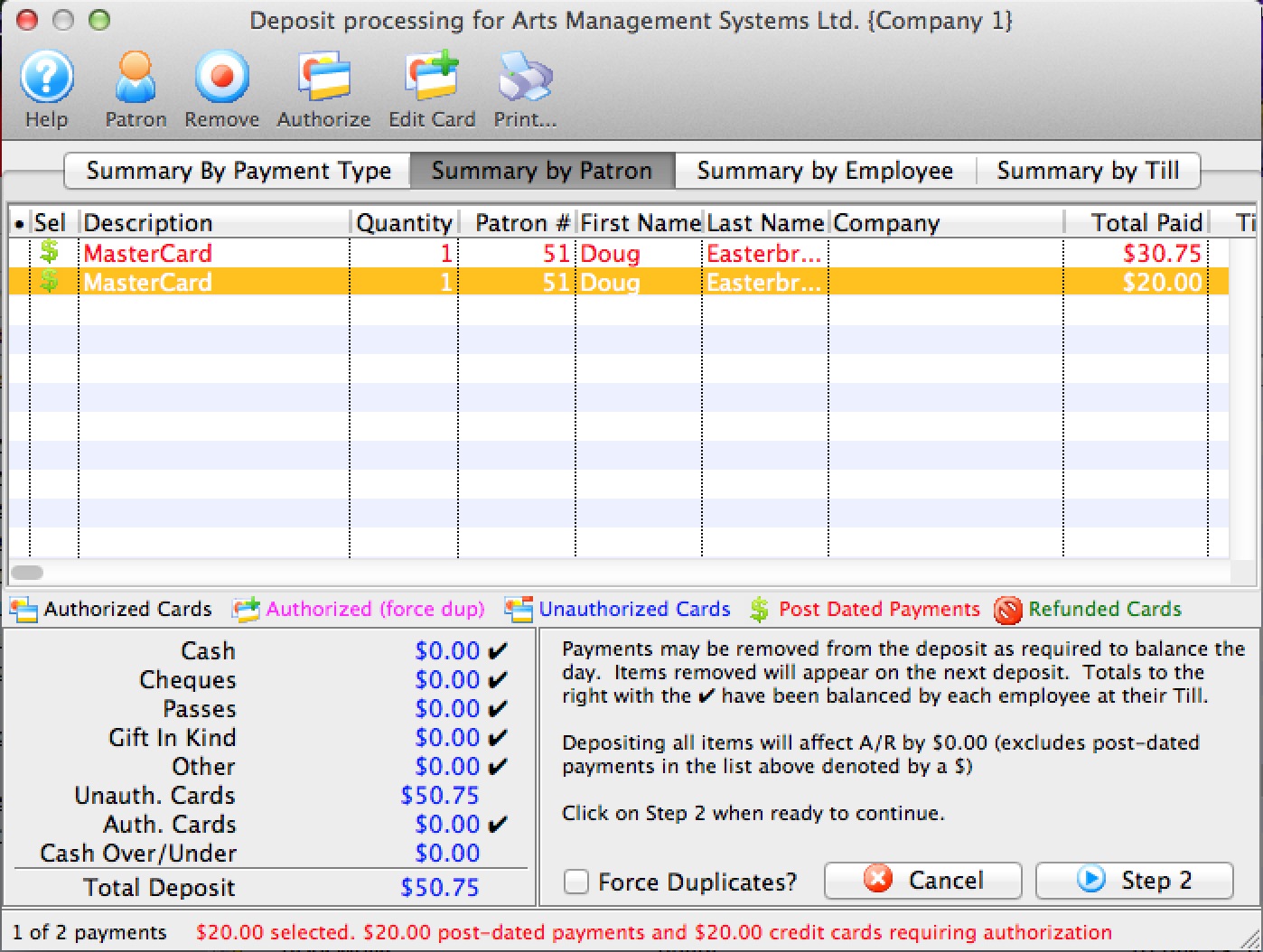
Parts of the Deposit Window
 |
Opens the online Help. |
 |
Opens the Patron record for the associated payment. Only valid on Summary by Patron tab. |  |
Removes the selected payments from the deposit. This only removes (not delete) a post dated credit card payment from a deposit. Once a payment is removed, the deposit total will be smaller. The removed payment will re-appear the next time you run the deposit window. Hopefully in that time frame, you will have a replacement credit card or the customer will have topped up the balance on the card so it can be authorized.
While valid on all tabs, the effect is a little different, depending on the tab you are on:
|
 |
Authorizes the selected payments through the credit card server if necessary. Valid on all tabs for credit cards |
 |
Allows you to change the card that a post dated payment was being charged to - in case of a decline and the patron provides a replacement credit card for the purchase.
This option is only valid on the Summary by Patron tab where you can select the individual payment that you want to change. |
 |
Prints a list of the payment in the Deposit window. |
 |
Summarizes the payments in the deposit by payment type. |
 |
Summarizes the payments in the deposit by patron. |
 |
Summarizes the payments in the deposit by the employee who received them. |
 |
Summarizes the payments in the deposit by the till they were associated with. |
| Description | A description of the payment. |
| Quantity | The number of payments. |
| Patron # | The patron number of the patron the payment is associated with. |
| First Name | The first name of the patron associated with the payment. |
| Last Name | The last name of the patron associated with the payment. |
| Company | The company associated with the payment. |
| Received By | The employee who received the payment. |
| Total Paid | The total amount of the payment. |
| Till # | The till number the payment is associated with. |
| Payment Desc | A description of the payment. |
| Date Received | The date the payment was received. |
| Merchant | The merchant used to process the payment. |
| Date Updated | The last date the payment was updated. |
| Troutid | |
| Auth. # | The authorization number of the payment if it was a credit card. |
| Credit Card | The credit card number used to make the payment. |
| Payment # | The payment number. |
| Cash | The amount of cash received with the payment. |
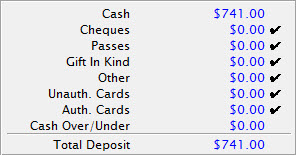 |
The breakdown of all the deposits received and the total deposit amount. |
| Force Duplicates? | If there are similar transactions that seem like duplicates and need to be authorized, this will force the transactions through on the credit card server. Duplicate transactions are rejected by default. |
 |
Cancels the Deposit window. |
 |
Moves to Step Two of the deposit process. |