
Main menu
You are here
Sales Entry Tab

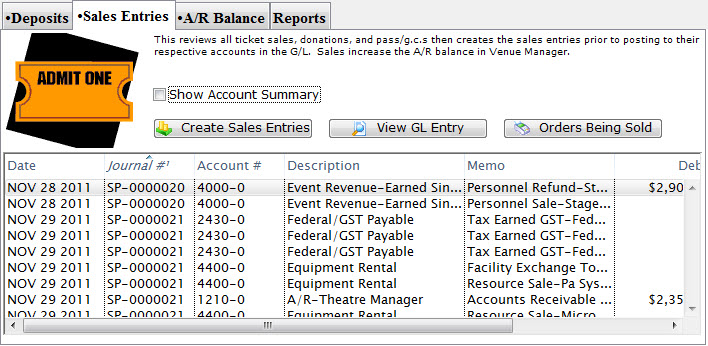
Parts of the Sales Entries Tab
 |
The Deposits tab is used for creating deposits to send to the bank. For more information on the Deposits tab, click here. |
 |
The A/R Balance tab is used to journalize all outstanding A/R to the General Ledger. For more information on the A/R Balance tab, click here. |
 |
The Reports tab is used for printing reports when the End of Day process is complete. For more information on the Reports tab, click here. |
| Date | The date the journal was created. |
| Journal # | The journal to which the payment(s) were posted. |
| Account # | The unique account number for the payment type. |
| Description | A description of the account. |
| Memo | A detailed description of the journal. |
| Debit | Debits will be created for there corresponding account number in the G/L. |
| Credit | Credits will be created for there corresponding account number in the G/L. |
| Play Code | Event the sales entry is associated with. |
 |
Enable the checkbox to summarize the data by account number. |
 |
Begins the process of journalizing the sales entries to the General Ledger. For more information on the Sales Entry Creation process, click here. |
 |
Opens the G/L entry associated with the selected items. |  |
Opens a window to view any orders currently in the process of being sold which may affect the End of Day balance. |