
Main menu
You are here
Time Parameters Tab

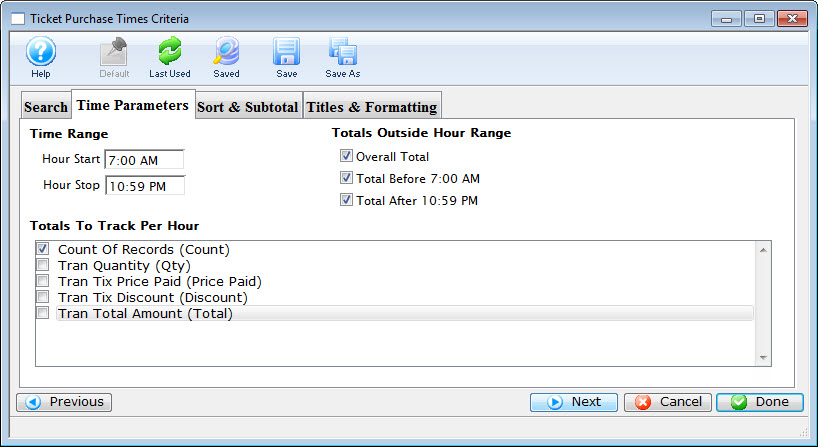
Parts of the Titles Tab
 |
If available, uses the default search criteria for this report. |
 |
If this report has previously been run, this button will add the previous criteria. |
 |
Opens a list of saved criteria for this report. |
 |
Saves the current criteria to be used later. |
 |
Saves the current criteria to be used later and opens a dialog to name this criteria. |
Time Range |
|
| Hour Start | Enter the Hour to Start the Report |
| Hour Stop | Enter the Hour to Stop the Report |
Totals Outside Hour Range |
|
| Overall Total | If enabled, the report will total all the tickets purchased outside of the time range specified. |
| Total before 7:00 AM | If enabled, the report will total all the tickets purchased prior to the start of the time range. |
| Total after 10:59 PM | If enabled, the report will total all the tickets purchased after the end of the time range. |
Totals to Track Per Hour |
|
| Count Of Records | If enabled, the report displays a count of the records processed. |
| Tran Quantity (Qty) | If enabled, the report displays the quanitiy of the records processed. |
| Tran Tix Price Paid (Price Paid) | If enabled, the report displays the transaction ticket prices paid. |
| Tran Tix Discount (Discount) | If enabled, the report displays the discounted transaction ticket prices paid. | Tran Total Amount (Total) | If enabled, the report displays the the total of all the transactions. |
 |
Returns to the previous tab. |
 |
Cancels that adding of criteria and returns the user to the Report window. |
 |
Completes the addition of criteria and the sorting of data, and begins to generate the report. Click here for more information on the Finished Report window. |
Diataxis: