
Main menu
You are here
The Add/Edit Parameter Window

The Add/Edit Parameter window is used for selecting a data field and it's
parameters to be used as criteria for the report. Click here for more information about adding criteria to a report.
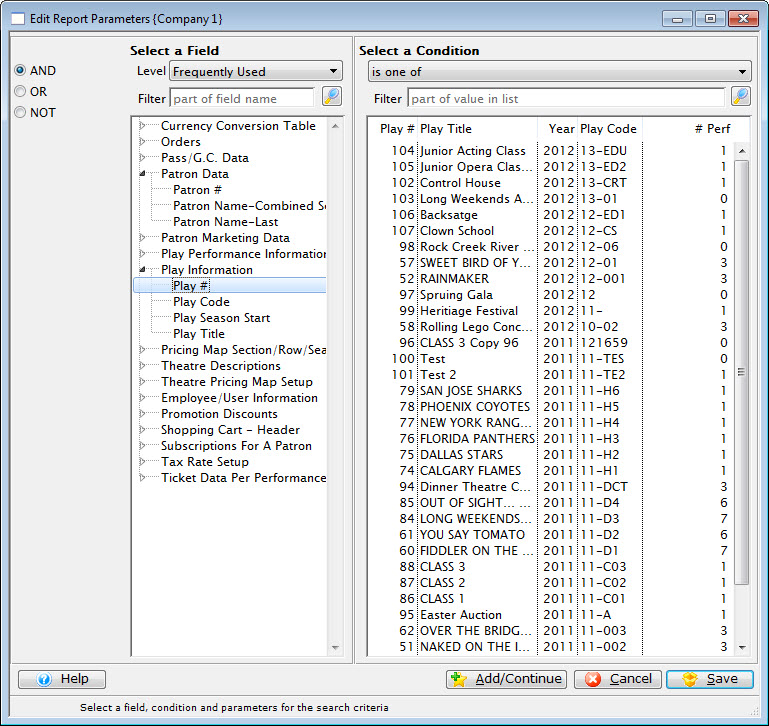
Parts of the Criteria Window
 |
Select how this criteria will work with other criteria. |
Select A Field |
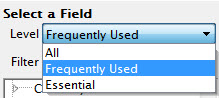 |
Filters the listing of fields. Options are:
|
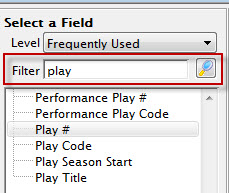 |
Type part of a field name to list only the fields whose name contains one of the words you have typed. Click the Search  button to filter the list. If the filter box is empty, all fields will display. button to filter the list. If the filter box is empty, all fields will display. |
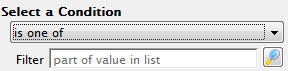 |
A drop down menu showing the available conditions for the field. Conditions are ways to search the field for data, such as "is one of" or "=." | Filter | Type part of a word to show rows in the list that contain what you have typed. Click the Search button to filter the list. If the filter box is empty, all fields will display. |
 |
Adds the current criteria and allows selection of additional criteria. |
 |
Cancels the adding of the criteria. |
 |
Adds the current criteria and returns the user to the Add Criteria window. |
Diataxis: