
Main menu
You are here
Insert Summary Tab

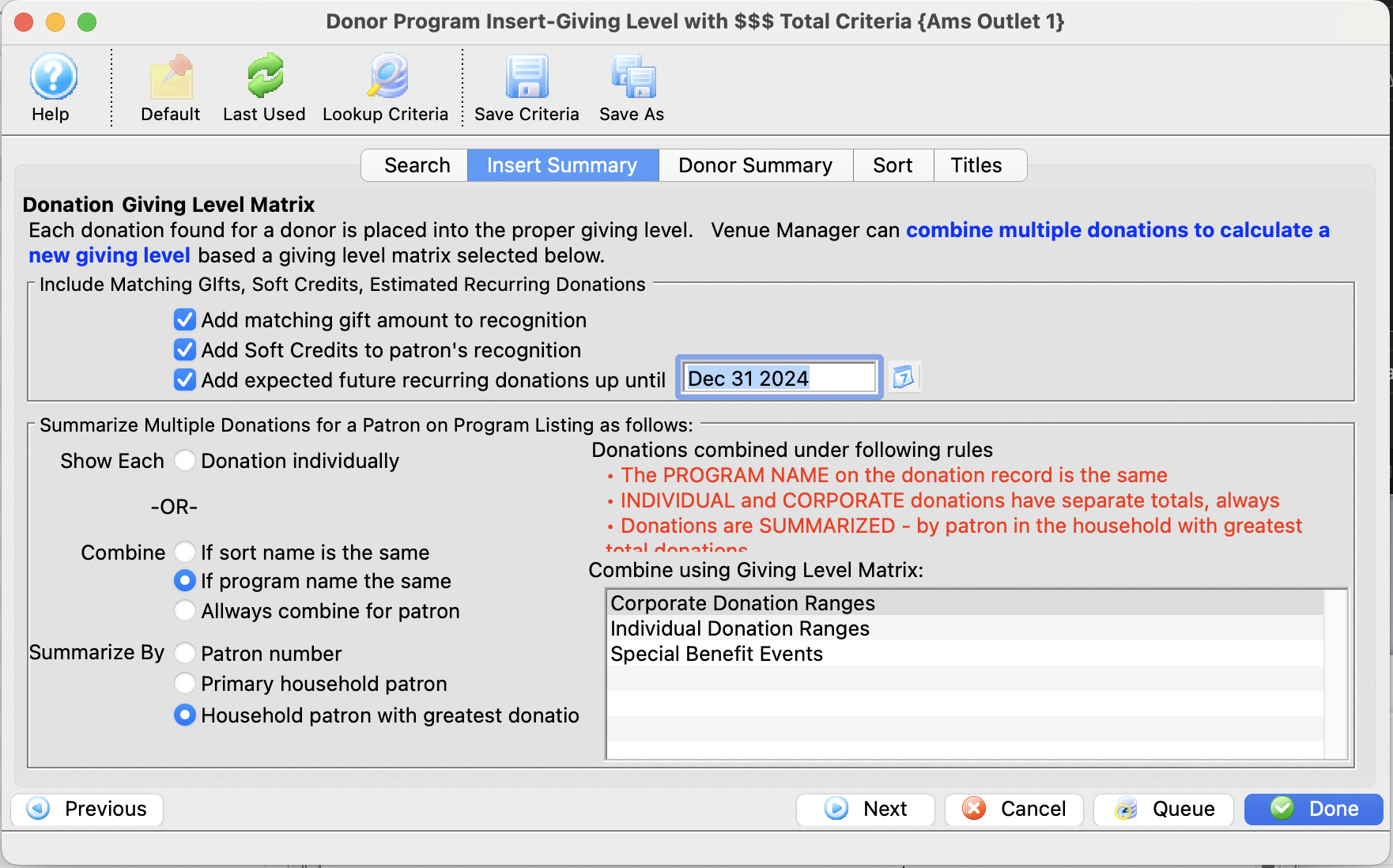
 |
This report criteria panel is very useful for Telling Theatre Manager how you want multiple donations for the same patron aggregated (or not) when you are trying to produce the program listing reports. There are two options:
|
Parts of the Insert Summary Tab
 |
If available, uses the default search criteria for this report. |
 |
If this report has previously been run, this button will add the previous criteria. |
 |
Opens a list of saved criteria for this report. |
 |
Saves the current criteria to be used later. |
 |
Saves the current criteria to be used later and opens a dialog to name this criteria. |
Donation Giving Level Matrix |
|
| Matching Gifts | |
| Checkbox - Add matching gift amount to patron's recognition | If the patron is part of a matching gift program, then the matching gift will be included in the totals for patron recognition when this box is checked. |
| Soft Credits | |
| Checkbox - Add Soft Credits to patron's recognition | If the patrons has soft credits in the donor history, these will be added to the totals then this box is checked. |
| Future Recurring Donations | |
| Checkbox - Add expected future recurring donations | If the patrons has recurring donations that are included in the giving summary, then Theatre Manager will
|
| Summarize Multiple Donations for Patron on Program Listing
Select to show each donation individually on the program listing -OR- COMBINE them according to one of the criteria below: |
|
| Show each donation individually | Shows all donations within their appropriate giving level matrices without any summarization |
| Combine based on sort name | If a patron has donations in multiple giving level matrices, then all donations that have the same sort name attached will be combined into a single matrix of the user's choice. This will remove double-entered patrons if the donations contain the same sort name. |
| Combine based on program name | If a patron has donations in multiple giving level matrices, then all donations that have the same program name attached will be combined into a single matrix of the user's choice. This will remove double-entered patrons if the donations contain the same program name. |
| Combine based on patron number | If a patron has donations in multiple giving level matrices, then all donations that have the same patron number attached will be combined into a single matrix of the user's choice. This will remove double-entered patrons if the donations contain the same patron number. |
| Combine based on household number | If many people in a household have given donations, then all donations that have the same household number will be combined
into a single matrix of the user's choice. This will aggregate donations for the same household.The name that is chosen when combining by household will follow these rules
|
| Giving Level Matrix | You will see your own giving level matrices so you can combine the selected donations to reclassify them as you wish.
There are three selections in the example image above which are representative of what venues may have typically set up.
|
 |
Moves to the previous tab. |
 |
Moves to the next tab. |
 |
Cancels that adding of criteria and returns the user to the Report window. |
 |
Completes the addition of criteria and the sorting of data, and begins to generate the report. Click here for more information on the Finished Report window. |
Diataxis: