
Main menu
You are here
Tickets Sold/Revenue by Why Did Patron Buy?

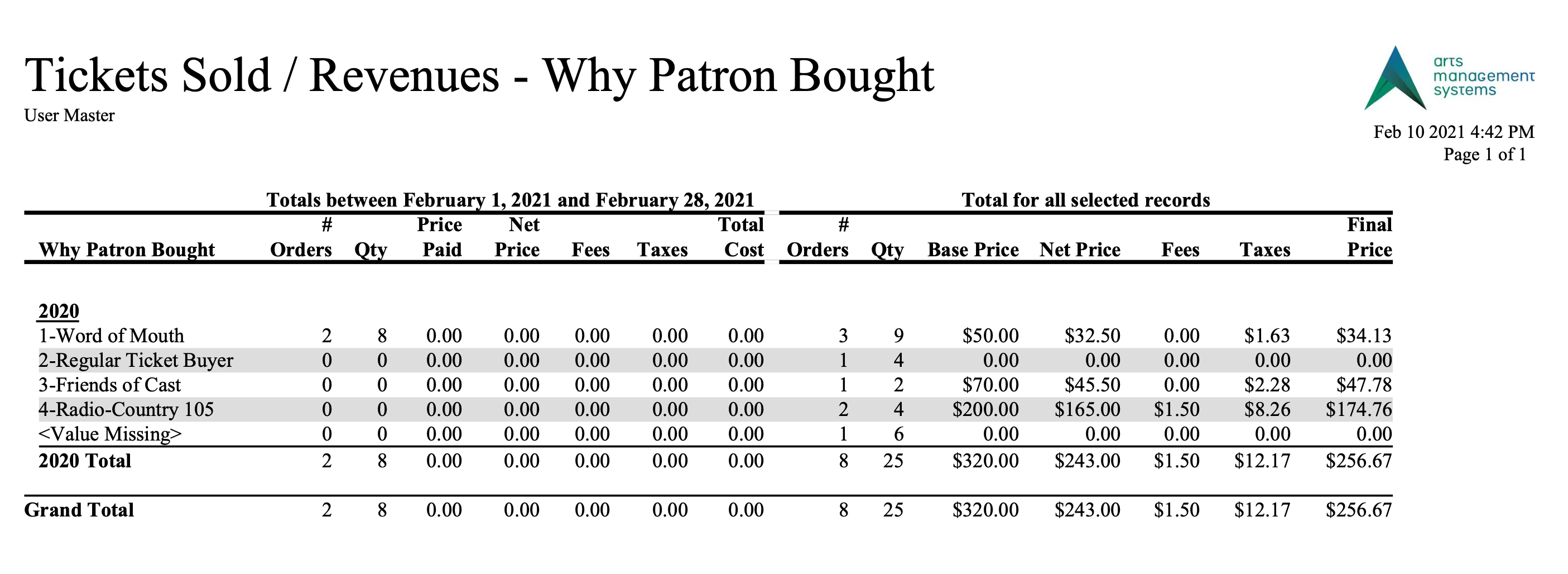
The Tickets Sold/Revenue by Why Did Patron Buy? report can be found under the Ticket Printing, Invoicing and Inventory Analysis category. The reasons are those are are set up in the Order Reason to Buy code table.
This report has additional criteria options. Click for more information about:
Purpose of the Report
This report generates a summary of the tickets and revenue earned by the Why Did Patron Buy? field. It shows both the daily sales and total sales.
Departments Who Benefit From This Report
| Box Office | Use this report as an overview of the tickets sold and revenue earned by the Why Did Patron Buy? field. |
| Marketing | Use this report as an overview of the tickets sold and revenue earned by the Why Did Patron Buy? field. |
Criteria Hints
It is recommended that this report be run with a specific event or group of events as the criteria.
| Parameter Field | Condition | Value |
| Event # | is one of | (Event) |
Use the SHIFT key to select a series of events, or the OPTION key (Mac) or CTRL key (Windows) to select multiple individual events.