
Main menu
You are here
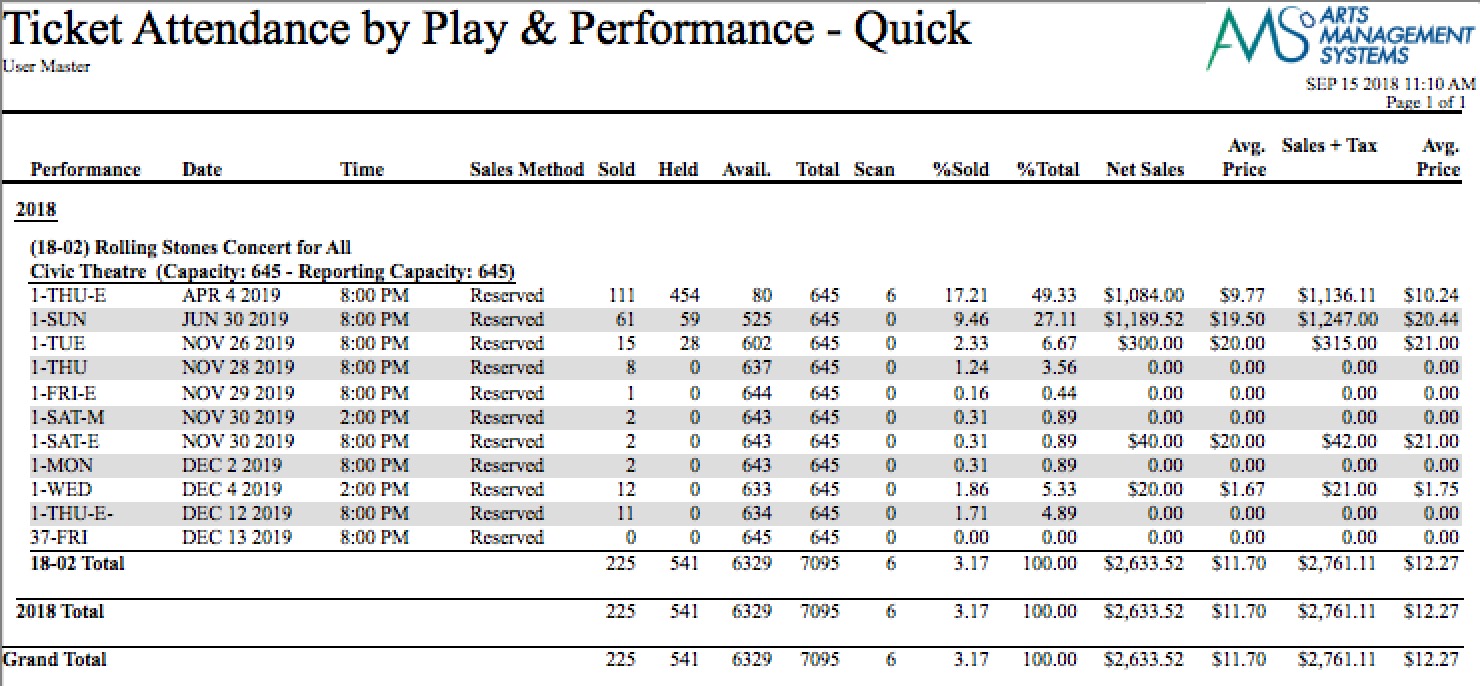
Revenue/Attendance Counts - Quick

The Revenue/Attendance Counts - Quick report can be found under the Ticket Printing, Invoicing and Inventory Analysis category. This report has additional criteria options. Click for more information about:
Purpose of the Report
This report generates a summary by performance of the attendance and revenue for the performance.
Departments Who Benefit From This Report
| Box Office | Use this report as a quick view of how sales are doing for each performance. |
| Accounting | Use this report as a quick view of how sales are doing for each performance. |
| Marketing | Use this report as a quick view of how sales are doing for each performance. |
Criteria Hints
It is recommended that this report be run with a specific event or events as the criteria.
| Parameter Field | Condition | Value |
| Event # | is one of | (Event) |
Use the SHIFT key to select a series of events, or the OPTION key (Mac) or CTRL key (Windows) to select multiple individual events.