
Main menu
You are here
Volunteer Window

Volunteers are an integral part of every organization. Using the Volunteer window, you can keep track of:
- Detailed Notes on your volunteers
- Physical and other information in the Volunteer tab
- Add the Volunteer Positions they have held and the hours worked
- Keep track of the Times they are Available
- Any Awards they have recieved according to the number of hours they have volunteered
- Any Tasks that may have been assigned to them through the Facility module
To access this window, you use the Volunteer  button on the Patron List Toolbar / Ribbon Bar.
The Volunteer Window opens.
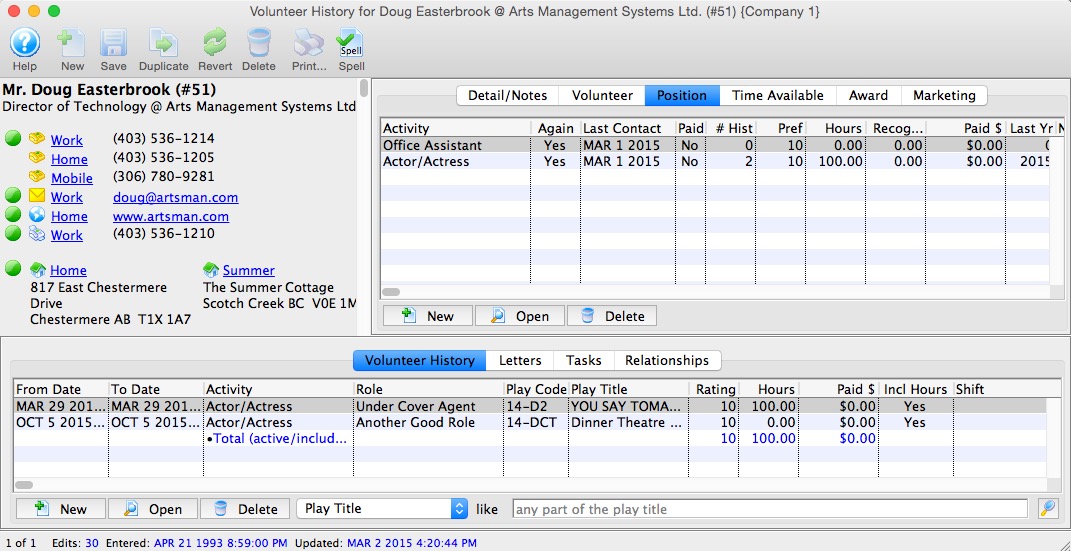
Parts of The Window
Volunteer Information |
This information is contained in the upper portion of the window. All information is taken directly from the patron information you entered. |
| Detail / Notes | This tab allows you to enter more specific information about the volunteer. Click here for more information. |
| Volunteer | This tab has adjustable menus and fields for additional information on the volunteer. Click here for more information. |
| Position | This tab lists positions the volunteer can perform. Click here for more information. |
| Time Availability | This tab allows you to set the times the volunteer is available or unavailable. Click here for more information. |
| Award | This tab allows you to see any awards the volunteer has received. Click here for more information. |
History |
The Activity History / Evaluations is the lower section of the window and contains all of the activities the volunteer has participated in. Click here for more information. |
 |
New - Clicking the New button allows you to add New Activity History for the Volunteer. |
 |
Open - Opens the currently selected history for viewing or edititing |
 |
Delete - Deletes the selected History |
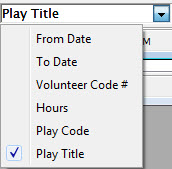  |
Search - Allows you to search for a Play / Event to associate the history to. |