
Main menu
You are here
Position Tab

The positions tab is part of the Volunteer Window and displays the positions which the volunteer can perform. Functions of this tab are add a position, edit a position, and delete a position.
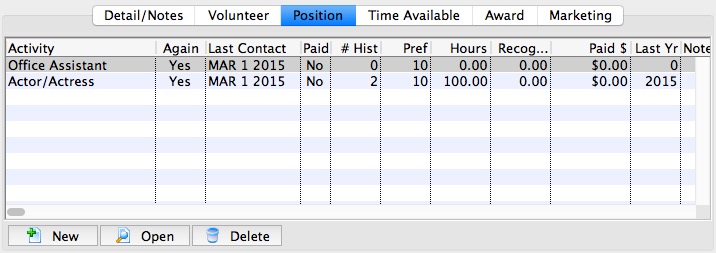
Parts of the Positions Tab
| Position | The volunteer code of the position. The codes are setup in Code Tables >> Volunteer Activities. Click here to learn how to set the codes. |
| Again | If the volunteer is still interested in the position. |
| Contacted | The date last contacted. |
| Paid | If the activity was paid. |
| History | If any historical information is available. |
| Preference | The preference rating of the volunteer for the position on a scale of 1-10. |
| Hours | The total number of hours worked in the position. |
| Paid $ | The total amount that was paid for the activity. |
| Last Year | The last year that the volunteer performed the position. |
| Notes | Any notes associated with the position. |
 |
Inserts a new position through the Positions For Window. Click here to learn how to insert a new position. |
 |
Shows the details for the selected position as well as allowing editing in the Positions For Window. Click here to learn how to edit a current position. |
 |
Deletes the selected position. Click here to learn how to delete positions. |
|
For quick reference information on Adding Editting and Deleting Volunteer Postions, click the following link. |

Diataxis: