
Main menu
You are here
Profile Tab


This tab provides a place to save some more personal information about the patron
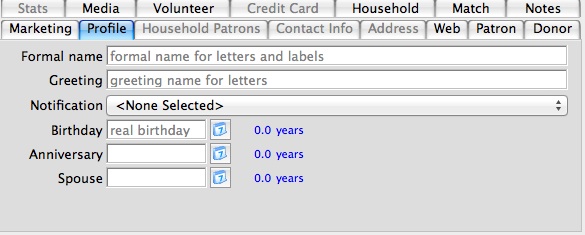
Parts of the Profile Tab
| Formal Name | The patrons formal name. The formal name is a combination of the Salutation, the First name, the Initial and the Last name. |
| Greeting | Displays the name the patron likes being called in every day life. It is quite often the patron's first name or a version of it. |
| Birthday | Date of the Patrons Birth. Use the Calendar  button to select a date or type a date in the field provided. button to select a date or type a date in the field provided. |
| Anniversary | Patrons Anniversary date. Use the Calendar button to select a date or type a date in the field provided. |
| Spouse | Patrons Spouses birthday. Use the Calendar button to select a date or type a date in the field provided. |
| Notification | Select an electronic notification from the drop down. This will send an electronically generated letter to a designated employee alerting that employee of activity in the patrons record. |
Diataxis: