
Main menu
You are here
Credit Card Tab

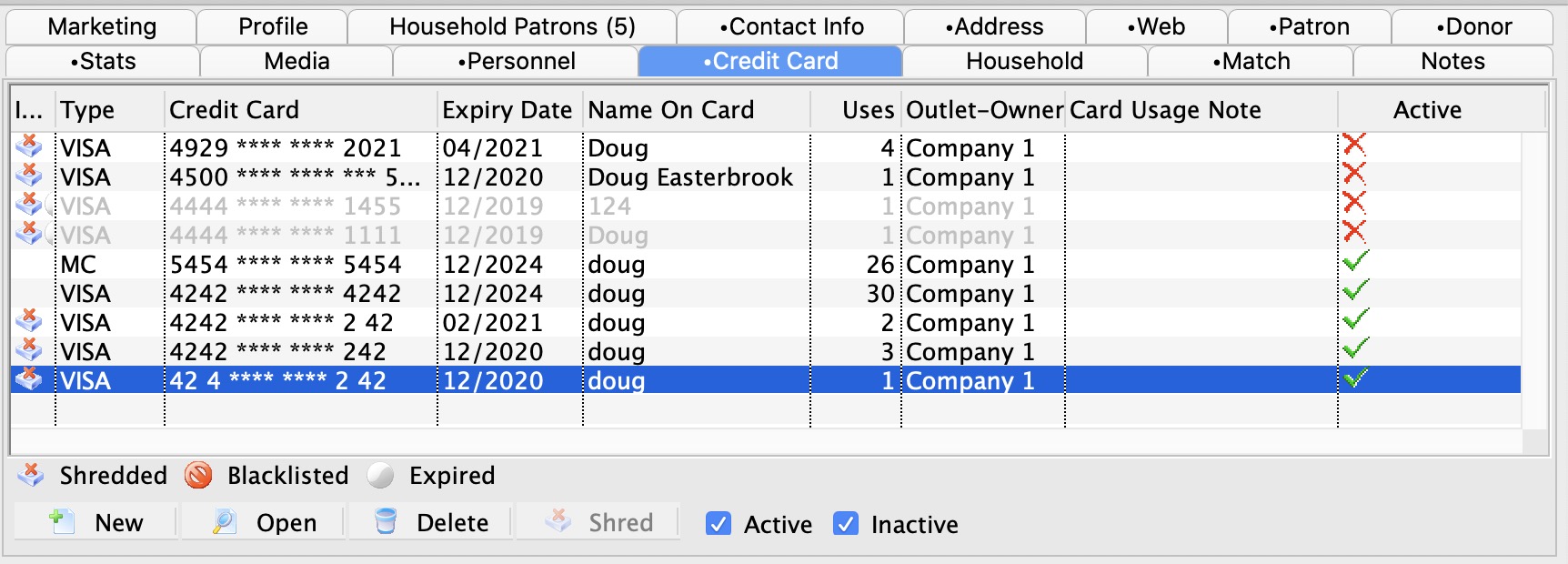
This tab stores the patrons credit card history for records and auditing purposes. Data in this tab is visible to an employee if they have been granted access under Employee Setup.
 |
If you want to black list the card and prevent it from being used in Theatre Manager, edit the card and click the black list checkbox |
Parts of the Credit Card Tab
| Type | Credit card type. e.g. Visa, Master Card, American Express. |
| Name on Card | Name printed on the credit card used for added security when processing the card. |
| Credit Card | The credit card number |
| Expiry Date | Date the card will expire. |
| Uses | Once a card has been used, a count of the number of times it is used is retained. This is the number of payments records with this credit card number on it. |
 |
Adds a new credit card to the patrons file. Click here for more information on Adding New Credit Cards. |
 |
Opens the credit card detail window for editing. Click here for more information on Editting a Credit Cards. |
 |
Deletes a credit card from the patron file. Once credit cards without transaction history can be deleted from the patron record. Click here for more information on Deleting a Credit Card. |
 |
Shred the selected credit card records if they exceed the minimum retention policy of # days. Theatre Manager can implement either Schedule "C" or "D" for the SAC. You can define a retention period for credit card information. Click here for more information. |  |
Determines the state of the card and if it can be selected to process credit card transactions. Expired, lost or stolen cards can be set to an inactive state. |
Diataxis: