
Main menu
You are here
Entry Detail - Transactions Tab

The General Ledger Entry Detail window is used for examining posted entries.
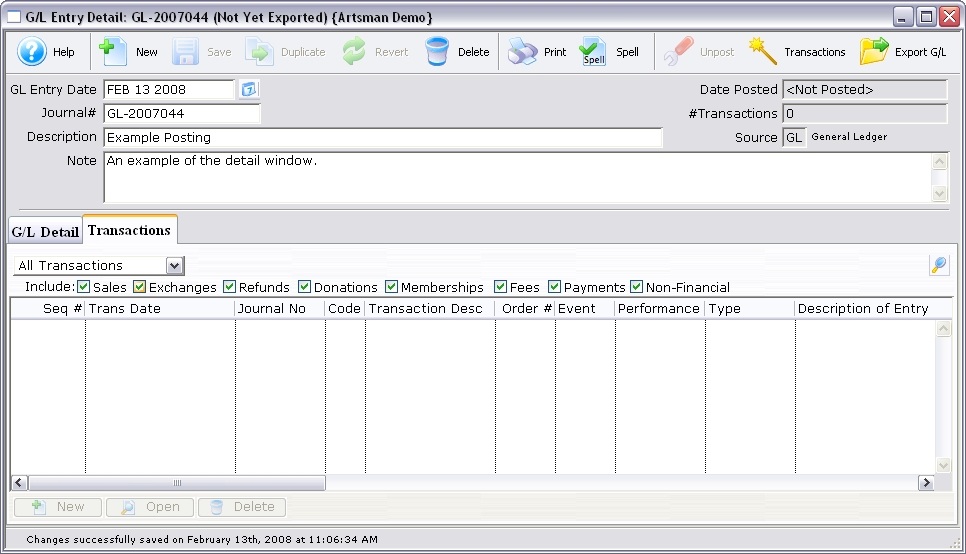
Parts of the G/L Entry Detail Transaction Tab
 |
The G/L Detail tab is used for adding the debits and credits to the different general ledger accounts. For more information on the G/L Detail tab, click here. |
 |
Begins a search of the transactions. |
| Include | The types of transactions to include. To remove a type from the search, uncheck the box next to the item. |
| Seq # | The sequence number of the transaction. |
| Trans Date | The date of the transaction. |
| Journal No | The journal number of the transaction. |
| Code | The transaction code associated with the transaction. |
| Transaction Desc | A description of the transaction. |
| Order # | The order number associated with the transaction. |
| Event / Play | The event / play associated with the transaction. |
| Performance | The performance associated with the transaction. |
| Type | The type of transaction. |
| Description of Entry | A description associated with the entry of the transaction. |
 |
This function is not available in this window. |
 |
Opens the Transaction Detail window. |
 |
This function is not available in this window. |