
Main menu
You are here
Seat Management Patron Section

You use the Seat Management Patron Section to add or edit patrons subscribed to the season package.
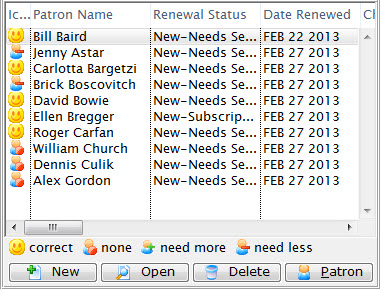
Parts of the Seat Management Patron Section
| Patron Name | Name of the subscriber. |
| Renewal Status | The current status of the patron's subscription. |
| Date Renewed | The last date the patron renewed their subscription |
| Change Date | The last date a seating change was requested. |
| Change Location | The location of the seating change that was requested. |
| Performance | The performance code for the control house they are part of. |
| Seats Since | The date that the subscriber first subscribed. |
| Seat Count - Current | The number of seats currently held as part of the subscription. |
| Seat Count - Desired | The number of seats the subscriber would like to have. |
| Seating Request Comments | Any comment added for a seating request. |
| Priority of Seating | The priority given to the seating change request. |
| Patron # | The patron's record number. |
| First Name | The first name of the patron. |
| Last Name | The last name of the patron. |
| Company | The company the patron works for. |
 |
Adds a new patron to the season package. For more information on adding a patron to a season package, click here. |
 |
Opens the patron's subscription record. Click here for more information on the Patron Subscription Detail window. |
 |
Deleted the patron from the season package. If the patron already has booked seats, the tickets will need to be refunded also. |
 |
Opens the patron window for the selected patron. Click here for more information on the patron window. |