
Main menu
You are here
Seat Management Seating Section

You use the Seat Management Seating Section to add or alter the seats the patron is subscribed or wait listed for.
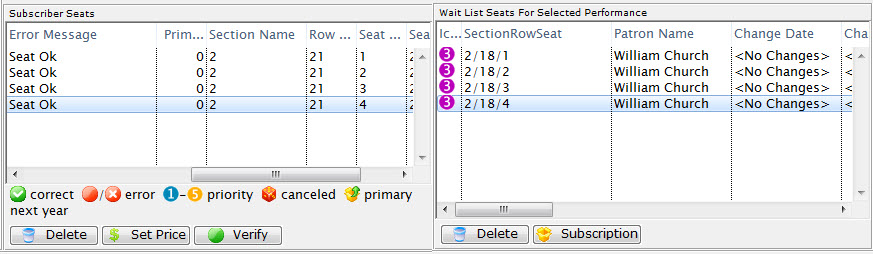
Parts of the Seat Management Patron Section
Subscriber Seats |
|
| Icon |  |
| Quantity | The number of seats that patron has. |
| Price Code | The price code used for the seats. |
| Section/Row/Seat | The section, row and seat for the seats the subscriber has. |
| Promotion | The promotion for the seats the subscriber has. |
| Error Message | Any error messages in regards to subscribing a patron to these seats. |
| Primary Seat | The primary seat of the patron. |
| Section | The section of the seat. |
| Row # | The row number of the seat. |
| Seat # | The seat number of the seat. |
| Seat Code | The seat code for the seat. |
 |
Deletes the selected seat. |
 |
Change the subscription Price/Promotion of the selected seats in the package. |
 |
Verify the selected primary seats to ensure they have the correct status. |
Wait List Seats for Selected |
|
| Section/Row/Seat | The section, row and seat number for the wait listed seats. |
| Patron Name | The patron who is on the wait list for the seats. |
| Change Date | The date the patron on the wait list requested the seating change. |
| Change Location | The location the patron on the wait list requested. |
| Priority of Seating | The priority of the patron in the seating change request. |
| Seating Request Comments | Any comments in conjunction with the seating request change. |
| Promotion | The promotion for the seats. |
| Renewal Status | The renewal status of the patron on the wait list for the seats. |
| Primary Seats | The primary seats for the patron. |
| Section | The section of the seats. |
| Row # | The row number of the seats. |
| Seat # | The seat number of the seats. |
| Price Code | The price code for the seats. |
| Last Name | The last name of the patron on the wait list for the seats. |
| First Name | The first name of the patron on the wait list for the seats. |
| Company | The name of the company of the patron on the wait list for the seats. |
| Quantity | The quantity of seats the patron is requesting. |
|
This button is unavailable in this section. |
 |
Shows the subscription package for the selected seat. |