
Main menu
You are here
Event / Plays Tab

The Event / Plays tab lists all the events / plays that are currently currently attached to the selected venue.
|
Note: The term "Play" can be customized in Theatre Manager to more accurately represent your type of performances. It may be called:
|

New events / Plays can be added to the venue through this window clicking the New  button. Click here, for more information on creating an Event / Play.
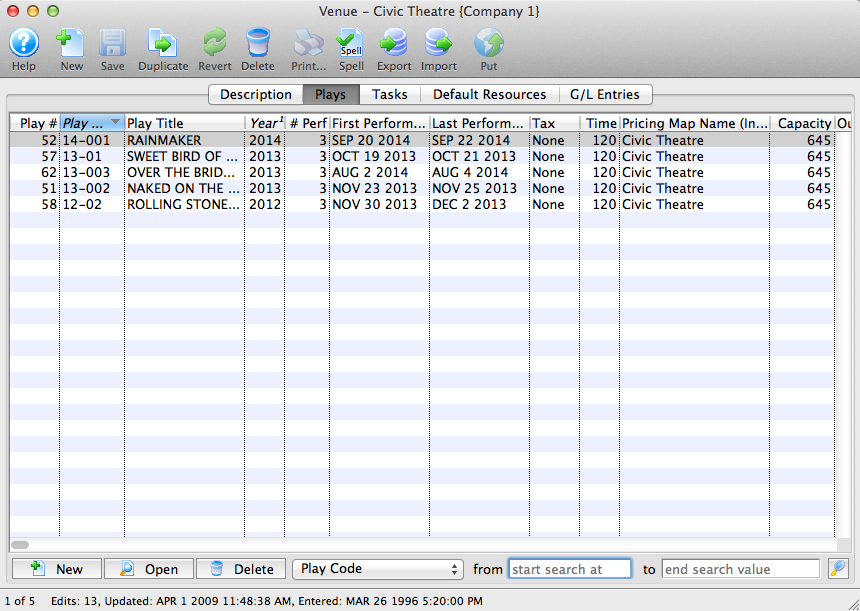
Parts of the Event / Plays tab
| Play # | The sequence number of the event / play in the database. |
| Event Code | The event code as defined on the Description tab. For more information on the Description tab click here. |
| Event Title | The event title as defined on the Description tab. For more information on the Description tab click here. |
| Year | The Season Year as defined on the Description tab. For more information on the Description tab click here. |
| # Perf. | The number of performances for the event. For more information on the Performances tab click here. |
| First Performance | The date of the first performance. For more information on the Performances tab click here. |
| Last Performance | The date of the last performance. For more information on the Performances tab click here. |
| Tax | The tax structure used for the event (if any), as defined on the Accounting tab. For more information on the Accounting tab click here. |
| Time | The runtime of the performances as defined on the Marketing tab. For more information on the Marketing tab click here. |
| Pricing Map Name(Internal) | The internal name of the map. |
|
|
Opens the template for creating a new event. For more information on creating a new event click here. |

|
Opens the selected event setup. |

|
Deletes the selected event from the database. Note: you can only delete events with no transactions. |