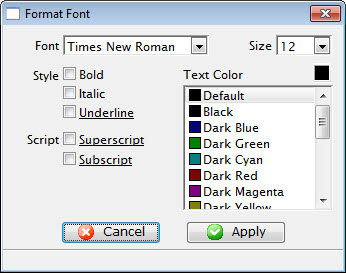
Font Tab
|
| Font |
A drop-down menu listing all available fonts that can be
used in the letter. |
| Font Size |
A drop-down menu listing standard point sizes for the font
selected. Sizes may also be entered in the field manually. |
| Style |
This style section refers to the style of the font. The available
options are Bold, Italics, and Underlined. |
| Text Color |
The color of the text may be changed either by:
- using the color picker button on the right hand side
- or picking from the list of default colours
|
| Script |
The script section allows for the text to be formatted as
either Superscript or Subscript. |