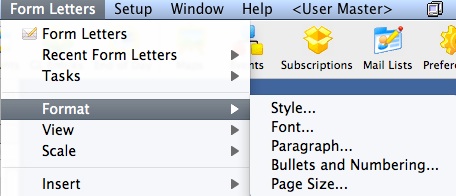
The Format menu is used for adjusting the format of the text and paragraphs of the letter. Some of these options are also available in:
Parts of the Format Menu
| Style |
This opens up the Format Style window for changing the style of the text based on an existing style (or to make a new style.
|
| Font |
This opens the Format Font Format Font window for changing the font of
the text. |
| Paragraph |
This opens the Paragraph Properties window for changing the format of paragraphs in the letter.
|
| Bullets and Numbering |
This opens the Bullets and Numbering window for formatting
text with bullets or numbering. |
| Page Size |
This opens the Format Page Size window for the adjusting
the properties of the document. |

