Main menu
You are here
The Season Package Detail Events / Plays Tab

The Season Package Detail Event / Plays tab is used for adding events to a season package.
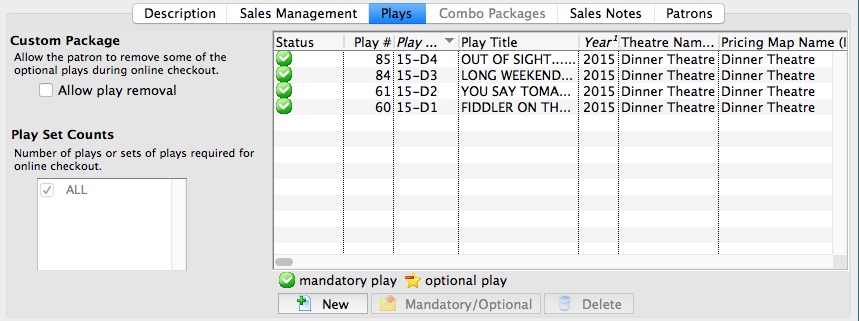
Parts of the Season Package Detail Event Tab
Custom Package |
|
| Allow Event Removal | Indicates if the patron is allowed to remove optional events from the season package during the online subscription checkout process. |
Event Set Counts |
|
| Select Number of Events | Select the number of events or sets of event counts required for online subscription checkout |
Event List Columns |
|
| Status | Indicates if the event is a mandatory event or optional event within the season package. |
| Event # | The sequence number of the event. |
| Event Code | The event code for the event. |
| Event Title | The title of the event. |
| Year | The season year that the event falls under. |
| Theatre Name (Internal) | The internal name of the venue that the event takes place in. |
| Pricing Map Name (Internal) | The internal name of the venue's pricing map that the event takes place in. |
 |
Adds an event to the list of events in the season package. |
 |
You can indicate which events are optional as far as the package goes. When the event is optional, the patron can remove that event online if they choose to.
Note:
|
 |
Removes the selected event from the season package. This only removes the event from within the season package and doesn't delete the event. |
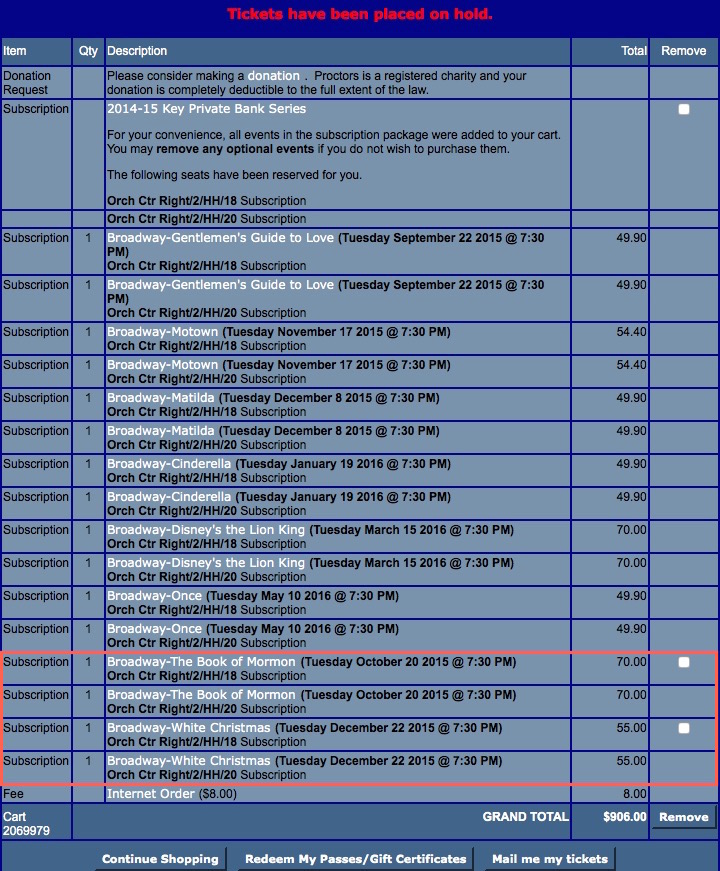
The following is an example of an online season subscription with optional events, highlighted in red. In the 'Remove' column, the optional events have the option to be removed from the shopping cart prior to checkout.