Skip to main content
Main menu
AMS Cloud Status
Product Info
Community
Contact Us
Mailing List / RSS Feed
Privacy Policy
Search form
Search
Installing Theatre Manager
Upgrading Theatre Manager
Quick Reference Guides
Self-Guided Demo Tutorial
Theatre Manager Online Help
Getting Started - Hardware Requirements
Login / Logoff
Customizing Theatre Manager
Overview of the Theatre Manager Workspace
Accounting
Overview of the General Ledger
The General Ledger Submenu
Receivables Submenu
End of Day Wizard and Daily Balancing
The Transaction Monitor
Creating G/L Entries
Setting up the Chart of Accounts
Chart of Accounts Window
G/L Account Detail
Setting up General Ledger Accounts
Merging G/L Accounts
Deleting General Ledger Accounts
Determine the Chart of Accounts
Editing a General Ledger Account
Finding General Ledger Accounts
Sample Chart of Accounts
Adding Accounts to the General Ledger
General Ledger - Budgets
Preparing for Tax Change
Attendance Tracking/Ticket Scanning
Course Management
Credit Card Authorization Setup
Donation Management
Hot Seat Analyzer
Importing Data to TM
Code Tables - Awards Code
Code Tables - Personnel Codes
Exporting Data From TM
Introduction to Invoices
Season Subscriptions - Creating a Control House
Mail Lists - what are they?
Media Management
Memberships, Passes, G/Cs
Order Management
Outlet Management
Patron Management
Payments Management
Personnel/Volunteer Management
Season Subscription Management
System Setup
Venue Management
Ticket Management
Ticket Trove
Web Sales Management
Form Letters and EBlasts
Facility Management
Reports
Reveal Dashboards
REST API Overview
Web Page Documentation
Frequently Asked Questions
Theatre Manager: Responding to COVID 19
Newsletters
AMS Cloud Status
Product Info
Community
Contact Us
Mailing List / RSS Feed
Privacy Policy
You are here
Home
›
Theatre Manager Online Help
›
Accounting
›
Setting up the Chart of Accounts
›
Chart of Accounts Window
Setting up General Ledger Accounts
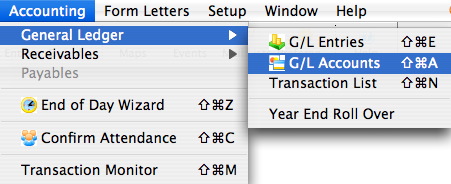
Access to the Chart of Accounts is through the Accounting menu.
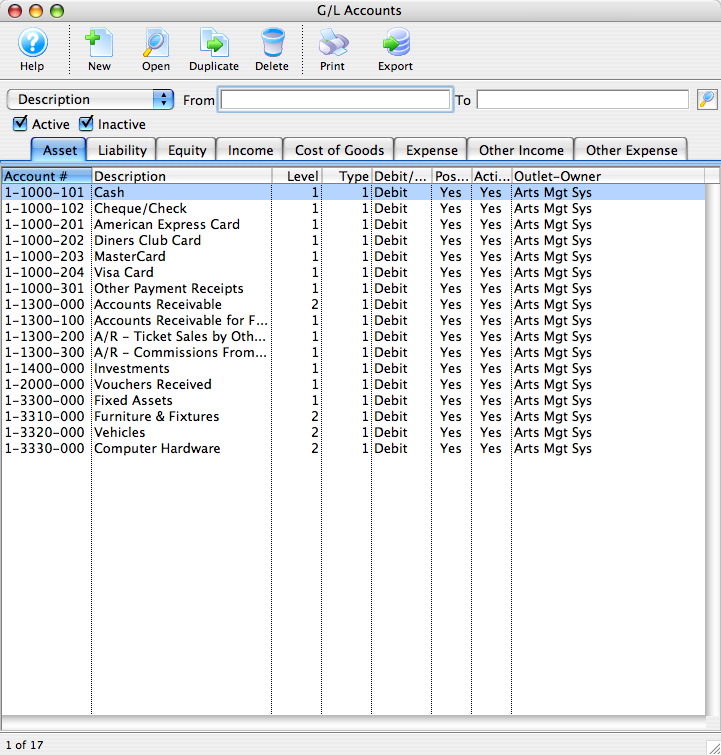
The G/L Accounts window opens.
‹ G/L Account Usage
up
Merging G/L Accounts ›
Printer-friendly version