
Main menu
You are here
Mac OS X Lion or later - Multiple Drive Setup and Install

The steps below are an outline of how to setup a Mac Mini (or Mac Pro) with OS X Lion Server or later (Mountain Lion, Mavericks) that has two or more drives.
|
The steps outlined are similar if you have a Mac Mini or Mac Pro running OS X 10.6.x or earlier. You will have an install DVD and can do most of the steps without connecting to the internet. |

The general process to prepare such a machine for optimal performance is:
- Save any data or databases that you have on the machine
- Stripe the drives
- Reinstall Lion Server
- Install Postgres as normal
- Restore a database to that server
The steps have a degree of technical complexity and assume you are able to interpret and adapt to variations in the process yourself.
Striping a Mac with two or more drives under Lion or later
Since Lion does not come with any install disks, you will need to follow a special procedure to stripe the drives on Lion servers as follows:
- Make a backup of any data on the computer that you deem important if you have been using it for a while
- Connect the Mac Mini/Mac Pro to the internet, a monitor and keyboard. The internet is important as it will be required to restore the operating system
- Restart the Mac with the Apple and R keys held down simultaneously. This will boot from the internal Lion partition on the drive
- When the machine responds with the OS X operating system installer screen, select the language of your choice and begin the install
- The next screen will be the utilities window. Select Disk Utility and:
- After selecting a drive, click on the the 'RAID' tab.
- Select STRIPED RAID SET for the 'RAID Type' prompt. The default is a mirrored drive set, so be careful; otherwise, you will end up starting over.
- Drag both individual drives into the RAID Stripe and verify that the estimated size of the RAID set is the total of both drives. (it should look similar to the diagram below)
- Create the RAID Striped Set.
- After confirming you want to do this, Partition Utility will bring the RAID array back online.
- Quit 'Disk Utility'
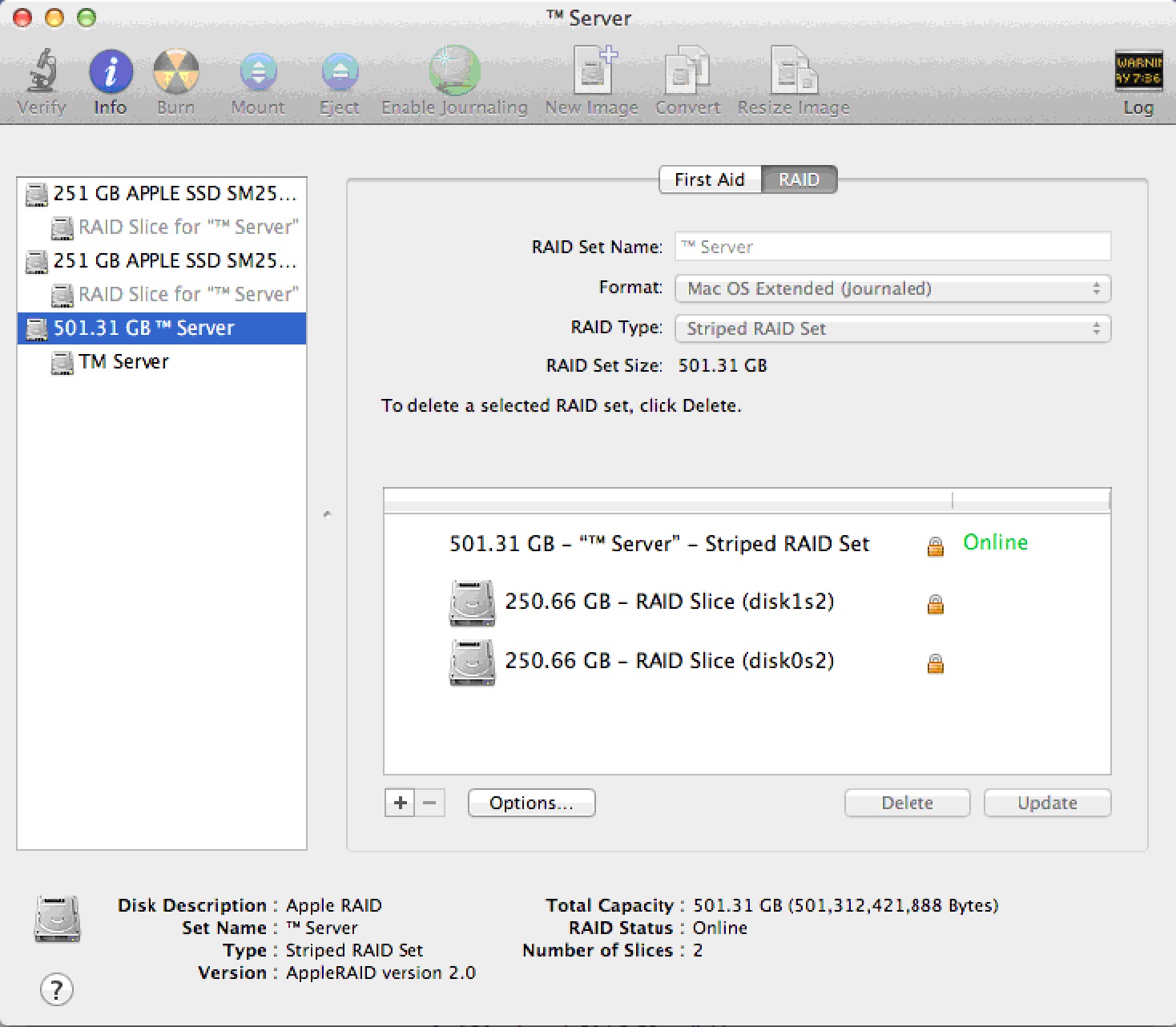
- On the main window, you should now select 'Reinstall Mac OS X Lion' (optionally, you could restore from a time machine backup). Follow any/all prompts and reinstall Lion. It may say that File Vault or some other features are disabled - it's the price of gaining a lot of performance from the dual drive server.
- The download from the Apple web site may take a while, so let the installer do its thing.
Post Installation Steps
- After installing and configuring, download any updates using 'Software Update'. You may need to repeat this step until there are no more updates available.
- Configure the server with a static IP address
- Disable Airport, Spotlight indexing, Time Machine and any power saving settings
- Setup the firewall as required
- Ensure the backup script is setup and thoroughly tested and that there is a step that can successfully FTP the database to another machine (or copy it using the Unix 'cp' command). If a hard drive in the striped RAID set dies, none of the data on any drive is recoverable so OFF-MACHINE backups are mandatory.