Randomizing Mail Lists
Randomizing Mail Lists
- Creating a number of random lists for a lottery based on sale system. The resultant mail lists can be used with different on sale coupon/pre-access codes to distribute times to patrons to buy online
- Generate a random subset of the people in a mail list for marketing purposes like surveys or invitations to special events
- Taking a general mail list that is slightly bigger than a mail out budget and deciding (randomly) who should get mailers.
- Breaking up a larger list of patrons into a few random groupings if you want to distribute the e-blast across a number of multiple sendings.
The steps below indicate how to create a random list of patrons. A few thoughts about these lists.
- You can create random lists and add people manually or by adding criteria to them if you wish
- You can take people off a random mail list - as you would any other list
- You can e-blast or merge data to print letters for these lists
- You can run reports to see revenue or activity for patrons on a random list
- You can add the list to pre-access codes to and change when they are available to allow staggered onsales
- and much more.
Steps to Create Random Lists
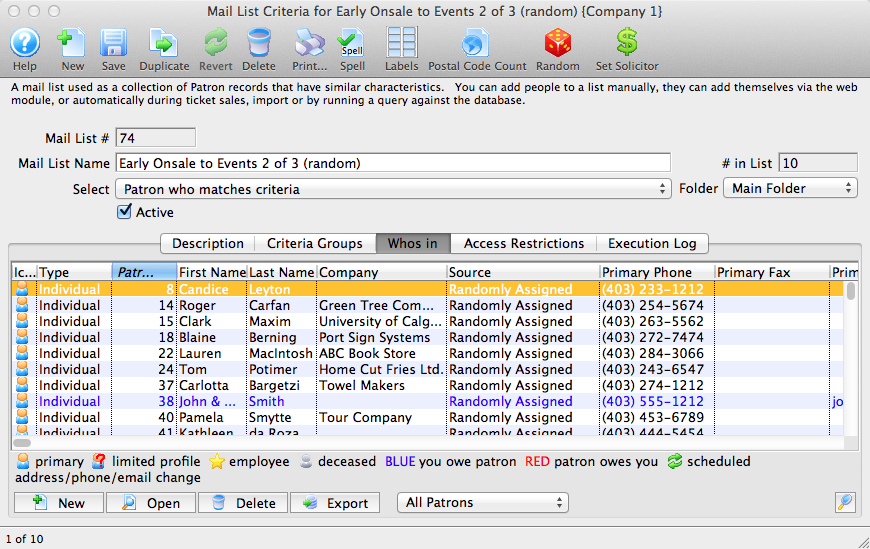
Before creating a random list, you must already have found the patrons you want and placed them into an existing list. For example, if you have a list of members, or new donors, or volunteers, start with that list by opening it up to display it as below.
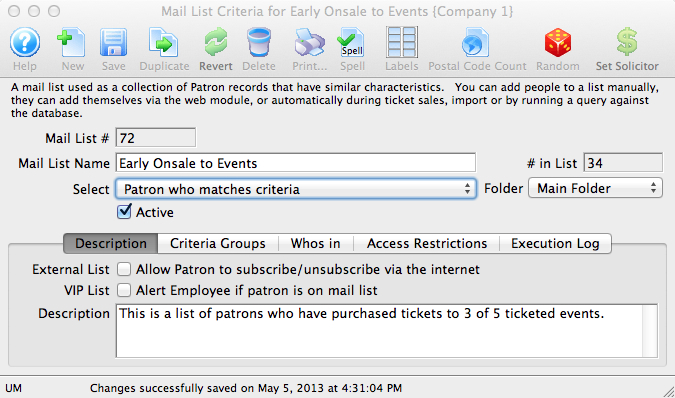
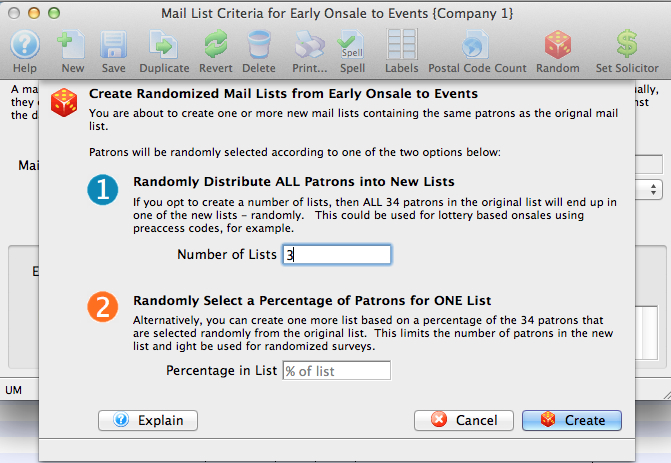
Click on the 'Random' Icon in the toolbar and you will see a window similar to below. There are two options that you can select:
- Randomly distribute ALL patrons into new lists. Type in the number of new lists you wish to create. Theatre Manager will automatically create those mail lists for you and then assign the patrons in the original list to ONE OF the new lists at random. Patrons will not appear in more than one list and the number of people in each list should be more or less approximately equal. Some lists will have more (or less) patrons due to the random nature of the process.
- Randomly Select a Percentage of Patrons for ONE list take a different approach. Type in the percentage of people you would like in the new list that will be created. Theatre Manager will select them at random from the existing mail list and put them into the new list (up to the specified percentage of patrons). It will never place more than the specified percentage of patrons into the list.
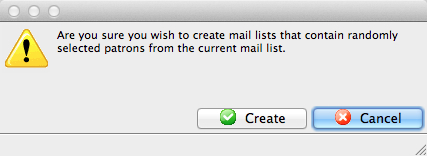
Confirm whether you want to continue creating the mail lists containing random people.
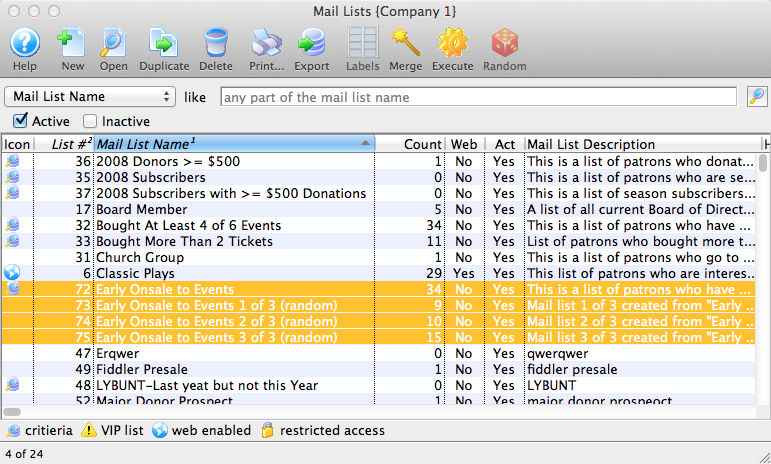
When you are done, if you look at the list of mail lists, you will see the appropriate number of new mail lists. The titles of those lists will start with the same name as the one you used to randomize. They will end with a comment indicating which of the random lists it was.
There is a new status on any window that shows who is in a mail list (or the mail lists that a patron belongs to. If you look at the 'source' column, it indicates that the patron was 'Randomly Assigned' to the list (instead of added at box office, or self added on internet, etc.). This is one way to know how the people got on this list.
Selling tickets by Lottery (how to)
Selling tickets by Lottery (how to)
 |
Lottery based ticket sales are a way to fairly and equitably sell tickets to a large number of people by spreading out ticket sales across a longer period of time - so that an instantaneous free-for-all on your web site will not overwhelm your hardware. |
- many more people want tickets than are available
- you expect the tickets to go like hotcakes and, most likely, vastly overwhelm your hardware's capabilities
- you want the patrons to sign up in advance to say that they are interested in having a chance to buy the tickets
- and then you randomly decide:
- which of those people will actually get a shot to buy the tickets -and-
- the unlucky ones do not get a chance during the onsale because they lost the lottery - but might be able to buy later when the tickets are placed onsale, unannounced.
General Steps to do a lottery based Onsale
How, you ask? There are a few things that need to be set up as summaried below and explained in detail afterwards. You will need:
- A self subscribing double opt-in mail list to track the above patrons who want to be in the lottery
- These patrons will need to sign in and create a full account (if they don't have one already)
- A merge process to look for duplicate patrons in the mail list - eg same person, multiple emails - so that they can't game the system.
- Extract a random group of patrons from the mail list and organize into presales groups
- One or more coupons that allow presales access to the event
- Set up auto-release holds that release in waves
- An eblast to winning patrons telling them when their access time to the tickets are
- An eblast to losing patrons to tell them they are not in the lottery.
|
Note: this intentionally spreads out web sales across time so that your servers have less load at any given time. eg, if there are 10 lottery slots, hardware/servers required to handle a single onsale need only be 1/10th as powerful to handle a lottery spread out over time (which becomes 10 mini-onsales). |
Step 1: Make a mail list that people can self subscribe to
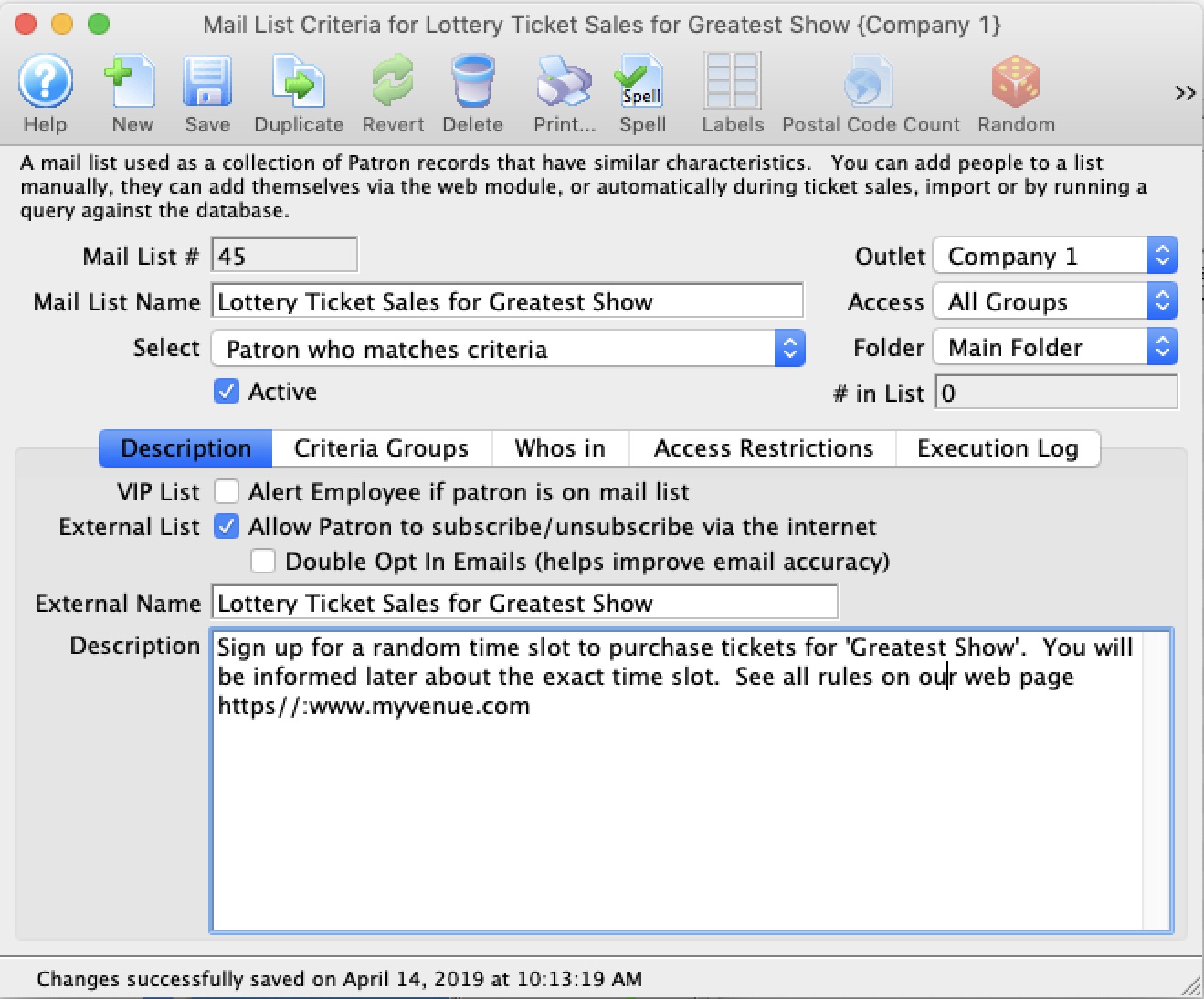
You will need to make a mail list that lets patrons to add or remove themselves online.
- Give it an external name of Lottery Sales sign up for 'the event' or what ever seems obvious to the patrons.
- The description should describe the purpose of the list, when the date range of the actual onsales occur and a link to your marketing page that describes how the lottery system will work and that not everybody is guaranteed a spot, but that it is random
- Make sure the mail list is double opt-in which will ensure that the email addresses are real since the patron needs to confirm it (it prevents people creating dummy emails).
- Refer to the instructions to make a mail list patrons can self subscribe to
- If patrons call the box office to be part of the lottery, you can manually add them to this list, just make sure you:
- Make sure that they have an email address on their account
- If you have to add an email address for the patron, use the reset password feature to send them an email to indicate its better to make a password right away (i.e. well before before the onsale)
- Merge any duplicate records together for the patron that may exist
Step 2: Send an email to patrons asking them to sign up
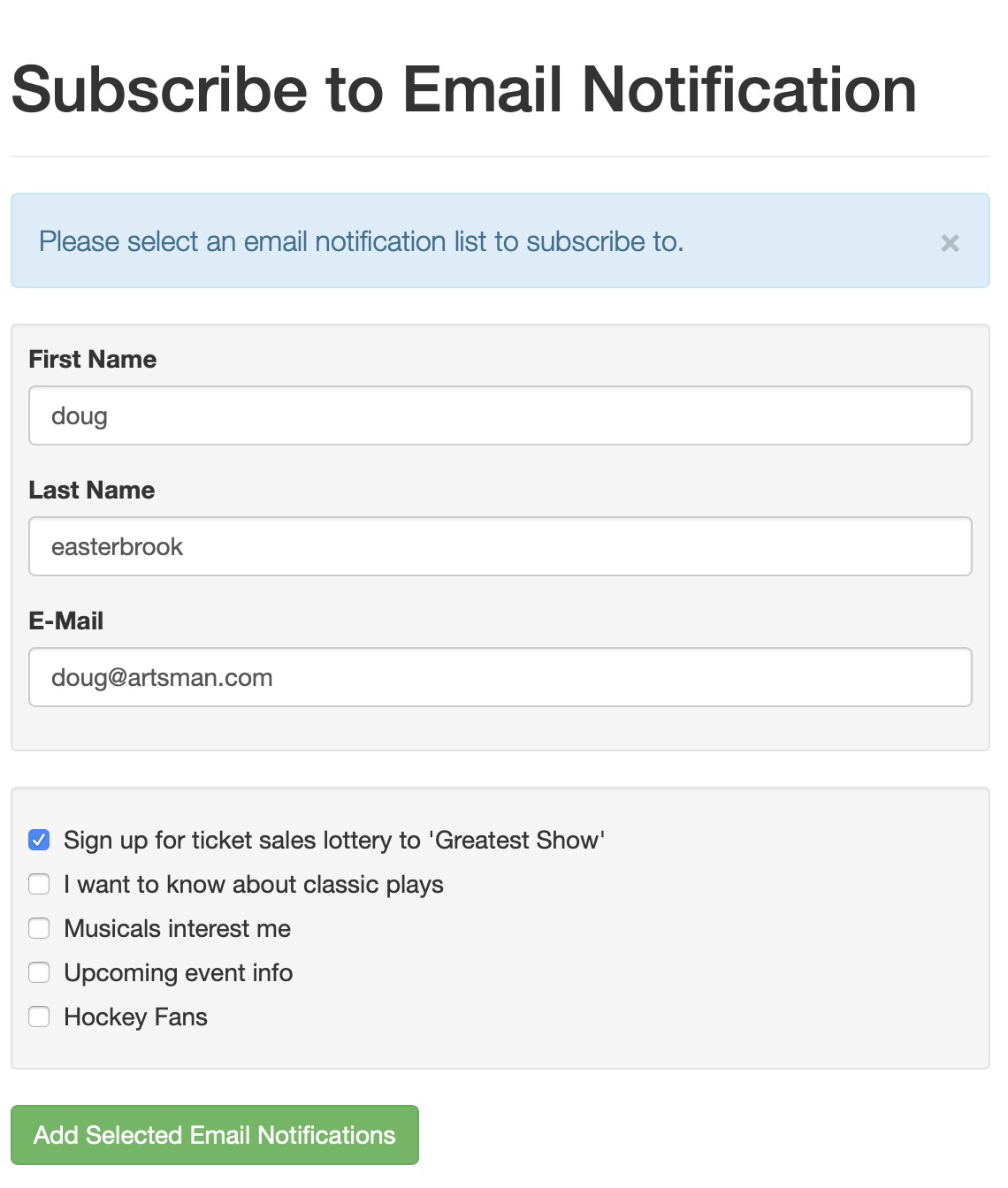
You can use the form letter feature to send an email to patrons asking that they sign up to the lottery mail list. You will need to:
- Make a mail list of patrons you want to send the form letter email to
- Create a form letter inviting them to join the lottery for the tickets:
- Include in the content of the form letter, a link to quick add the patron to a mail list. It might look like one of the two options below:
- https://tickets.yourvenue.com/TheatreManager /1/login?maillistquickadd=0 to take people to an email option to quickly sign up and which makes partial patrons for new email addresses -or-
- https://tickets.yourvenue.com/TheatreManager /1/online?btnMailList which has people sign in and then they can manage all their mail lists
Step 3: De-duplicate and merge people
Now that you've collected a lot of people in to the 'Lottery' mail list, you may still need to de-duplicate entries before the actual onsale. Why is that? One of the tenets of mail lists is that patrons can only be in the list once. Very true, but if a patron signed up multiple times using different email addresses, you may want to do some merging by:
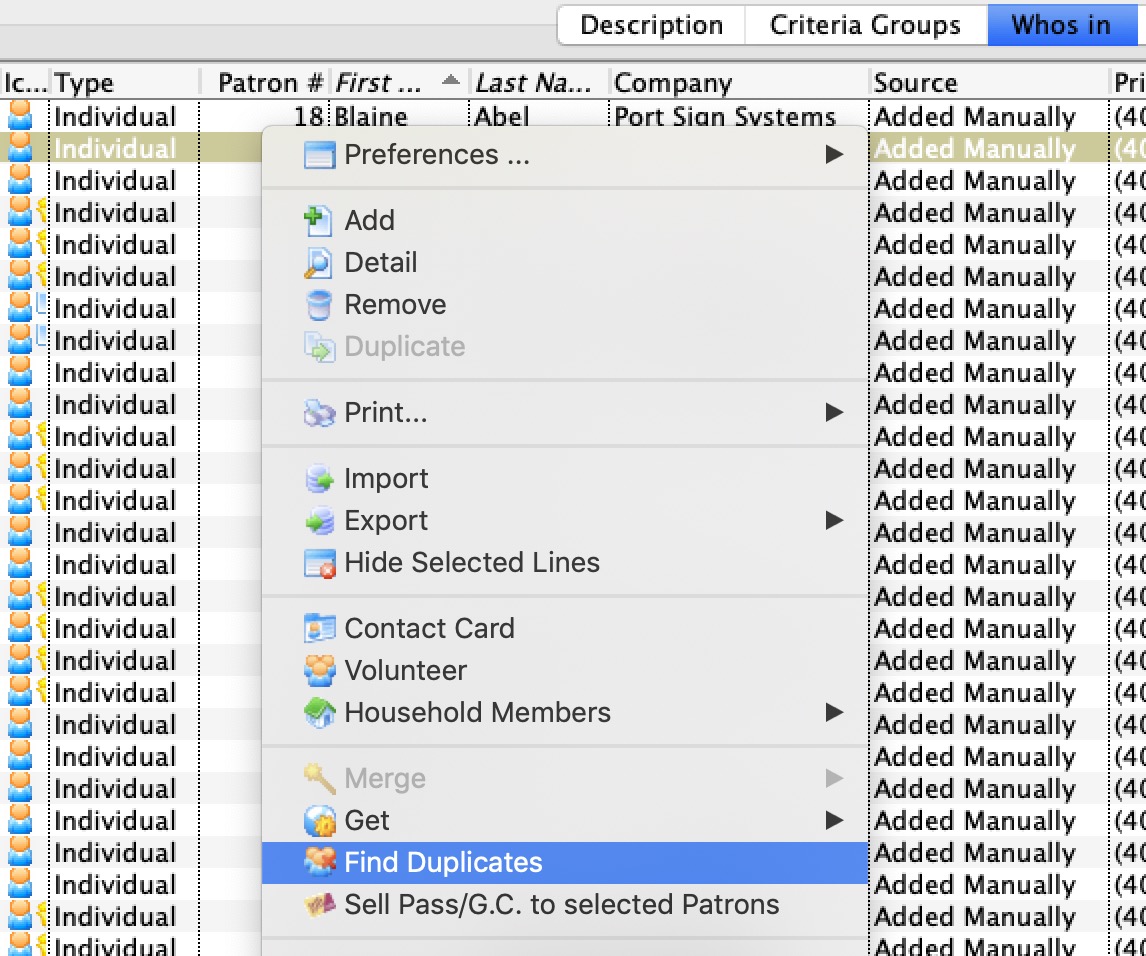
- Open the 'lottery' mail list
- Go to the Whos in tab
- Right click on the list to see the context menu and pick find duplicates
- This will limit the search for duplicates to people within the list. Try a few broad brush searches like:
- Combined name
- Last Name and First Name
- Name and phone number
- You may also want to sort the list by various fields and see if you can identify and merge duplicates that way. eg:
- Sort by phone and see what you can find
- Or sort by email
Step 4: Randomize the mail list
As the date of the lottery nears, you need to look at:
- the total number of people in the list,
- the number of available tickets,
- and match to approximate load that your servers can manage
- The first randomization is used to extract approximately 10,000 out of 90,000, or 12% of the patrons into a new mail list to identify the people who you are eligible for ticket sales by lottery (option 2 in the randomization image to the right)
- The second randomization will take the new list and break it into 10 more or less equal groups of people in 10 new mail lists. It is these last 10 mail lists that we'll use for emailing and coupons in the next steps (option 1 in the randomization image to the right)
Step 5: Make Pre-access Coupons
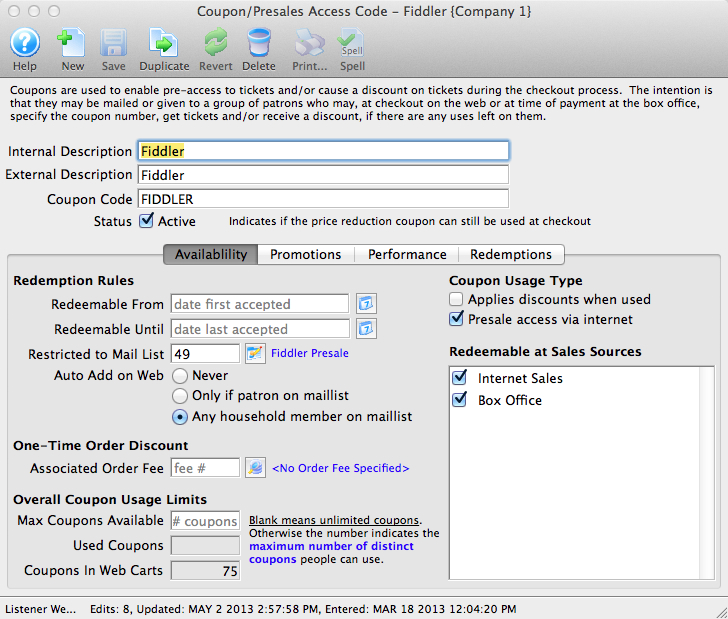
Per the example above, if we have 10 lottery sales groups, then we will need to make 10 preaccess coupons with the following characteristics:
- Internal Descriptions might be 'Lottery Group 1' through 'Lottery Group 10'
- Internal Description is displayed to the patron on the shopping cart and should be simply something like 'Pre Sales access to the Greatest Event time xx:xx to yy:yy'
- Make each one restricted to ONE OF the final 10 random lists created in step 4
- Set the coupon to be Auto Add in Web and for Any household member
- Make the coupon usage type Presales access via internet
- For the Redeemable From and Redeemable to dates, set up distinct sales times on each coupon such as
- Monday 10:00am to noon
- Monday noon to 2:00pm
- Monday 2:00pm to 4:00pm
- Tuesday 10:00am to noon
- etc.
Make the time periods suitable to how your patrons buy online, although for an onsale like this, they will probably just come to your web site.
- In the Performance tab, select the performances that the lottery presales are for
- In the Notes tab, you can create html links that will show the event as a convenience for the patron. Contact ArtsMan support and we can help with the link and button names. These will appear on the cart window as an aid to the Patron
Step 6: Create auto release holds
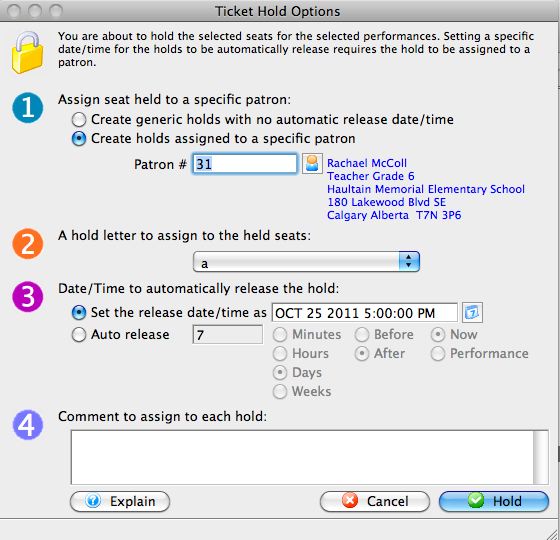
This step can be done at any time but needs to be ready before the onsale. The idea is to select and hold an equal proportion of tickets for the performance and auto release them at the same time just prior to the onsales time slot - eg. a couple of minutes or so. To do this:
- Go to the Maps Tab for the event that you are going to sell
- If there are 10 onsales slots, you want to:
- hold 10% of the tickets in each performance
- for a specific patron - you may want to make a specific before-event-sales patron for this onsale that you can merge into the standard before-event-sales patron later
- and coordinate the release time to match the coupon access time in step 5 above
|
At this point, the Lottery is set up. You have:
|
Step 7: Inform each patron of their lottery time
This uses Theatre Manager's Eblast capability to merge and send a letter to each of the winning lottery participants informing them of their time slot.
- Create a different form letter for each of the winning lottery groups
- Put the access time range for that lottery group into the letter
- Into the letter, add a
- direct link to the event if you are selling one event and to multiple performances
- direct link to a performance if you are only selling to one performance for the onsale
- direct link with seats selected where you might automatically pick the maximum number of seats allowed (not necessarily beside each other) and you are using pick your own. Then the patron need only remove some seats and pick their price.
- Eblast that letter to the patrons that won
Step 8: Inform those Patrons that did not win the lottery to buy tickets
You'll also need to create a mail list of those that did not win in the lottery to let them know that they mighrt get some singles after the onsale is over
- Create a letter to send to the patrons that did not win.
- Make another mail list of all people in that applied and remove those that won
- eblast those in this final mail list of people not selected