Ticket Printing, Invoicing and Ticket Analysis
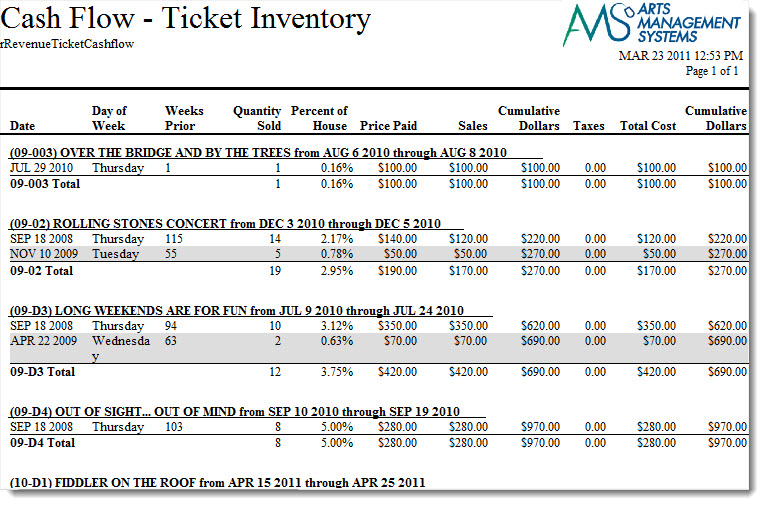
Cash Flow - Ticket Inventory Analysis
Cash Flow - Ticket Inventory Analysis
- Day
- Week
- Month
- ... or some custom sort and sub totals that you prefer for yourself
**in its current state means that when the report is run on your sold inventory, it can only consider the sold tickets as of right now. An ticket that was sold and refunded will not appear in the report. Any ticket that is sold, refunded and then sold again will have the most recent sale date on it. If you need to see the sales progress with the ebb and flow of sales and refunds, you will need to look at the daily sales summary reports or the transaction based reports.
Click for more information on
Purpose of the Report
This report generates a listing of the sales for each event and performance.
Departments Who Benefit From This Report
| Box Office | Use this report to see how much money will be received from a particular performance or event. |
| Accounting | Use this report to see how much money will be received from a particular performance or event. |
| General Manager | Use this report to see how much money will be received from a particular performance or event. |
Criteria Hints
It is recommended that this report be run with a specific event or events as the criteria.
| Parameter Field | Condition | Value |
| Event # | is one of | (Event) |
Use the SHIFT key to select a series of events, or the OPTION key (Mac) or CTRL key (Windows) to select multiple individual events.
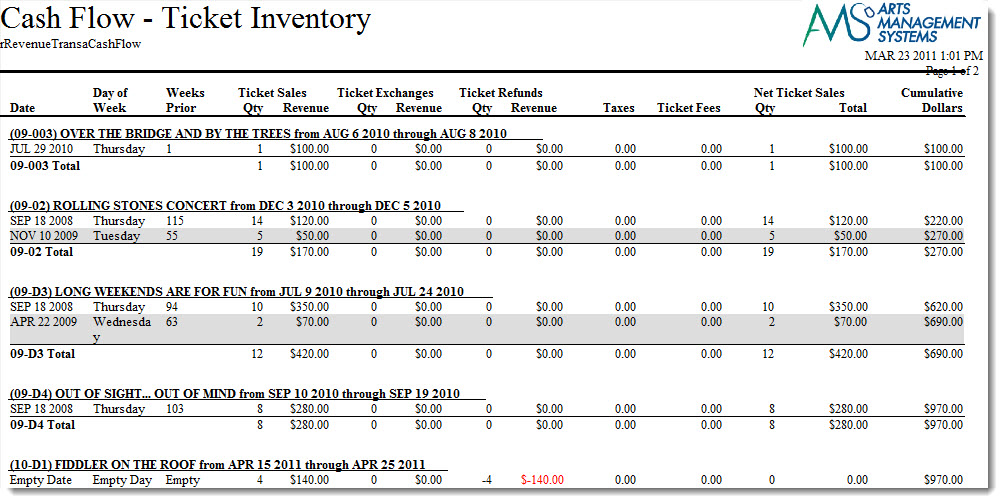
Cash Flow - Transaction Analysis
Cash Flow - Transaction Analysis
The Cash Flow - Transaction Analysis report can be found under the Ticket Printing, Invoicing and Inventory Analysis category. This report has additional criteria options. Click for more information about:
Purpose of the Report
This report generates a listing of the sales, exchanges, and refunds for each event and performance.
Departments Who Benefit From This Report
| Box Office | Use this report to see how much money will be received from a particular performance or event. |
| Accounting | Use this report to see how much money will be received from a particular performance or event. |
| General Manager | Use this report to see how much money will be received from a particular performance or event. |
Criteria Hints
It is recommended that this report be run with a specific event or events as the criteria.
| Parameter Field | Condition | Value |
| Event # | is one of | (Event) |
Use the SHIFT key to select a series of events, or the OPTION key (Mac) or CTRL key (Windows) to select multiple individual events.
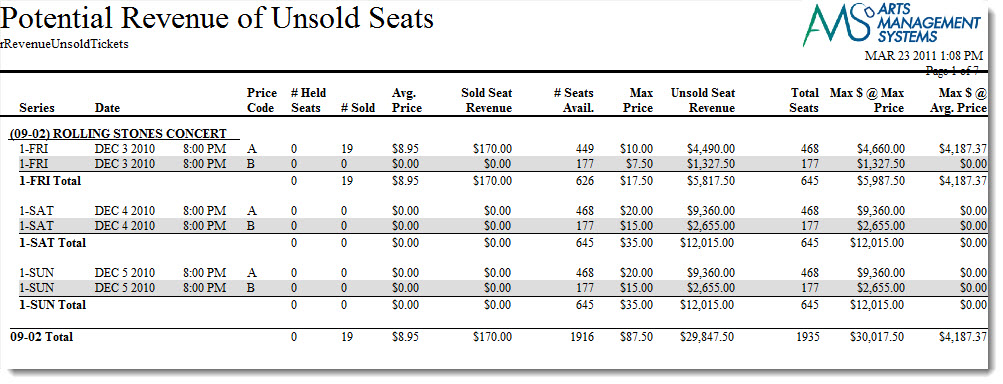
Potential Revenue From Unsold Tickets
Potential Revenue From Unsold Tickets
The Potential Revenue From Unsold Tickets report can be found under the Ticket Printing, Invoicing and Inventory Analysis category. This report has additional criteria options. Click for more information about:
Purpose of the Report
This report generates a listing of the potential revenue based on the price code structure and the number of seats available.
 |
In all cases, you will need to factor in your expected sales percentage. For example, if you typically only sell 80% of a house, then multiply any of the revenue figures in the report by 80% to determine expected revenue or attendance.
If you know this event will be sold out, then you can use the figures as printed. |
The meaning of the columns are:
| Price Code |
This is the price code for the section of the venue representing the base price. Most venues have one price code per section. Some have two that may represent base pice regular priced tickets and base price for subscriptions.
If there are multiple price codes for a seat, then the one with the highest base price is used (since it represents the highest possible sale price) and any price code with a lower base price is ignored (since the projected price wold be lower). This report helps predict best if your pricing is based on fewer price codes and more promotions to discount tickets in a section. |
| # Held Seats | This count indicates the number of seats that are marked as 'held' in that pricing zone. |
| # Sold | This count indicates the number of seats that are already sold in this pricing zone. Sold seats help determine the average price that people are willing to pay to sit in that section. And since they are sold, already dictate the maximum revenue for those specific seats. |
| Average Price |
The average price is the total sold seat revenue (see next column) for the event in that section divided by the number of seats sold. The average price is used as one of the predictors for maximum revenue.
Traditionally, subscriptions are sold first. That lowers the average revenue. Then single tickets come on sale which starts to nudge the average revenue upwards (over the sales cycle). |
| Sold Seat Revenue | Sold Seat Revenue is the total revenue for the seats sold so far for all promotions/discounts. |
| # Seats Available | The seats available are the number of seats in that price code/section that can still be sold. These seats are the foundation onto calculating the maximum possible revenue. |
| Max Price | The Maximum price is the highest possible price that can be paid for seats in that price zone. |
| Unsold Seat Revenue | This is the number of unsold seats times the highest base price that the seat can be sold for. It represents the maximum that you revenue that you can get if you sold all remaining seats at this maximum price. |
| Total Seats | Total seats is number of seats that cold used this price code (including current solds and helds). For a performance, the total should be the same as the number of seats in the venue. |
| Max $ at Max Price |
Maximum $ at max price is calculated as:
Current sold seat revenue + all remaining seats sold at maximum price. you will likely never reach this revenue total unless:
|
| Max $ at Average Price |
Current sold seat revenue + all remaining seats sold at the average price.
As the sales cycle progresses more tickets are sold, this becomes the most likely predictor of future revenue. |
Departments Who Benefit From This Report
| Box Office | Use this report to see how much money can be earned for a performance and is still to be earned. |
| Accounting | Use this report to see how much money can be earned for a performance and is still to be earned. |
| General Manager | Use this report to see how much money can be earned for a performance and is still to be earned. |
Criteria Hints
It is highly recommended that this report be run with a specific event or events as the criteria.
| Parameter Field | Condition | Value |
| Event # | is one of | (Event) |
Use the SHIFT key to select a series of events, or the OPTION key (Mac) or CTRL key (Windows) to select multiple individual events.
Print Invoices
Print Invoices
|
When you print multiple orders for the same patron, they will appear on a single invoice if they have the same billing and shipping addresses.
However, it there are two different billing or shipping addresses, they will create two separate invoices. |

Click here for information on generating a report. Click here for information on the Finished Report window.
Purpose of the Report
This report generates an invoice for each patron's account.
Departments Who Benefit From This Report
| Box Office | Use this report to generate invoices for all orders. |
Criteria Hints
It is recommended that this report be run with a specific order or orders as the criteria.
| Parameter Field | Condition | Value |
| Order # | between | (Order) and (Order) |
Printing Raffle Tickets
Printing Raffle Tickets
- Select the File >> Reports Menu or click the Reports Button in the main Theatre Manager toolbar / ribbon bar.
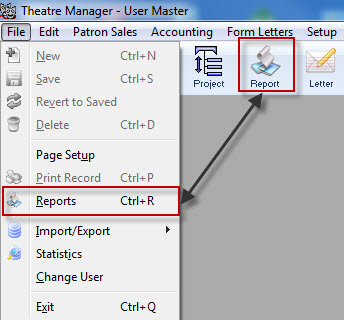
The Reports Window opens.
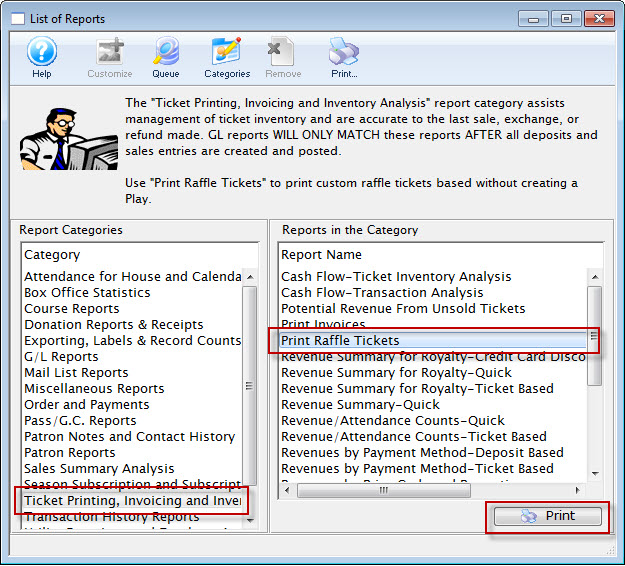
- Select Ticket Printing, Invoicing and Inventory Analysis Section and then Print Raffle Tickets Report.
- Click Print

The Parameters for Raffle Tickets Window opens.
- You must pick a ticket face that is based on tickets and has ticket information on it
- The ticket number that will print is the ticket number field on the ticket face
- Only the fields that are shown below will substitute on the ticket face. Any other specialized information must be hard coded on the ticket face
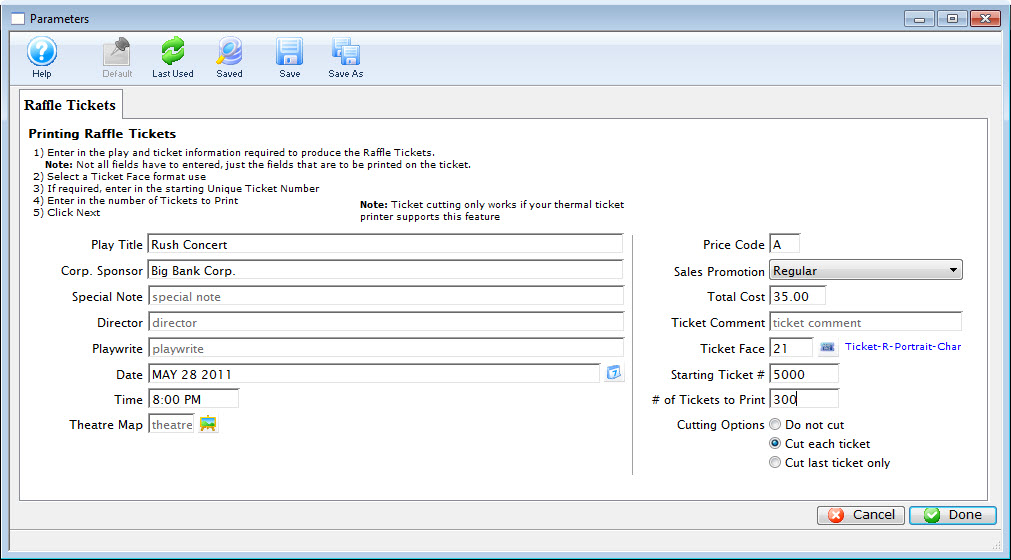
- Enter all of the applicable information.
- When complete, click the Done
 button.
- Confirm your Printer Setup,
Click Here for more information.
- Click OK/Print on your Printer setup Window.
The Raffle Tickets will be printed.
Promoter Revenue Audit
Promoter Revenue Audit
|
There is also an online version of this report that promoters can obtain for themselves if they are set up as a promoter for the event. |
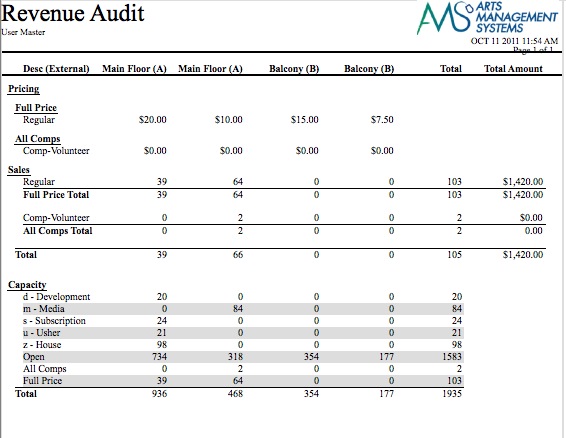
- Base Price - which shows that the highest price could be in a section.
- Sales - which shows what is sold by promotion and subtotalled by the sales grouping category on the sales promotion screen
- Capacity - which mixes the number of seats held, the open (unsold) seats, and repeats the subtotals from the sales section. The hold allocation for a section is automatically assigned to the highest price that can be found in a section for any night. For example, if a map has two possible bases prices for a seat -- and it is held, then Theatre Manager allocates the hole to the highest possible price code.
Note: A new section heading is generated across the top of the report in Theatre Manager for each unique price code, price, description and tax rate. That means if you are doing a report for an 8 day run, then you need to either:
- make sure that the base prices, price code description, and tax rate for each price code are the same for each performance if you want to generate one report for the entire run -or-
- generate the same report for each night -or-
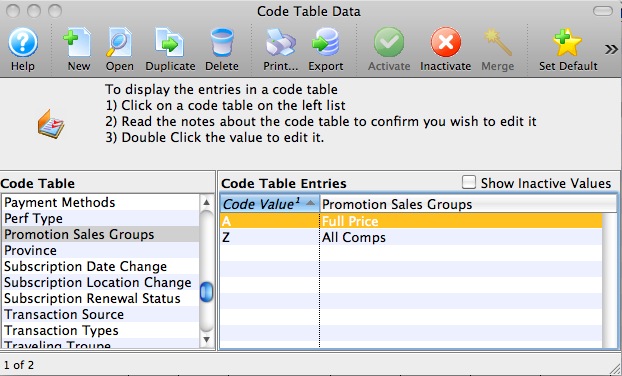
- if there are two prices in a section for any reason, explain why they are different or segregate them by sales group description on the promotion setup. For example, ADA requirement was that seats could be purchased in the wheelchair area in prices proportional to the number of seats in the venue for able bodied people. That means those seats could have multiple price codes. Similarly, you may have two base prices - one for regular and one for subscriptions. If the regular and subscription tickets are in a different report subtotal group then you will see the two sections across the top and the totals segregated down the side by sales group and promotion
The above indicates a sample report with 3 sections. In this sample:
- there are two different base prices in main floor and two in balcony (because it is a multi-night event with different weekday prices)
- there are two sales promotions because only regular and comp-volunteer tickets were sold
- and there are two subtotal sections in the sales area (carried into the capacity area) based on the sales promotions.
The subtotal groups are given a description in code tables as per the following picture
Revenue Summary - Quick
Revenue Summary - Quick
The Revenue Summary - Quick report can be found under the Ticket Printing, Invoicing and Inventory Analysis category. This report has additional criteria options. Click for more information about:
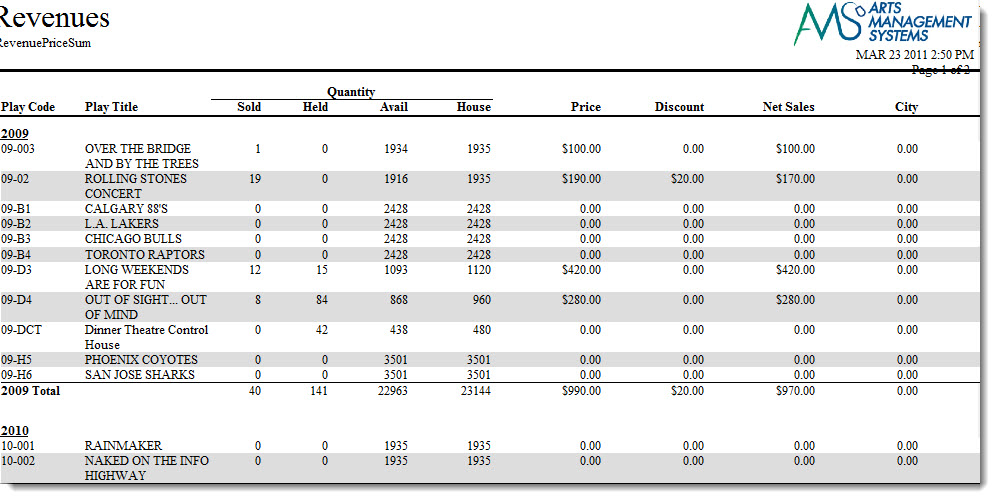
Purpose of the Report
This report generates a summary of the ticket sales for each performance of an event and the taxes and ticket fees associated.
Departments Who Benefit From This Report
| Box Office | Use this report for a quick way to view the total sales for each performance with extended information. |
| Accounting | Use this report for a quick way to view the total sales for each performance with extended information. |
Criteria Hints
It is recommended that this report be run with a specific event or events as the criteria.
| Parameter Field | Condition | Value |
| Event # | is one of | (Event) |
Use the SHIFT key to select a series of events, or the OPTION key (Mac) or CTRL key (Windows) to select multiple individual events.
Revenue Summary Reports - Parameters
Revenue Summary Reports - Parameters
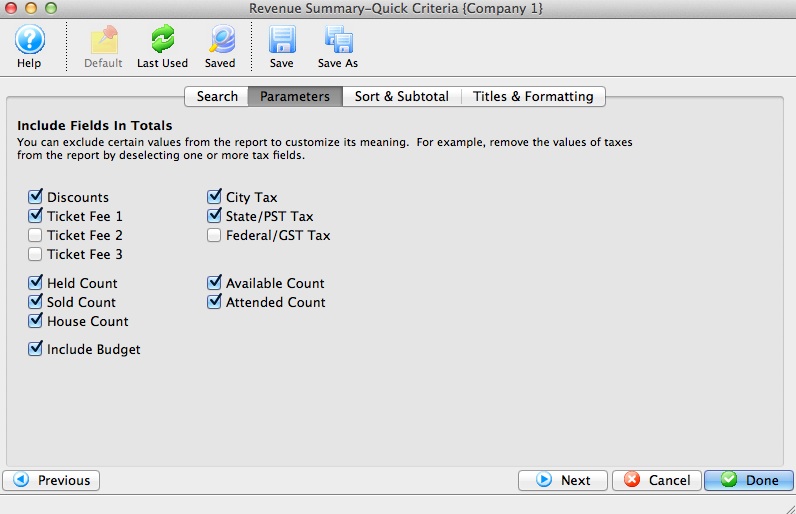
| Discounts | Includes Promotion Discounts in the report totals |
| Ticket Fee 1 through 3 | Includes Ticket Fee 1, 2, 3 in the report totals |
| Held Count | Includes the number of seats currently held for an event or performance in the report totals |
| Sold Count | Includes the number of seats currently sold for a performance in the report totals |
| House Count | Includes the reporting capacity of a performance in the report totals |
| Include Budget | Includes the sales target number setup on the Event Performance tab in the report totals |
| City Tax | Includes CITY tax in the report totals |
| State/PST Tax | Includes State/PST tax in the report totals |
| Federal/GST Tax | Includes Federal/GST tax in the report totals |
| Available Count | Includes the number of available seats in the performance in the report totals |
| Attended Count | Includes the number of patron who attend the performance in the report totals |
Revenue Summary for Royalties - Credit Card Discounts
Revenue Summary for Royalties - Credit Card Discounts
 |
The report may display Accounts Receivable. Receivables should be resolved or removed from the report to ensure correct totals. If Receivables are not removed they will be included in the totals and could result in over paying royalties. |
|
The revenues by payment method report provides similar information and shows the fee and tax breakdown. |

Purpose of the Report
This report generates a listing of the payment types used for an event and shows the credit card fees that were charged for payment.
Departments Who Benefit From This Report
| Box Office | Use this report to show how much money was charged in credit cards fees from the sales for an event. |
| Accounting | Use this report to show how much money was charged in credit cards fees from the sales for an event. |
Criteria Hints
It is recommended that this report be run with a specific event or events as the criteria.
| Parameter Field | Condition | Value |
| Event # | is one of | (Event) |
Use the SHIFT key to select a series of events, or the OPTION key (Mac) or CTRL key (Windows) to select multiple individual events.
Revenue Summary for Royalty - Quick
Revenue Summary for Royalty - Quick
The Revenue Summary for Royalty - Quick report can be found under the Ticket Printing, Invoicing and Inventory Analysis category. This report has additional criteria options. Click for more information about:
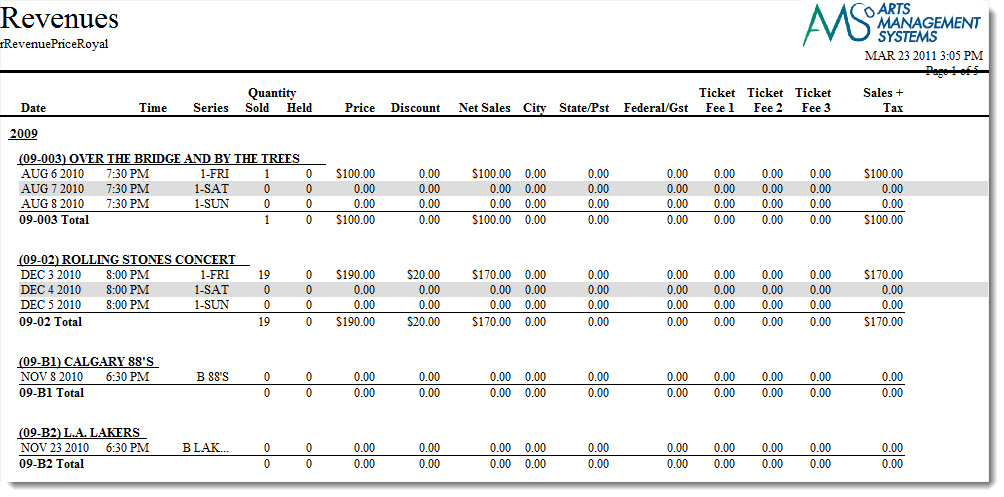
Purpose of the Report
This report generates a summary of the ticket sales for each performance of an event and the taxes and ticket fees associated.
Departments Who Benefit From This Report
| Box Office | Use this report for a quick way to view the total sales for each performance with extended information. |
| Accounting | Use this report for a quick way to view the total sales for each performance with extended information. |
Criteria Hints
It is recommended that this report be run with a specific event or events as the criteria.
| Parameter Field | Condition | Value |
| Event # | is one of | (Event) |
Use the SHIFT key to select a series of events, or the OPTION key (Mac) or CTRL key (Windows) to select multiple individual events.
Revenue Summary for Royalty - Ticket Based
Revenue Summary for Royalty - Ticket Based
The Revenue Summary for Royalty - Ticket Based report can be found under the Ticket Printing, Invoicing and Inventory Analysis category. This report has additional criteria options. Click for more information about:

Purpose of the Report
This report generates a summary of the ticket sales for an event by promotion type.
Departments Who Benefit From This Report
| Box Office | Use this report to see the total tickets sales for an event by promotion type. |
| Accounting | Use this report to see the total tickets sales for an event by promotion type. |
Criteria Hints
It is recommended that this report be run with a specific event as the criteria. The report will summarize multiple events.
| Parameter Field | Condition | Value |
| Event # | is one of | (Event) |
Revenue/Attendance Counts - Quick
Revenue/Attendance Counts - Quick
The Revenue/Attendance Counts - Quick report can be found under the Ticket Printing, Invoicing and Inventory Analysis category. This report has additional criteria options. Click for more information about:
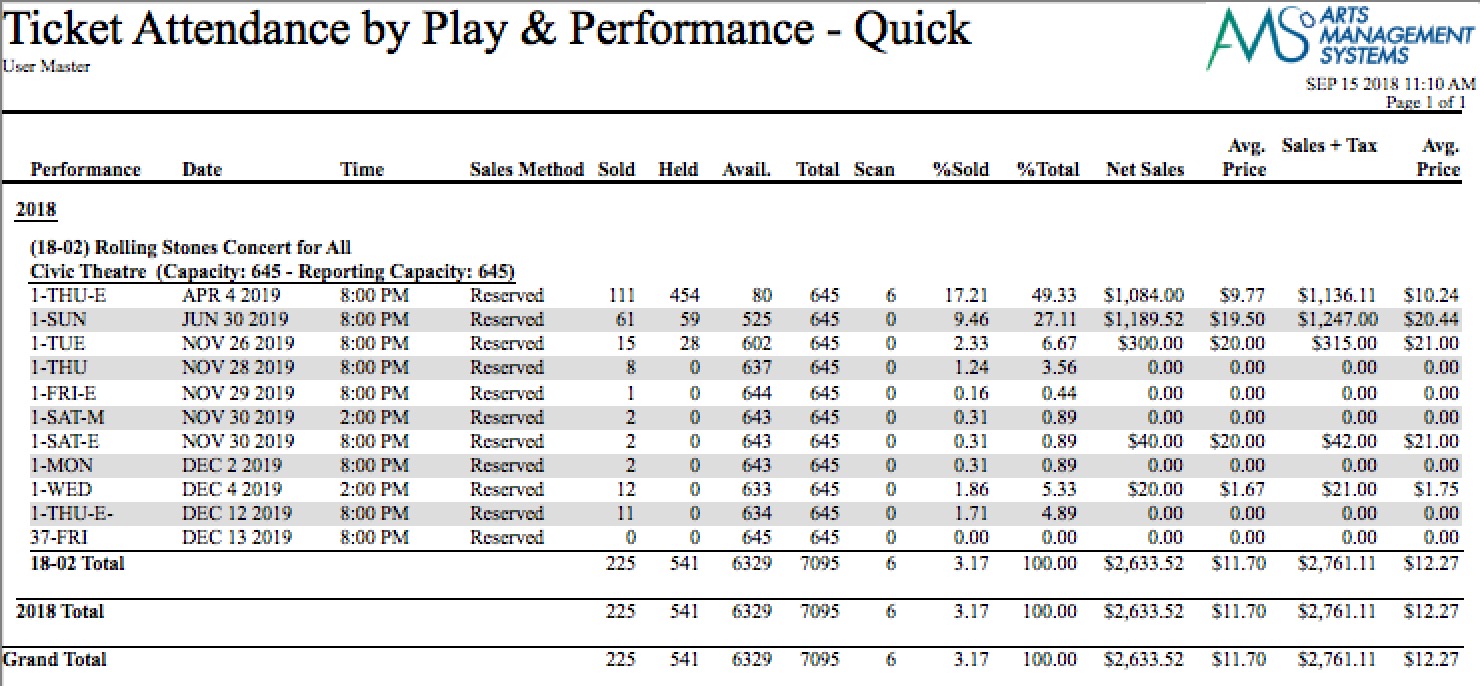
Purpose of the Report
This report generates a summary by performance of the attendance and revenue for the performance.
Departments Who Benefit From This Report
| Box Office | Use this report as a quick view of how sales are doing for each performance. |
| Accounting | Use this report as a quick view of how sales are doing for each performance. |
| Marketing | Use this report as a quick view of how sales are doing for each performance. |
Criteria Hints
It is recommended that this report be run with a specific event or events as the criteria.
| Parameter Field | Condition | Value |
| Event # | is one of | (Event) |
Use the SHIFT key to select a series of events, or the OPTION key (Mac) or CTRL key (Windows) to select multiple individual events.
Revenue/Attendance Counts - Ticket Based
Revenue/Attendance Counts - Ticket Based
The Revenue/Attendance Counts - Ticket Based report can be found under the Ticket Printing, Invoicing and Inventory Analysis category. This report has additional criteria options. Click for more information about:

Purpose of the Report
This report generates a summary by performance of the attendance and revenue for performances with tickets sold.
Departments Who Benefit From This Report
| Box Office | Use this report as a quick view of how sales are doing for each performance with tickets sold. |
| Accounting | Use this report as a quick view of how sales are doing for each performance with tickets sold. |
| Marketing | Use this report as a quick view of how sales are doing for each performance with tickets sold. |
Criteria Hints
It is recommended that this report be run with a specific event or events as the criteria.
| Parameter Field | Condition | Value |
| Event # | is one of | (Event) |
Use the SHIFT key to select a series of events, or the OPTION key (Mac) or CTRL key (Windows) to select multiple individual events.
Revenues by Payment Method - Deposit Based
Revenues by Payment Method - Deposit Based
The Revenues by Payment Method - Deposit Based report can be found under the Ticket Printing, Invoicing and Inventory Analysis category. This report has additional criteria options. Click for more information about:

Purpose of the Report
This report generates a summary by payment method of the ticket sales for each performance with money that has been deposited.
Departments Who Benefit From This Report
| Box Office | Use this report to see the ticket sales for performances by payment method. |
| Accounting | Use this report to see the ticket sales for performances by payment method. |
Criteria Hints
It is recommended that this report be run with a specific event or events as the criteria.
| Parameter Field | Condition | Value |
| Event # | is one of | (Event) |
Use the SHIFT key to select a series of events, or the OPTION key (Mac) or CTRL key (Windows) to select multiple individual events.
Revenues by Payment Method - Ticket Based
Revenues by Payment Method - Ticket Based
The Revenues by Payment Method - Ticket Based report can be found under the Ticket Printing, Invoicing and Inventory Analysis category. This report has additional criteria options. Click for more information about:
|
This report does an allocation of payment methods to tickets. It should not be used for accounting purposes - read the link for an explanation |
|
You can include receivables for events on the report which will show totals compatible with the Event A/R tab and other inventory reports..
Excluding receivable for the event will report lower sales to the event for the purposes of this report. Some promoters prefer to only see fully paid for tickets. |
|
The Royalty Report may be another useful report to determine credit card discounts for charging renters or discounting royalties. |

Purpose of the Report
This report generates a summary by payment method of the ticket sales for each performance.
Departments Who Benefit From This Report
| Box Office | Use this report to see the ticket sales for performances by payment method. |
| Accounting | Use this report to see the ticket sales for performances by payment method. |
Criteria Hints
It is recommended that this report be run with a specific event or events as the criteria.
| Parameter Field | Condition | Value |
| Event # | is one of | (Event) |
Use the SHIFT key to select a series of events, or the OPTION key (Mac) or CTRL key (Windows) to select multiple individual events.
Revenues by Price Code and Promotion
Revenues by Price Code and Promotion
The Revenues by Price Code and Promotion report can be found under the Ticket Printing, Invoicing and Inventory Analysis category. This report has additional criteria options. Click for more information about:

Purpose of the Report
This report generates a summary of each promotion used extended across price codes for a performance.
Departments Who Benefit From This Report
| Box Office | Use this report to see the how money was split between promotions and price codes for a performance. |
| General Manager | Use this report to see the how money was split between promotions and price codes for a performance. |
Criteria Hints
It is recommended that this report be run with a specific event or events as the criteria.
| Parameter Field | Condition | Value |
| Event # | is one of | (Event) |
Use the SHIFT key to select a series of events, or the OPTION key (Mac) or CTRL key (Windows) to select multiple individual events.
Revenues by Promotion (Average Ticket Price)
Revenues by Promotion (Average Ticket Price)
The Revenues by Promotion (Average Ticket Price) report can be found under the Ticket Printing, Invoicing and Inventory Analysis category. This report has additional criteria options. Click for more information about:

Purpose of the Report
This report generates a summary by promotion for each performance and also calculates the average ticket price based on that promotion.
Departments Who Benefit From This Report
| Box Office | Use this report to see the average price per ticket based on a promotion. |
Criteria Hints
It is recommended that this report be run with a specific event or events as the criteria.
| Parameter Field | Condition | Value |
| Event # | is one of | (Event)> |
Use the SHIFT key to select a series of events, or the OPTION key (Mac) or CTRL key (Windows) to select multiple individual events.
Revenues by Promotion (Detailed Breakdown)
Revenues by Promotion (Detailed Breakdown)
The Revenues by Promotion (Detailed Breakdown) report can be found under the Ticket Printing, Invoicing and Inventory Analysis category. This report has additional criteria options. Click for more information about:

Purpose of the Report
This report generates a summary by promotion for each performance and shows detailed information.
Departments Who Benefit From This Report
| Box Office | Use this report to see detailed information about each promotion used for a performance. |
Criteria Hints
It is recommended that this report be run with a specific event or events as the criteria.
| Parameter Field | Condition | Value |
| Event # | is one of | (Event) |
Use the SHIFT key to select a series of events, or the OPTION key (Mac) or CTRL key (Windows) to select multiple individual events.
Ticket Held Seat Detail
Ticket Held Seat Detail
The Ticket Held Seat Detail report can be found under the Ticket Printing, Invoicing and Inventory Analysis category. This report has additional criteria options. Click for more information about:

Purpose of the Report
This report generates a listing of all seats held for an event.
Departments Who Benefit From This Report
| Box Office | Use this report to view and verify held seats for an event. It will also show seats that have been held for a patron. |
Criteria Hints
It is recommended that this report be run with a specific event as the criteria. The report will summarize multiple events.
| Parameter Field | Condition | Value |
| Event # | is one of | (Event) |
Tips and Tricks
Perhaps you want to find the seats that just have one code letter, in this example f.
- In the Edit Report Parameters, chose Ticket Data for Patron >> Ticket Price Code.

The key is in the Condition you select. Between or Equal searches always capitalize, however CONTAIN does not.
- Choose the condition Contain, and enter f. Click Save.
- Run the Report.

Ticket Hold Counts - Quick
Ticket Hold Counts - Quick
The Ticket Hold Counts - Quick report can be found under the Ticket Printing, Invoicing and Inventory Analysis category. This report has additional criteria options. Click here for more information about the Hold Code Options tab. Click for more information about:

Purpose of the Report
This report generates a summary of the held seats for each performance along with the number in each hold code.
Departments Who Benefit From This Report
| Box Office | Use this report to view and verify held seats for an event. |
Criteria Hints
It is recommended that this report be run with a specific event or group of events as the criteria.
| Parameter Field | Condition | Value |
| Event # | is one of | (Event) |
Use the SHIFT key to select a series of events, or the OPTION key (Mac) or CTRL key (Windows) to select multiple individual events.
Tickets Sold by Price Code
Tickets Sold by Price Code
The Tickets Sold by Price Code report can be found under the Ticket Printing, Invoicing and Inventory Analysis category. This report has additional criteria options. Click here for more information about the Price Code Options tab. Click for more information about:
- Generating a report
- Finished Report window
- Price Code Options tab
- Sort & Subtotal tab
- Formatting tab

Purpose of the Report
This report generates a summary of the tickets sold for each performance and to which price codes.
Departments Who Benefit From This Report
| Box Office | Use this report to see an overview of the price codes used for ticket sales to a performance. |
Criteria Hints
It is recommended that this report be run with a specific event or group of events as the criteria.
| Parameter Field | Condition | Value |
| Event # | is one of | (Event) |
Use the SHIFT key to select a series of events, or the OPTION key (Mac) or CTRL key (Windows) to select multiple individual events.
Tickets Sold by Price Code and Promotion
Tickets Sold by Price Code and Promotion
The Tickets Sold by Price Code and Promotion report can be found under the Ticket Printing, Invoicing and Inventory Analysis category. This report has additional criteria options. Click here for more information about the Price Code Options tab. Click for more information about:
- Generating a report
- Finished Report window
- Price Code Options tab
- Sort & Subtotal tab
- Formatting tab

Purpose of the Report
This report generates a summary of the tickets sold for each performance and to which promotions and price codes.
Departments Who Benefit From This Report
| Box Office | Use this report to see an overview of the promotions and price codes used for ticket sales to a performance. |
Criteria Hints
It is recommended that this report be run with a specific event or group of events as the criteria.
| Parameter Field | Condition | Value |
| Event # | is one of | (Event) |
Use the SHIFT key to select a series of events, or the OPTION key (Mac) or CTRL key (Windows) to select multiple individual events.
Tickets Sold/Revenue by Why Did Patron Buy?
Tickets Sold/Revenue by Why Did Patron Buy?
This report has additional criteria options. Click for more information about:
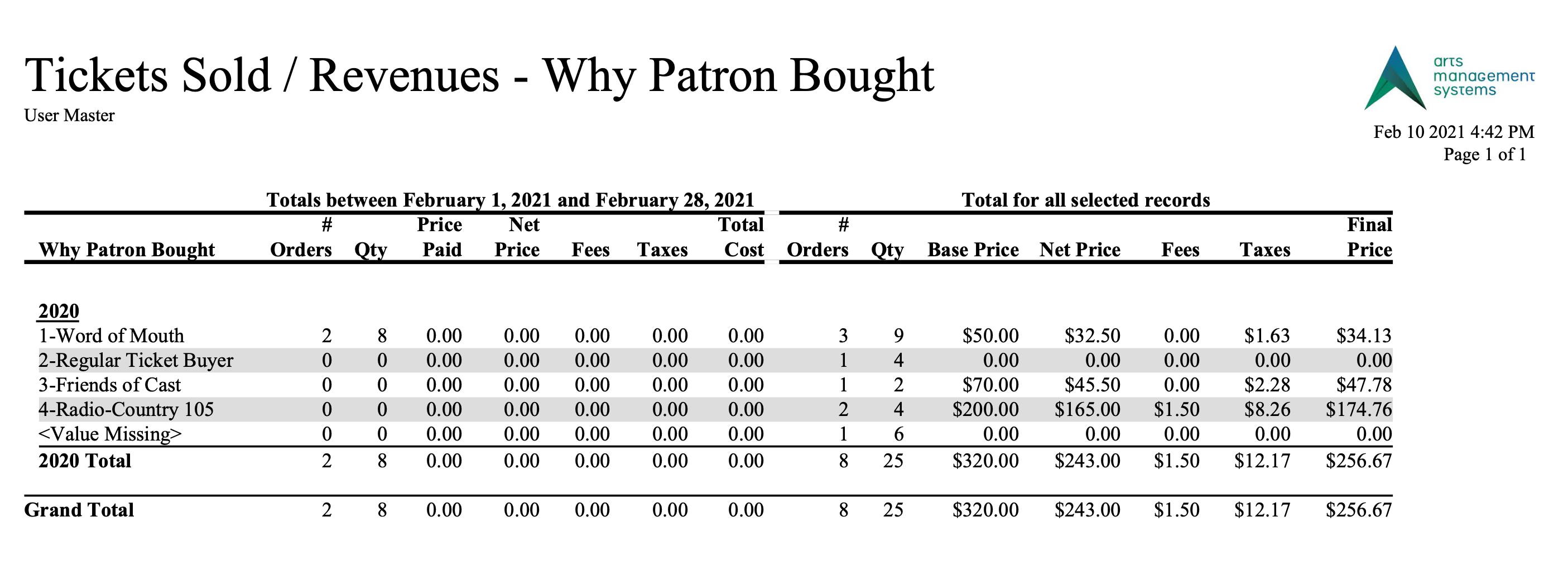
Purpose of the Report
This report generates a summary of the tickets and revenue earned by the Why Did Patron Buy? field. It shows both the daily sales and total sales.
Departments Who Benefit From This Report
| Box Office | Use this report as an overview of the tickets sold and revenue earned by the Why Did Patron Buy? field. |
| Marketing | Use this report as an overview of the tickets sold and revenue earned by the Why Did Patron Buy? field. |
Criteria Hints
It is recommended that this report be run with a specific event or group of events as the criteria.
| Parameter Field | Condition | Value |
| Event # | is one of | (Event) |
Use the SHIFT key to select a series of events, or the OPTION key (Mac) or CTRL key (Windows) to select multiple individual events.
Tickets Sold/Revenues by Promotion & Price Code
Tickets Sold/Revenues by Promotion & Price Code
The Tickets Sold/Revenues by Promotion & Price Code report can be found under the Ticket Printing, Invoicing and Inventory Analysis category. This report has additional criteria options. Click for more information about:
- Generating a report
- Finished Report window
- Parameters tab
- Price Code Options tab
- Sort & Subtotal tab
- Formatting tab

Purpose of the Report
This report generates a summary of the tickets and revenue earned by promotion and price code.
Departments Who Benefit From This Report
| Box Office | Use this report as an overview of the tickets sold and revenue earned by promotion and price code. |
| Accounting | Use this report as an overview of the tickets sold and revenue earned by promotion and price code. |
| General Manager | Use this report as an overview of the tickets sold and revenue earned by promotion and price code. |
Criteria Hints
It is recommended that this report be run with a specific event or group of events as the criteria.
| Parameter Field | Condition | Value |
| Event # | is one of | (Event) |
Use the SHIFT key to select a series of events, or the OPTION key (Mac) or CTRL key (Windows) to select multiple individual events.