
Main menu
You are here
Parts of the Venue /Theatre List Window

The Venue List is accessed through the Setup >> Theatre / Venue
menu.
Alternatively you can click on the Venue button from the main Theatre Manager toolbar.
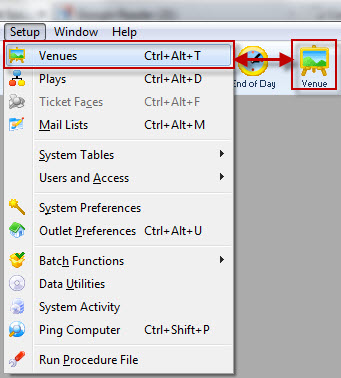
The Venue List window opens.
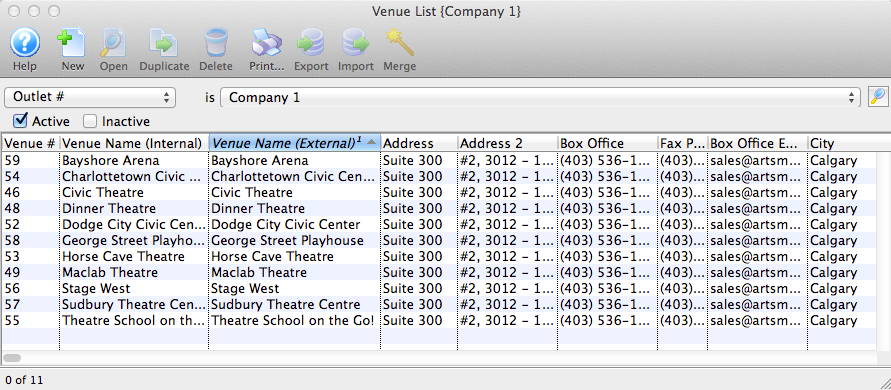
Parts of the Venue List Window
 |
Opens the Theatre Manager Online Help. |
 |
Creates a new Venue. For more information on creating new Venues, click here. |
 |
Opens the selected venue for editing. For more information on editing venues, click here. |
 |
Creates a copy of the selected venue. For more information on duplicating venues, click here. |
 |
Deletes the selected venues. Venues can only be deleted if their are no Pricing Maps attached and the maps have not been used to sell tickets. Click here For more information on Deleteing Venues.Click here For more information on Deleteing Venues. |
 |
Exports either the Venue List in text or Excel formats, or exports the map in .tmm format for importing to another Theatre Manager database. For more information on exporting maps, click here. |
 |
Imports a Venue from another Theatre Manager database. For instructions on importing venues, click here. |
 |
Allows you to merge two or venues together. This should be done if they occupy the same physical space. For instructions on Merging Venues, click here. |
| The fields listed below are the default columns listed for the Venue List window, but the columns can be changed to suit your needs. For more details on changing column preferences, click here. | |
| Map # | The unique number assigned to the venue for reference. |
| Venue Name (Internal) | Internal name of the venue. |
| Venue Name (External) | External name of the venue displayed online. |
| Capacity | Seating capacity for the map. |
| Price Codes | Letters and numbers assigned to the map for the pricing structure. |
| Plug-in | Plug-in assigned to the map. |
| Named? | Indicates whether or not the theatre seats have been named. |
| Outlet-Owner | Outlet responsible for the map. |
| Venue Time Zone | The actual time zone setting for the venue if it is specified. It will be ' |
| Time Zone | The time zone abbreviation for all events in the venue. |
Diataxis: