
Main menu
You are here
Comparing HTML Pages with BBedit (Free Edition)

On a Macintosh, you can use a tool like BBedit - Free Edition to compare two sets of web pages and move changes from one page to another. (Text Wrangler can do this comparison and its free, BBedit is a paid product from the same company).
 |
If you don't know which file to edit or compare, you can use various methods to find the file |
You can do a comparison on either:
- A subset of pages provided with each upgrade to identify the key differences, or
- you can compare your entire WebPages folder on the WebPages folder with the most recent folder supplied by Arts Management.
In either case, the approach is:
- Make a copy of your current WebPages folder on your TM web server and copy it to your computer.
By copying the pages, you can make changes to the web pages and test them in a test environment.
- Obtain the full set of web pages, or the subset that is part of the current release.
If you are jumping a few versions, you will need the web pages changes between the current version you are running and the latest release, or you can simply download a full copy of the latest web pages.
Use BBedit - free edition (or similar file comparison tool) to compare all files in a folder.
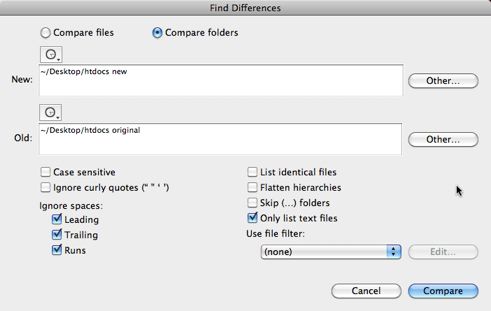
- Start BBedit and then go to Search->Find Differences.
In the find differences window that opens, put the names of the old and new WebPages folders as per the picture below and click Compare.
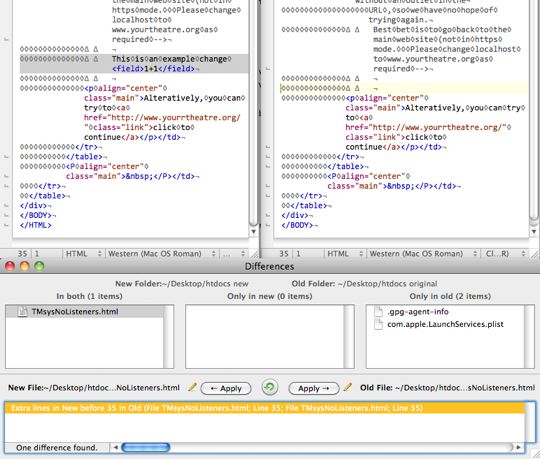
- Choose which changes should be merged into your web pages.
This shows you the list of files that are different (bottom left) and under that, the actual differences in the files. Clicking on any one difference will show you where in the file the differences are and you can apply them (or not) in either direction. Repeat this decision making for all files that are different.
- If there are new files, copy them into the corresponding folders.
- Finally test the changes by purchase online using the live web pages.