Transaction History Reports
Transaction History Reports
Transaction History - By Employee (Totals Only)
Transaction History - By Employee (Totals Only)
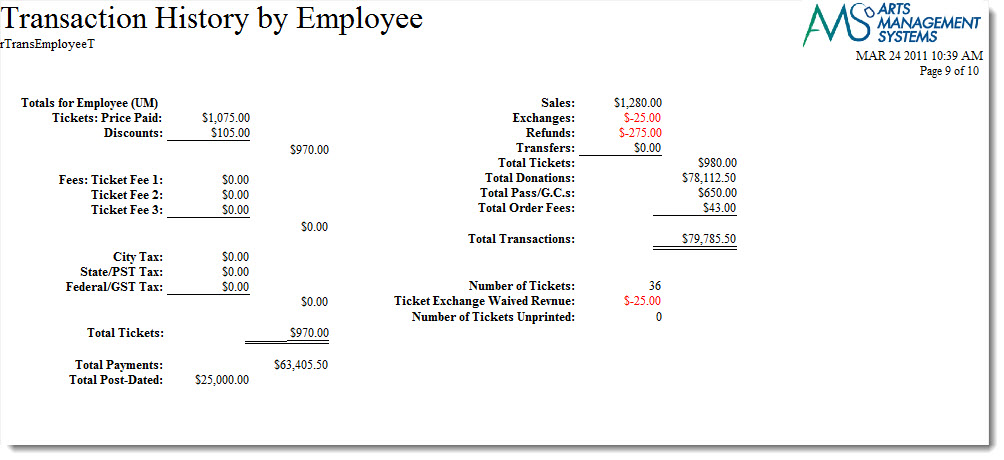
The Transaction History - By Employee (Totals Only) report can be found under the Transaction History Reports category. Below the image are detailed notes to help you in using the report.
Click here for information on generating a report. Click here for information on the Finished Report window.
Purpose of the Report
This report generates a summary of transactions that occurred in conjunction with an order by employee.
Departments Who Benefit From This Report
| Box Office | Use this report to review a summary of transactions by an employee for an order. |
Criteria Hints
It is recommended that this report be run with a date or date range as the criteria.
| Parameter Field | Condition | Value |
| G/L Header Date - Posted | between | (Date) and (Date) |
| Order Changed By | is one of | (Employee) |
Use the SHIFT key to select a series of employees, or the OPTION key (Mac) or CTRL key (Windows) to select multiple individual employees.
Transaction History - By Employee
Transaction History - By Employee
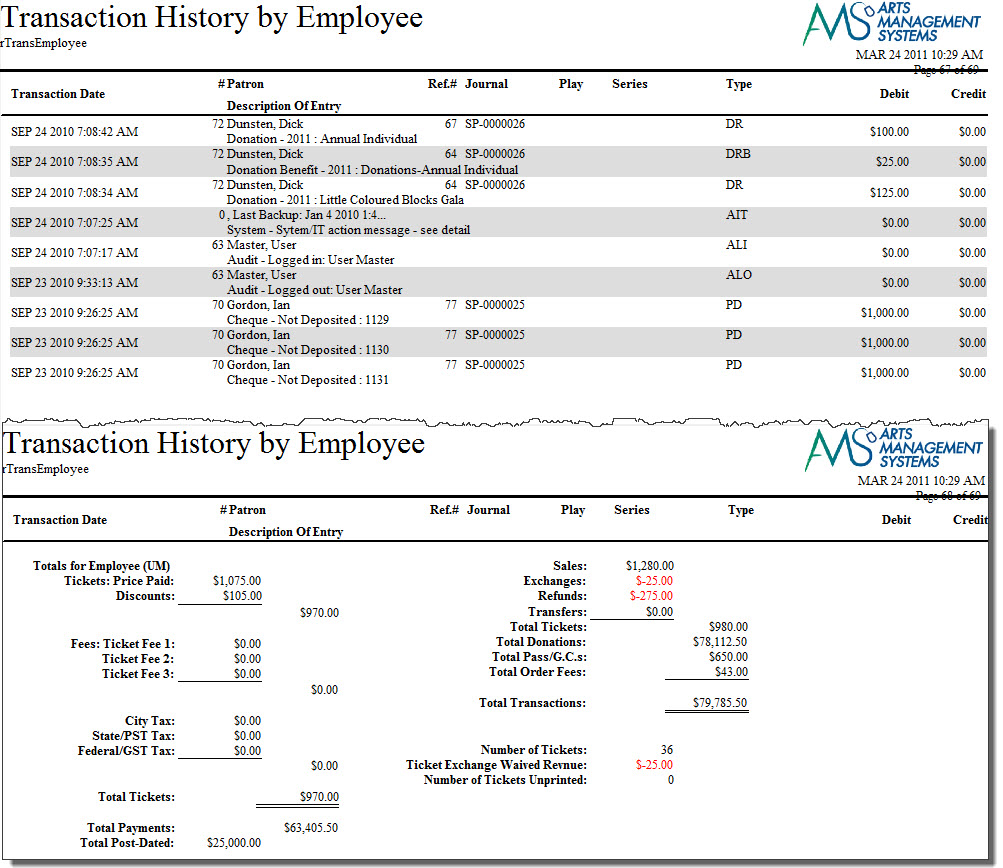
The Transaction History - By Employee report can be found under the Transaction History Reports category. This report has additional criteria options. Click here for more information about the Parameters tab. Click here for more information about the Sort & Subtotal tab. Click here for more information about the Formatting tab. Below the image are detailed notes to help you in using the report.
Click here for information on generating a report. Click here for information on the Finished Report window.
Purpose of the Report
This report generates a listing of transactions that occurred in conjunction with an order by employee.
Departments Who Benefit From This Report
| Box Office | Use this report to review transactions by an employee for an order. |
Criteria Hints
It is recommended that this report be run with a date or date range as the criteria.
| Parameter Field | Condition | Value |
| G/L Header Date - Posted | between | (Date) and (Date) |
| Order Changed By | is one of | (Employee) |
Use the SHIFT key to select a series of employees, or the OPTION key (Mac) or CTRL key (Windows) to select multiple individual employees.
Transaction History - By G/L Journal # (Totals Only)
Transaction History - By G/L Journal # (Totals Only)
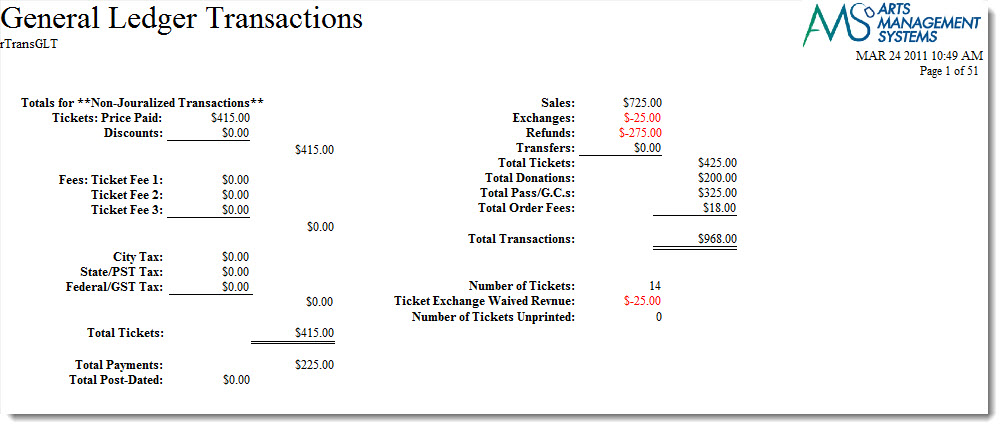
The Transaction History - By G/L Journal # (Totals Only) report can be found under the Transaction History Reports category. Below the image are detailed notes to help you in using the report.
Click here for information on generating a report. Click here for information on the Finished Report window.
Purpose of the Report
This report generates a summary of transactions that occurred in conjunction with the General Ledger.
Departments Who Benefit From This Report
| Box Office | Use this report to review a summary of transactions that occurred that affected the General Ledger. |
| Accounting | Use this report to review a summary of transactions that occurred that affected the General Ledger. |
Criteria Hints
It is recommended that this report be run with an account or range of accounts as the criteria.
| Parameter Field | Condition | Value |
| Account # | is one of | (Account) |
Use the SHIFT key to select a series of accounts, or the OPTION key (Mac) or CTRL key (Windows) to select multiple individual accounts.
Transaction History - By G/L Journal #
Transaction History - By G/L Journal #
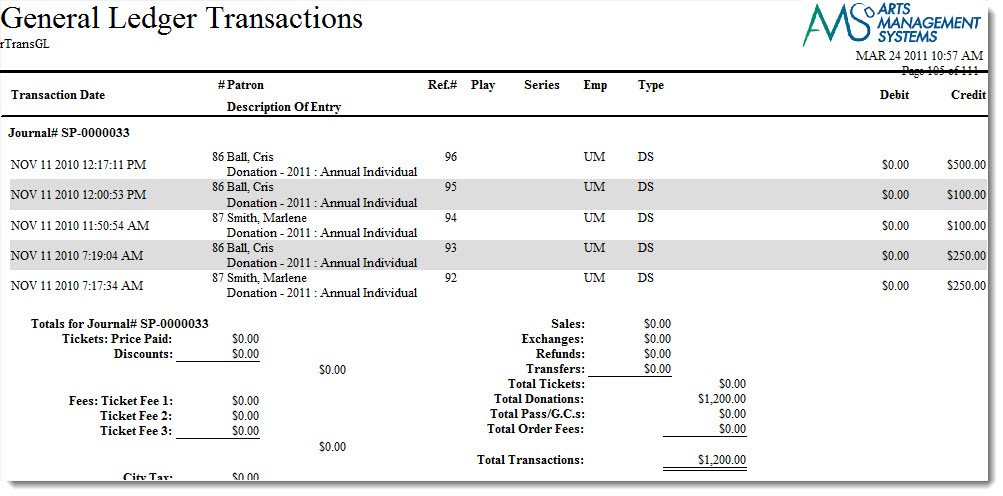
The Transaction History - By G/L Journal # report can be found under the Transaction History Reports category. This report has additional criteria options. Click here for more information about the Parameters tab. Click here for more information about the Sort & Subtotal tab. Click here for more information about the Formatting tab. Below the image are detailed notes to help you in using the report.
Click here for information on generating a report. Click here for information on the Finished Report window.
Purpose of the Report
This report generates a listing of transactions that occurred in conjunction with the General Ledger.
Departments Who Benefit From This Report
| Box Office | Use this report to review transactions that occurred that affected the General Ledger. |
| Accounting | Use this report to review transactions that occurred that affected the General Ledger. |
Criteria Hints
It is recommended that this report be run with an account or range of accounts as the criteria.
| Parameter Field | Condition | Value |
| Account # | is one of | (Account) |
Use the SHIFT key to select a series of accounts, or the OPTION key (Mac) or CTRL key (Windows) to select multiple individual accounts.
Transaction History - By Order (Totals Only)
Transaction History - By Order (Totals Only)
The Transaction History - By Patron (Totals Only) report can be found under the Transaction History Reports category. Below the image are detailed notes to help you in using the report.
Click here for information on generating a report. Click here for information on the Finished Report window.
Purpose of the Report
This report generates a listing of transactions that occurred by order.
Departments Who Benefit From This Report
| Accounting | Use this report to review transactions that occurred by order to track where sales, refunds, exchanges and transfers occur within an order |
Transaction History - By Order
Transaction History - By Order
The Transaction History - By Order report can be found under the Transaction History Reports category. This report has additional criteria options. Click here for more information about the Parameters tab. Click here for more information about the Sort & Subtotal tab. Click here for more information about the Formatting tab. Below the image are detailed notes to help you in using the report.
Click here for information on generating a report. Click here for information on the Finished Report window.
Purpose of the Report
This report generates a listing of transactions that occurred by order.
Departments Who Benefit From This Report
| Accounting | Use this report to review transactions that occurred by order to track where sales, refunds, exchanges and transfers occur within an order |
Transaction History - By Patron (Totals Only)
Transaction History - By Patron (Totals Only)
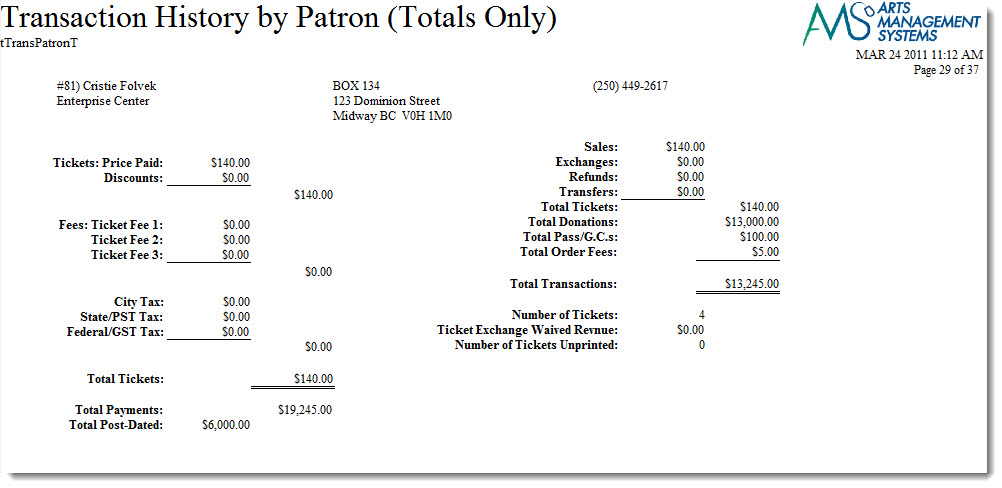
The Transaction History - By Patron (Totals Only) report can be found under the Transaction History Reports category. Below the image are detailed notes to help you in using the report.
Click here for information on generating a report. Click here for information on the Finished Report window.
Purpose of the Report
This report generates a summary of transactions that occurred by patron.
Departments Who Benefit From This Report
| Box Office | Use this report to review a summary of transactions that occurred by patron. |
Criteria Hints
It is recommended that this report be run with a patron or range of patrons as the criteria.
| Parameter Field | Condition | Value |
| Patron Name - Last | between | (Last Name) and (Last Name) |
Transaction History - By Patron
Transaction History - By Patron
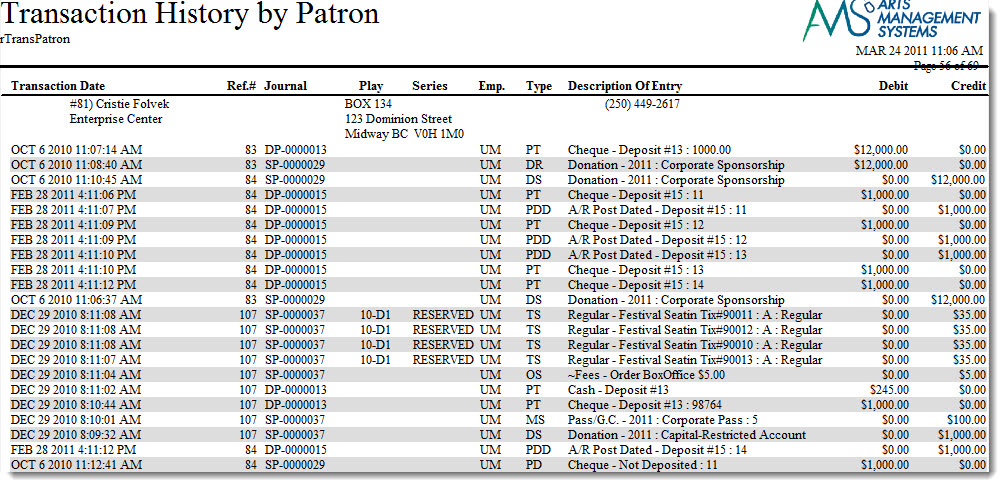
The Transaction History - By Patron report can be found under the Transaction History Reports category. This report has additional criteria options. Click here for more information about the Parameters tab. Click here for more information about the Sort & Subtotal tab. Click here for more information about the Formatting tab. Below the image are detailed notes to help you in using the report.
Click here for information on generating a report. Click here for information on the Finished Report window.
Purpose of the Report
This report generates a listing of transactions that occurred by patron.
Departments Who Benefit From This Report
| Box Office | Use this report to review transactions that occurred by patron. |
Criteria Hints
It is recommended that this report be run with a patron or range of patrons as the criteria.
| Parameter Field | Condition | Value |
| Patron Name - Last | between | (Last Name) and (Last Name) |
Transaction History - By Play (Totals Only)
Transaction History - By Play (Totals Only)
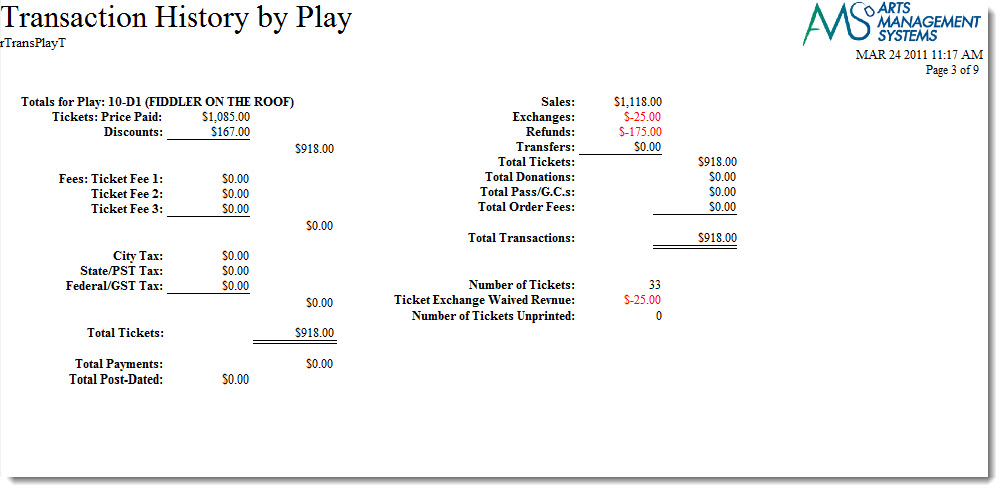
The Transaction History - By Event (Totals Only) report can be found under the Transaction History Reports category. Below the image are detailed notes to help you in using the report.
Click here for information on generating a report. Click here for information on the Finished Report window.
Purpose of the Report
This report generates a summary of transactions that occurred in conjunction with an order for an event.
Departments Who Benefit From This Report
| Box Office | Use this report to review a summary of transactions for an order by an event. |
Criteria Hints
It is recommended that this report be run with an event or range of events as the criteria.
| Parameter Field | Condition | Value |
| Event # | is one of | (Event) |
Use the SHIFT key to select a series of events, or the OPTION key (Mac) or CTRL key (Windows) to select multiple individual events.
Transaction History - By Play
Transaction History - By Play
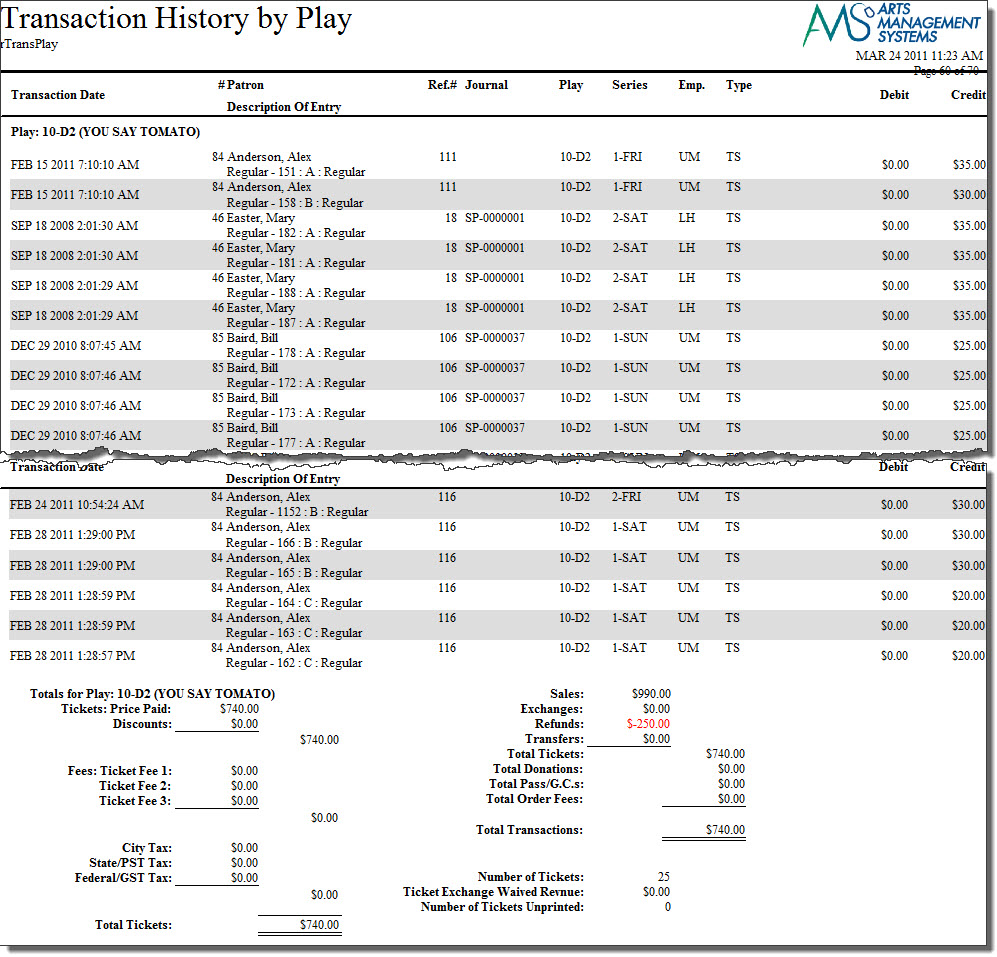
The Transaction History - By Event report can be found under the Transaction History Reports category. This report has additional criteria options. Click here for more information about the Parameters tab. Click here for more information about the Sort & Subtotal tab. Click here for more information about the Formatting tab. Below the image are detailed notes to help you in using the report.
Purpose of the Report
This report generates a listing of transactions that occurred in conjunction with an order for an event.
Departments Who Benefit From This Report
| Box Office | Use this report to review transactions for an order by an event. |
Criteria Hints
It is recommended that this report be run with an event or range of events as the criteria.
| Parameter Field | Condition | Value |
| Event # | is one of | (Event) |
Use the SHIFT key to select a series of events, or the OPTION key (Mac) or CTRL key (Windows) to select multiple individual events.
Transaction History - By Play, By Price Code (Totals Only)
Transaction History - By Play, By Price Code (Totals Only)
The Transaction History - By Play, By Price Code (Totals Only) report can be found under the Transaction History Reports category. Below the image are detailed notes to help you in using the report.
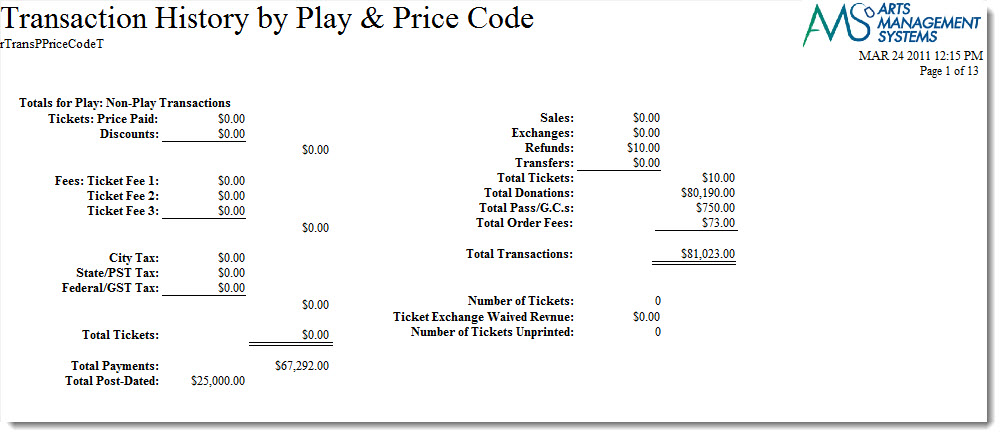
Click here for information on generating a report. Click here for information on the Finished Report window.
Purpose of the Report
This report generates a summary of transactions that occurred in conjunction with an order for an event by price code.
Departments Who Benefit From This Report
| Box Office | Use this report to review a summary of transactions for an order by an event and price code. |
Criteria Hints
It is recommended that this report be run with an event or range of events as the criteria.
| Parameter Field | Condition | Value |
| Event # | is one of | (Event) |
Use the SHIFT key to select a series of events, or the OPTION key (Mac) or CTRL key (Windows) to select multiple individual events.
Transaction History - By Play, By Price Code
Transaction History - By Play, By Price Code
The Transaction History - By Play, By Price Code report can be found under the Transaction History Reports category. This report has additional criteria options. Click here for more information about the Parameters tab. Click here for more information about the Sort & Subtotal tab. Click here for more information about the Formatting tab. Below the image are detailed notes to help you in using the report.
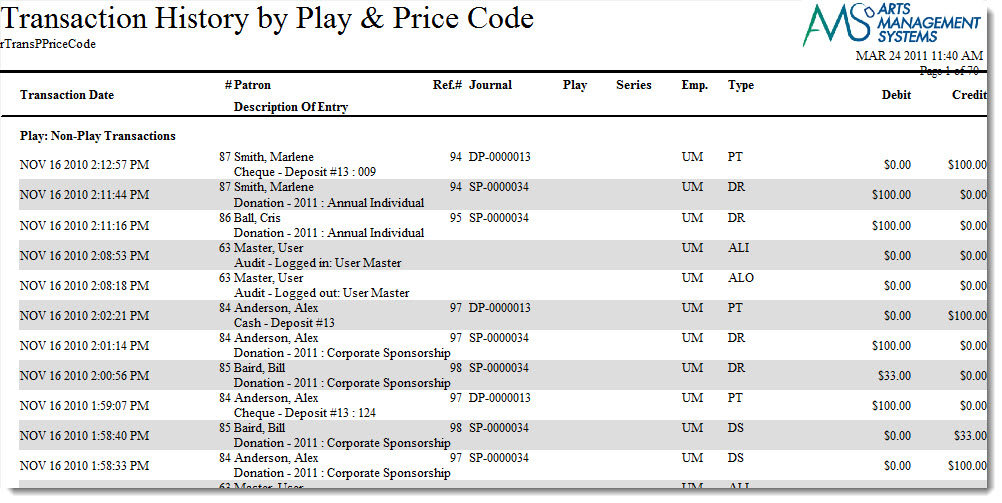
Click here for information on generating a report. Click here for information on the Finished Report window.
Purpose of the Report
This report generates a listing of transactions that occurred in conjunction with an order for an event by price code.
Departments Who Benefit From This Report
| Box Office | Use this report to review transactions for an order by an event and price code. |
Criteria Hints
It is recommended that this report be run with an event or range of events as the criteria.
| Parameter Field | Condition | Value |
| Event # | is one of | (Event) |
Use the SHIFT key to select a series of events, or the OPTION key (Mac) or CTRL key (Windows) to select multiple individual events.
Transaction History - By Sales Promotion Group (Totals Only)
Transaction History - By Sales Promotion Group (Totals Only)
The Transaction History - By Sales Promotion Group (Totals Only) report can be found under the Transaction History Reports category. Below the image are detailed notes to help you in using the report.
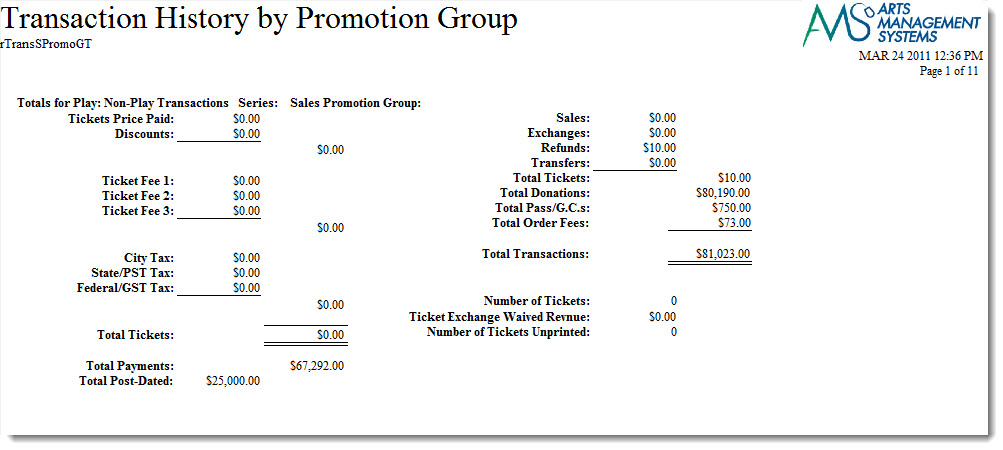
Click here for information on generating a report. Click here for information on the Finished Report window.
Purpose of the Report
This report generates a summary of transactions that occurred by sales promotion groupings.
Departments Who Benefit From This Report
| Box Office | Use this report to review a summary of transactions that occurred by sales promotion groupings. |
Criteria Hints
It is recommended that this report be run with an account or range of accounts as the criteria.
| Parameter Field | Condition | Value |
| Account # | is one of | (Account) |
Use the SHIFT key to select a series of accounts, or the OPTION key (Mac) or CTRL key (Windows) to select multiple individual accounts.
Transaction History - By Sales Promotion Group
Transaction History - By Sales Promotion Group
The Transaction History - By Sales Promotion Group report can be found under the Transaction History Reports category. This report has additional criteria options. Click here for more information about the Parameters tab. Click here for more information about the Sort & Subtotal tab. Click here for more information about the Formatting tab. Below the image are detailed notes to help you in using the report.
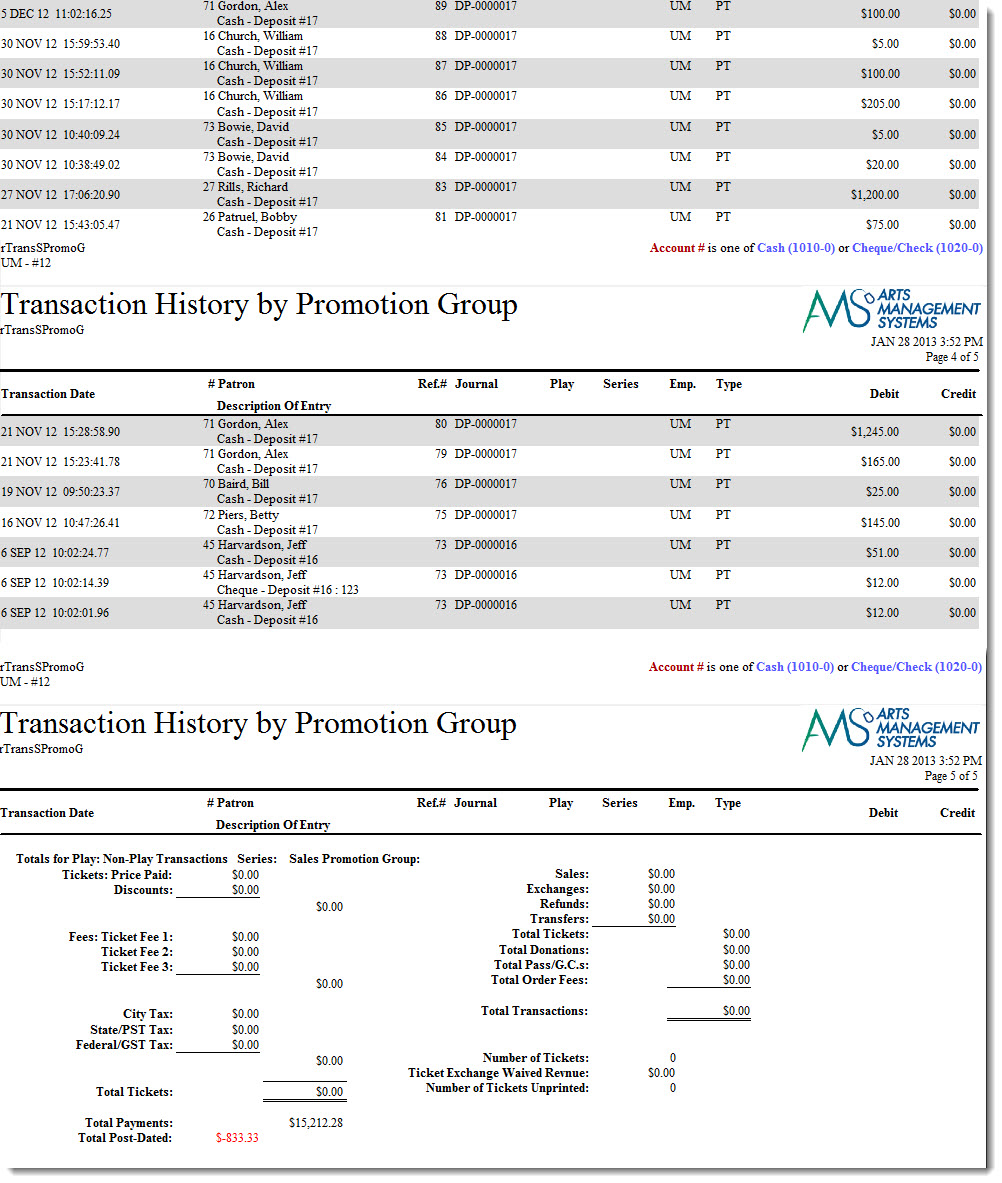
Click here for information on generating a report. Click here for information on the Finished Report window.
Purpose of the Report
This report generates a listing of transactions that occurred by sales promotion groupings.
Departments Who Benefit From This Report
| Box Office | Use this report to review transactions that occurred by sales promotion groupings. |
Criteria Hints
It is recommended that this report be run with an account or range of accounts as the criteria.
| Parameter Field | Condition | Value |
| Account # | is one of | (Account) |
Use the SHIFT key to select a series of accounts, or the OPTION key (Mac) or CTRL key (Windows) to select multiple individual accounts.
Transaction History - By Series, By Promotion (Totals Only)
Transaction History - By Series, By Promotion (Totals Only)
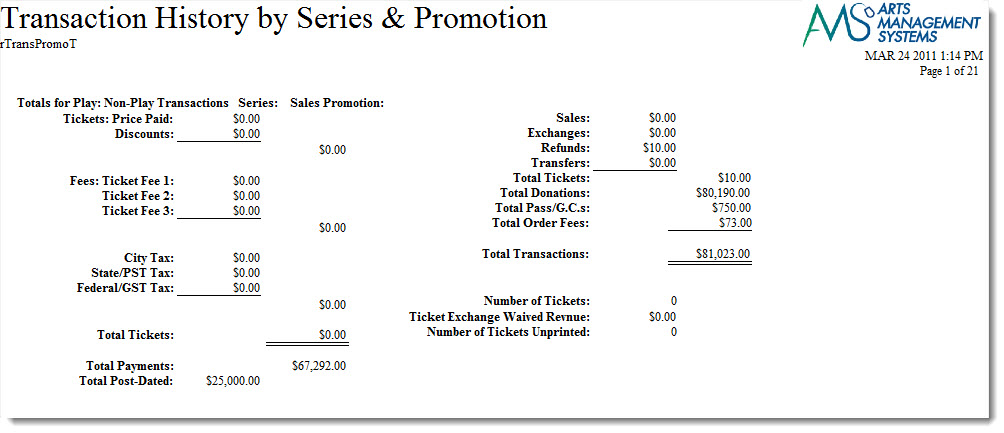
The Transaction History - By Series, By Promotion (Totals Only) report can be found under the Transaction History Reports category. Below the image are detailed notes to help you in using the report.
Click here for information on generating a report. Click here for information on the Finished Report window.
Purpose of the Report
This report generates a summary of transactions that occurred by series and promotion
Departments Who Benefit From This Report
| Box Office | Use this report to review a summary of transactions that occurred by series and promotion. |
Criteria Hints
It is recommended that this report be run with an event or range of events as the criteria.
| Parameter Field | Condition | Value |
| Event # | is one of | (Event) |
Use the SHIFT key to select a series of events, or the OPTION key (Mac) or CTRL key (Windows) to select multiple individual events.
Transaction History - By Series, By Promotion
Transaction History - By Series, By Promotion
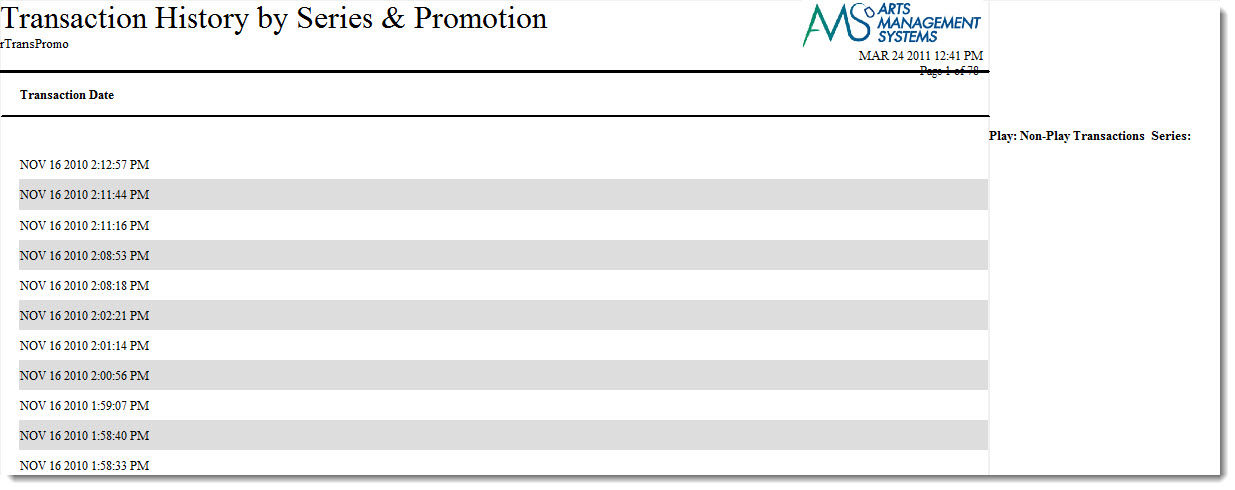
The Transaction History - By Series, By Promotion report can be found under the Transaction History Reports category. This report has additional criteria options. Click here for more information about the Parameters tab. Click here for more information about the Sort & Subtotal tab. Click here for more information about the Formatting tab. Below the image are detailed notes to help you in using the report.
Click here for information on generating a report. Click here for information on the Finished Report window.
Purpose of the Report
This report generates a listing of transactions that occurred by series and promotion
Departments Who Benefit From This Report
| Box Office | Use this report to review transactions that occurred by series and promotion. |
Criteria Hints
It is recommended that this report be run with an event or range of events as the criteria.
| Parameter Field | Condition | Value |
| Event # | is one of | (Event) |
Use the SHIFT key to select a series of events, or the OPTION key (Mac) or CTRL key (Windows) to select multiple individual events.
Transaction History List (Totals Only)
Transaction History List (Totals Only)
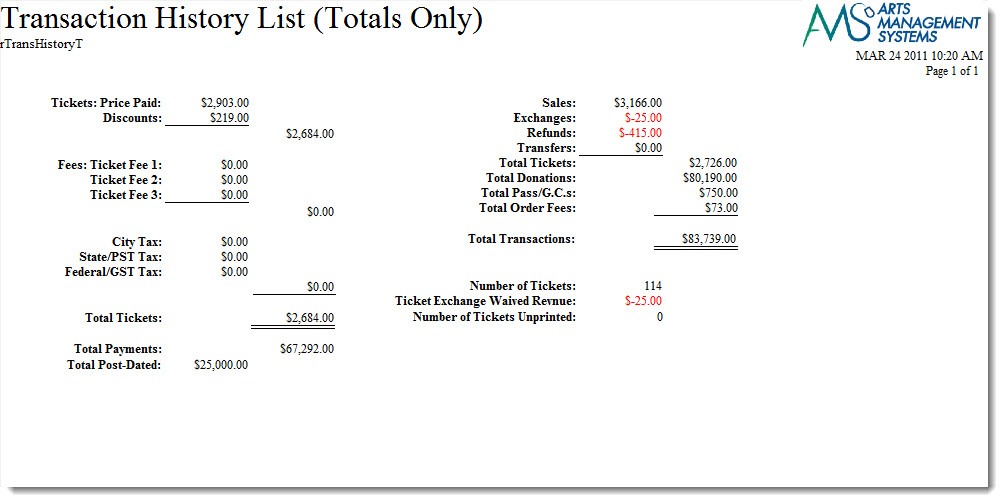
The Transaction History List (Totals Only) report can be found under the Transaction History Reports category. Below the image are detailed notes to help you in using the report.
Click here for information on generating a report. Click here for information on the Finished Report window.
Purpose of the Report
This report generates a summary of transactions that occurred during an order.
Departments Who Benefit From This Report
| Box Office | Use this report to review a summary of transactions that took place during an order. |
Criteria Hints
It is recommended that this report be run with a date or date range as the criteria.
| Parameter Field | Condition | Value |
| G/L Header Date - Posted | between | (Date) and (Date) |
Transaction History List
Transaction History List
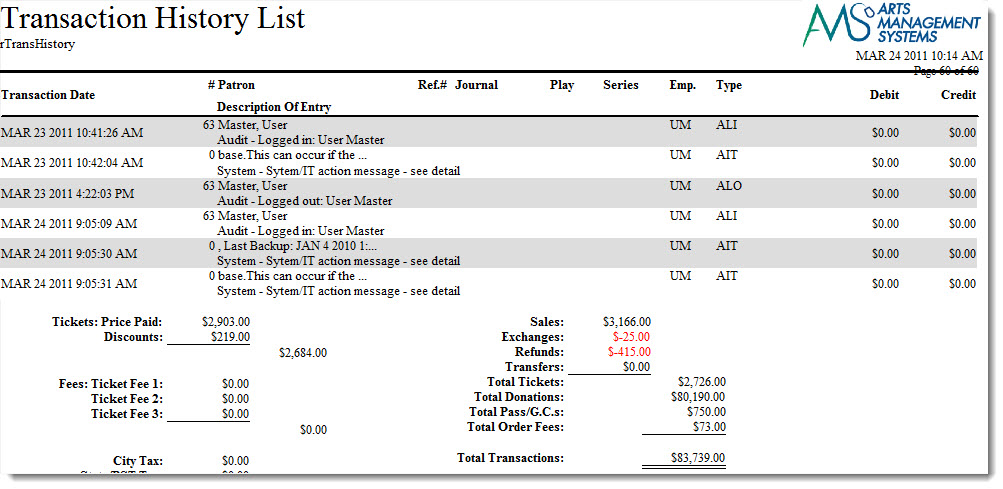
The Transaction History List report can be found under the Transaction History Reports category. Below the image are detailed notes to help you in using the report.
Click here for information on generating a report. Click here for information on the Finished Report window.
Purpose of the Report
This report generates a listing of transactions that occurred during an order.
Departments Who Benefit From This Report
| Box Office | Use this report to review transactions that took place during an order. |
Criteria Hints
It is recommended that this report be run with a date or date range as the criteria.
| Parameter Field | Condition | Value |
| G/L Header Date - Posted | between | (Date) and (Date) |
Transaction Revenues
Transaction Revenues
TheTransaction Revenues report can be found under the Transaction History Reports category.
Use Transaction Revenues to print ticket sales revenue from the transactions. This should match inventory if no transactions are deleted. Use this to analyse the revenues for a sales posting.
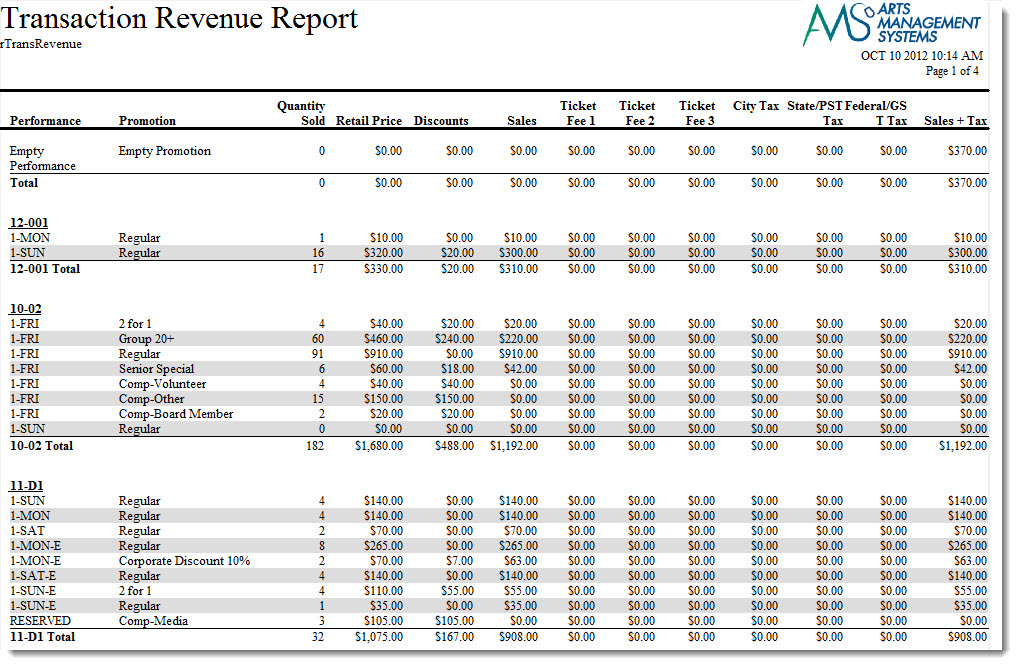
The criteria selections for this report contain additional options.
Click here for more information on the Insert Summary tab. Below the image are detailed notes to help you in using the report.Purpose of the Report
Use this to analyse the revenues for sales.
Departments Who Benefit From This Report
| Accounting | Use this report to review Fee, Taxes and Discount for an event by type of ticket sold. |
Criteria Hints
It is recommended that this report be run using criteria for:
- an event or range of events -or-
- for a specific date/timestamp range to check allocation of revenue -or-
- for specific GL codes and/or date posted if you want to see the transactions that make up some end of day entries
| Parameter Field | Condition | Value |
| Event # | is one of | (Event) |