Order and Payments
Bank Deposit - Totals
Bank Deposit - Totals
The Bank Deposit - Totals report can be found under the Order and Payments category. Below the image are detailed notes to help you in using the report.

Click here for information on generating a report. Click here for information on the Finished Report window.
Purpose of the Report
This report generates a summary of current and past bank deposits.
Departments Who Benefit From This Report
| Box Office | Use this report to see a summary of the deposits for the bank that are outstanding or in the past. |
| Accounting | Use this report to see a summary of the deposits for the bank that are outstanding or in the past. |
Criteria Hints
It is recommended that this report be run with for a single date or with a range of dates as the criteria.
| Parameter Field | Condition | Value |
| G/L Header Date - Posted | between | (Date) and (Date) |
Bank Deposit Check Listing
Bank Deposit Check Listing
The Bank Deposit Check Listing report can be found under the Order and Payments category. Below the image are detailed notes to help you in using the report.

Click here for information on generating a report. Click here for information on the Finished Report window.
Purpose of the Report
This report generates a detailed listing of past bank deposits and the checks that were part of the deposit.
Departments Who Benefit From This Report
| Box Office | Use this report to review deposits that have previously been taken to the bank. |
| Accounting | Use this report to review deposits that have previously been taken to the bank. |
Criteria Hints
It is recommended that this report be run with for a single date or with a range of dates as the criteria.
| Parameter Field | Condition | Value |
| G/L Header Date - Posted | between | (Date) and (Date) |
Cash Flow - Post Dated Payment Analysis
Cash Flow - Post Dated Payment Analysis
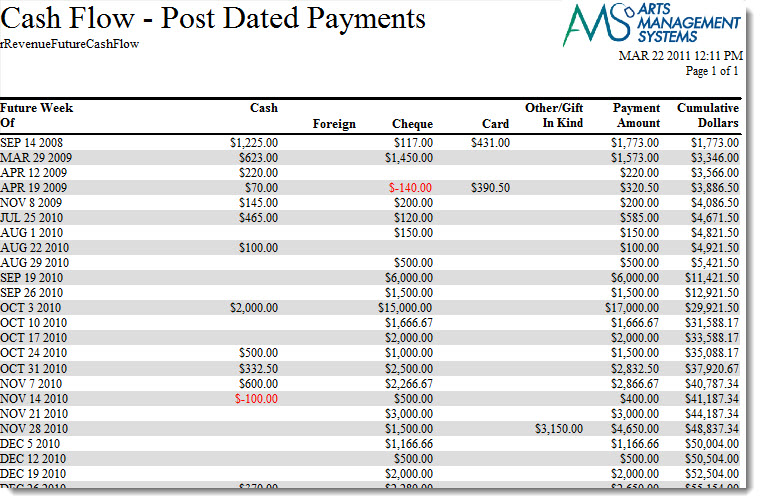
The Cash Flow - Post Dated Payment Analysis report can be found under the Order and Payments category. This reports has additional criteria than other reports. Click here for more information on the Subtotal Options tab. Below the image are detailed notes to help you in using the report.
Click here for information on generating a report. Click here for information on the Finished Report window.
Purpose of the Report
This report generates a summary of cash flow into the organization, including future cash flow based on post dated payments.
Departments Who Benefit From This Report
| Box Office | Use this report to review past and future cash flow for the organization. |
| Accounting | Use this report to review past and future cash flow for the organization. |
Criteria Hints
It is recommended that this report be run without criteria.
Check Request
Check Request
The Check Request report can be found under the Order and Payments category. Below the image are detailed notes to help you in using the report.

Click here for information on generating a report. Click here for information on the Finished Report window.
Purpose of the Report
This report generates a listing of refunds owed to a patron that are to be disbursed by check.
Departments Who Benefit From This Report
| Box Office | Use this report to see a listing of all refunds owed to a patron that need a check issued. |
| Accounting | Use this report to see a listing of all refunds owed to a patron that need a check issued. |
Criteria Hints
It is recommended that this report be run without criteria.
Credit Card Verification Responses
Credit Card Verification Responses
The Credit Card Verification Responses report can be found under the Order and Payments category. Below the image are detailed notes to help you in using the report.

Click here for information on generating a report. Click here for information on the Finished Report window.
Purpose of the Report
This report generates a listing of the responses received during payment verification.
Departments Who Benefit From This Report
| Box Office | Use this report to review the responses received during payment verification to look for any problems. |
Criteria Hints
It is recommended that this report be run with for a range of dates and with a payment method as the criteria.
| Parameter Field | Condition | Value |
| G/L Header Date - Posted | between | (Date) and (Date) |
| Payment Method | is one of | (Payment Method) |
Use the SHIFT key to select a series of payment methods, or the OPTION key (Mac) or CTRL key (Windows) to select multiple individual payment methods.
Daily Change in A/R
Daily Change in A/R
The Daily Change in A/R report can be found under the Order and Payments category. This report has additional criteria options. Click here for more information about the Sort & Subtotal tab. Click here for more information about the Formatting tab. Below the image are detailed notes to help you in using the report.

Click here for information on generating a report. Click here for information on the Finished Report window.
Purpose of the Report
This report generates a summary of the changes that occurred in Accounts Receivable.
Departments Who Benefit From This Report
| Box Office | Use this report to see a summary of the changes to the A/R account. |
| Accounting | Use this report to see a summary of the changes to the A/R account. |
Criteria Hints
It is recommended that this report be run with for a range of datesas the criteria.
| Parameter Field | Condition | Value |
| G/L Header Date - Posted | between | (Date) and (Date) |
Deposit Detail - by Employee
Deposit Detail - by Employee
The Deposit Detail - by Employee report can be found under the Order and Payments category. Below the image are detailed notes to help you in using the report.

Click here for information on generating a report. Click here for information on the Finished Report window.
Purpose of the Report
This report generates a detailed listing of current and past deposits by employee.
Departments Who Benefit From This Report
| Box Office | Use this report for a detailed view of current and past deposits by employee. |
| Accounting | Use this report for a detailed view of current and past deposits by employee. |
Criteria Hints
It is recommended that this report be run with for a specific employee with a range of dates as the criteria.
| Parameter Field | Condition | Value |
| Payment Received By | is one of | (Employee) |
| G/L Header Date - Posted | between | (Date) and (Date) |
Use the SHIFT key to select a series of employees, or the OPTION key (Mac) or CTRL key (Windows) to select multiple individual employees.
Deposit Detail
Deposit Detail
The Deposit Detail report can be found under the Order and Payments category. Below the image are detailed notes to help you in using the report.

Click here for information on generating a report. Click here for information on the Finished Report window.
Purpose of the Report
This report generates a detailed listing of current and past deposits.
Departments Who Benefit From This Report
| Box Office | Use this report for a detailed view of current and past deposits. |
| Accounting | Use this report for a detailed view of current and past deposits. |
Criteria Hints
It is recommended that this report be run with for a range of dates as the criteria.
| Parameter Field | Condition | Value |
| G/L Header Date - Posted | between | (Date) and (Date) |
Deposit Summary - by Employee
Deposit Summary - by Employee
The Deposit Summary - by Employee report can be found under the Order and Payments category. Below the image are detailed notes to help you in using the report.

Click here for information on generating a report. Click here for information on the Finished Report window.
Purpose of the Report
This report generates a summary of the current and past deposits by employee in Theatre Manager.
Departments Who Benefit From This Report
| Box Office | Use this report to view a summary of the current and past deposits by employee. |
| Accounting | Use this report to view a summary of the current and past deposits by employee. |
Criteria Hints
It is recommended that this report be run with a specificrange of dates as the criteria.
| Parameter Field | Condition | Value |
| G/L Header Date - Posted | between | (Date) and (Date) |
Deposit Summary
Deposit Summary
The Deposit Summary report can be found under the Order and Payments category. Below the image are detailed notes to help you in using the report.

Click here for information on generating a report. Click here for information on the Finished Report window.
Purpose of the Report
This report generates a summary of the current and past deposits in Theatre Manager.
Departments Who Benefit From This Report
| Box Office | Use this report to view a summary of the current and past deposits. |
| Accounting | Use this report to view a summary of the current and past deposits. |
Criteria Hints
It is recommended that this report be run with a specificrange of dates as the criteria.
| Parameter Field | Condition | Value |
| G/L Header Date - Posted | between | (Date) and (Date) |
Order Detail - by Date (Tickets Only)
Order Detail - by Date (Tickets Only)
The Order Detail - by Date (Tickets Only) report can be found under the Order and Payments category. Below the image are detailed notes to help you in using the report.

Click here for information on generating a report. Click here for information on the Finished Report window.
Purpose of the Report
This report generates a detailed listing of orders by date for tickets that have been purchased.
Departments Who Benefit From This Report
| Box Office | Use this report to review orders by date for ticket sales. |
Criteria Hints
It is recommended that this report be run with a specificrange of dates as the criteria.
| Parameter Field | Condition | Value |
| Order Date | between | (Date) and (Date) |
Order Detail - by Employee, by Patron (Tickets Only)
Order Detail - by Employee, by Patron (Tickets Only)
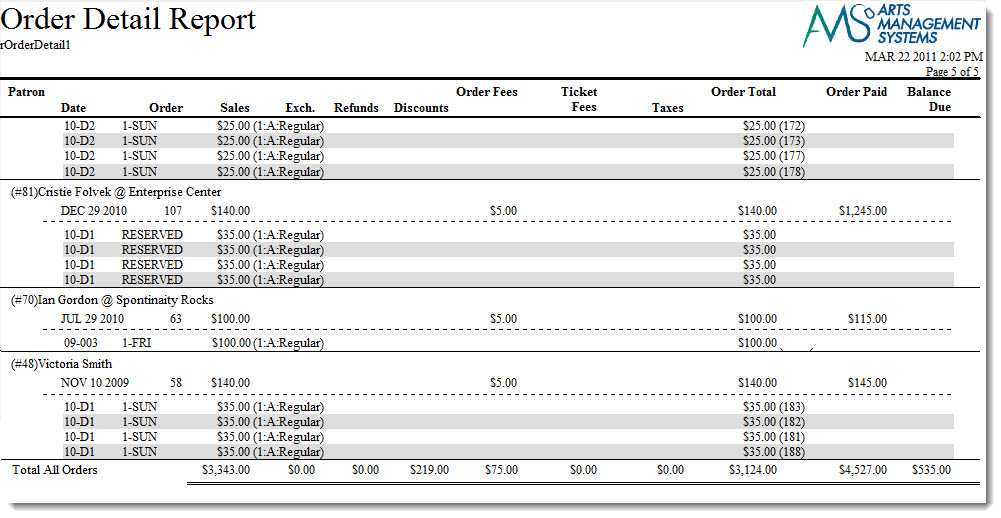
The Order Detail - by Employee, by Patron (Tickets Only) report can be found under the Order and Payments category. Below the image are detailed notes to help you in using the report.
Click here for information on generating a report. Click here for information on the Finished Report window.
Purpose of the Report
This report generates a detailed listing of orders for each employee by patron for tickets sales.
Departments Who Benefit From This Report
| Box Office | Use this report to review orders by employee for ticket sales. |
Criteria Hints
It is recommended that this report be run with a specificrange of dates and/or employee as the criteria.
| Parameter Field | Condition | Value |
| Order Date | between | (Date) and (Date) |
| Employee # | is one of | (Employee) |
Use the SHIFT key to select a series of employees, or the OPTION key (Mac) or CTRL key (Windows) to select multiple individual employees.
Order Detail - by Patron (Ticket, Pass/G.C., Donation, Resource, Fee & Payment)
Order Detail - by Patron (Ticket, Pass/G.C., Donation, Resource, Fee & Payment)
The Order Detail - by Patron (Ticket, Membership, Donation, Fee & Payment) report can be found under the Order and Payments category. Below the image are detailed notes to help you in using the report.

Click here for information on generating a report. Click here for information on the Finished Report window.
Purpose of the Report
This report generates a detailed listing of each patron's orders and all the detail that is in it.
Departments Who Benefit From This Report
| Box Office | Use this report to review patron's orders. |
Criteria Hints
- It is recommended that this report be run with a specific range of patrons as the criteria.
- If you are looking to see for a specific performance, or donation campaign, how people paid and what else was in the order, then build a mail list of 'people who bought for an event' or 'people who donated to..', then use that mail list as the criteria for this report.
| Parameter Field | Condition | Value |
| Patron Name-Last | between | (Last Name) and (Last Name) |
| Parameter Field | Condition | Value |
| Patron Belongs to mail list | is one of | Mail list of ticket buyers |
Order Detail - by Patron (Tickets Only)
Order Detail - by Patron (Tickets Only)
The Order Detail - by Patron (Tickets Only) report can be found under the Order and Payments category. Below the image are detailed notes to help you in using the report.

Click here for information on generating a report. Click here for information on the Finished Report window.
Purpose of the Report
This report generates a detailed listing of each patron's orders for tickets.
Departments Who Benefit From This Report
| Box Office | Use this report to review patron's orders for tickets. |
Criteria Hints
It is recommended that this report be run with a specific range of patrons as the criteria.
| Parameter Field | Condition | Value |
| Patron Name-Last | between | (Last Name) and (Last Name) |
Order Summary
Order Summary
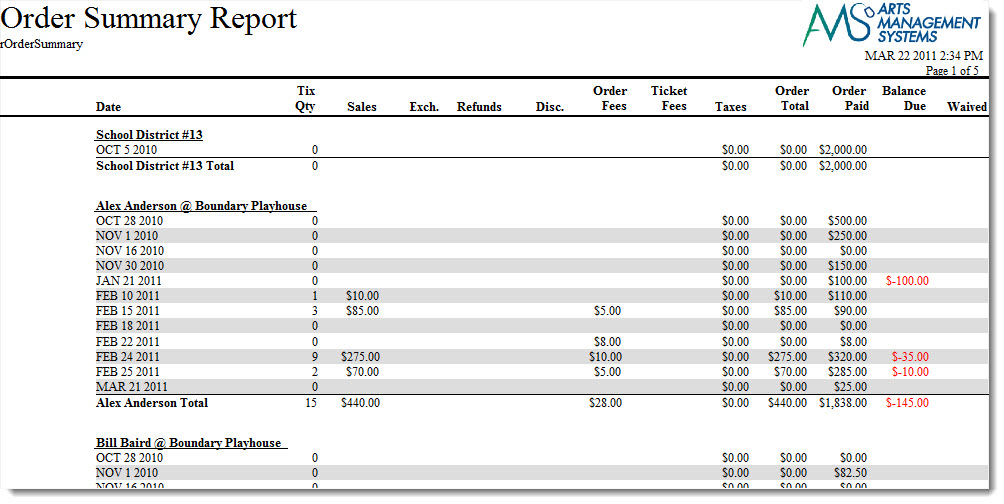
The Order Summary report is found in the Order and Payments category. This report has additional criteria options. Click here for more information about the Sort & Subtotal tab. Click here for more information about the Formatting tab. Below the image are detailed notes to help you in using the report.
Click here for information on generating a report. Click here for information on the Finished Report window.
Purpose of the Report
This report generates a summary of each order attached to a patron.
Departments Who Benefit From This Report
| Box Office | Use this report to review the orders for a patron. |
Criteria Hints
It is recommended that this report be run with a specific range of patrons as the criteria.
| Parameter Field | Condition | Value |
| Patron Name-Last | between | (Last Name) and (Last Name) |
Payment Detail by Deposit
Payment Detail by Deposit
The Payment Detail by Deposit report can be found under the Order and Payments category. Below the image are detailed notes for helping you in using this report.

Click here for information on generating a report. Click here for information on the Finished Report window.
Purpose of the Report
This report generates a listing of current and past payments as they are associated with a deposit.
Departments Who Benefit From This Report
| Box Office | Use this report to look at the payments associated with a deposit. |
Criteria Hints
It is recommended that this report be run with a specific date range as the criteria.
| Parameter Field | Condition | Value |
| G/L Header Date - Posted | between | (Date) and (Date) |
Payment Detail by Employee
Payment Detail by Employee
The Payment Detail by Employee report can be found under the Order and Payments category. Below the image are detailed notes to help you use the report.

Click here for information on generating a report. Click here for information on the Finished Report window.
Purpose of the Report
This report generates a listing of current and past payments by the employee and date they were handled.
Departments Who Benefit From This Report
| Box Office | Use this report to look at the payments handled by an employee by date. |
Criteria Hints
It is recommended that this report be run with a specific date range and employee as the criteria.
| Parameter Field | Condition | Value |
| Employee # | is one of | (Employee) |
| G/L Header Date - Posted | between | (Date) and (Date) |
Use the SHIFT key to select a series of employees, or the OPTION key (Mac) or CTRL key (Windows) to select multiple individual employees.
Payment Detail by Patron
Payment Detail by Patron
Click here for information on generating a report. Click here for information on the Finished Report window.
Purpose of the Report
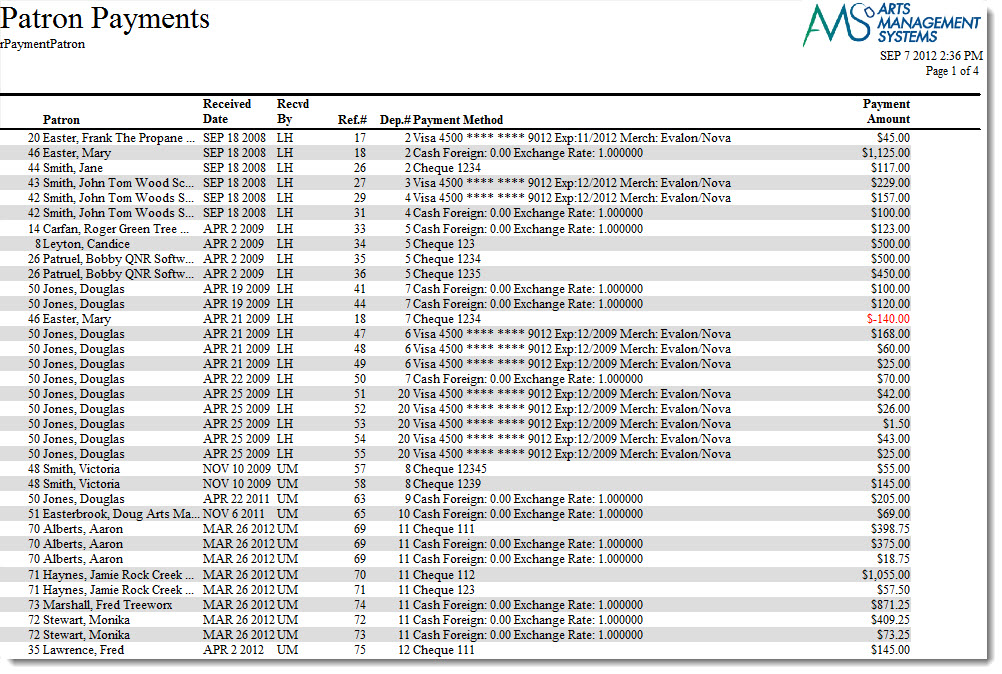
This report generates a listing of all payments by a patron.
Departments Who Benefit From This Report
| Box Office | Use this report to look at payments that have been made by a patron. |
Criteria Hints
It is recommended that this report be run with a specific date range and range of patrons as the criteria.
| Parameter Field | Condition | Value |
| Patron Name-Last | between | (Last Name) and (Last Name) |
| G/L Header Date - Posted | between | (Date) and (Date) |
| Post Dated Payments | Please refer to the description of post dated payment report criteria to limit this report to only post dated payments | |
Payment Summary - Sales Transaction Allocation
Payment Summary - Sales Transaction Allocation
The Payment Summary - Sales Transaction Allocation report can be found under the Order and Payments category. This report has additional criteria options. Click here for more information about the Sort & Subtotal tab. Click here for more information about the Formatting tab. Below the image are detailed notes to help you in using the report.

Click here for information on generating a report. Click here for information on the Finished Report window.
Purpose of the Report
You use the Payment Summary - Sales Transaction Allocation to allocate how much was paid by credit card, cash, checks, etc. based on transactions. This is best done on a dialy basis AFTER the End Of Day Wizard.
Departments Who Benefit From This Report
| Accounting | Use this report to see a total of all payments for a specific day. |
Criteria Hints
It is recommended that this report be run with a specific date rangeas the criteria.
| Parameter Field | Condition | Value |
| G/L Header Date - Posted | between | (Date) and (Date) |
Payment Summary
Payment Summary
The Payment Summary report can be found under the Order and Payments category. This report has additional criteria options. Click here for more information about the Sort & Subtotal tab. Click here for more information about the Formatting tab. Below the image are detailed notes to help you in using the report.
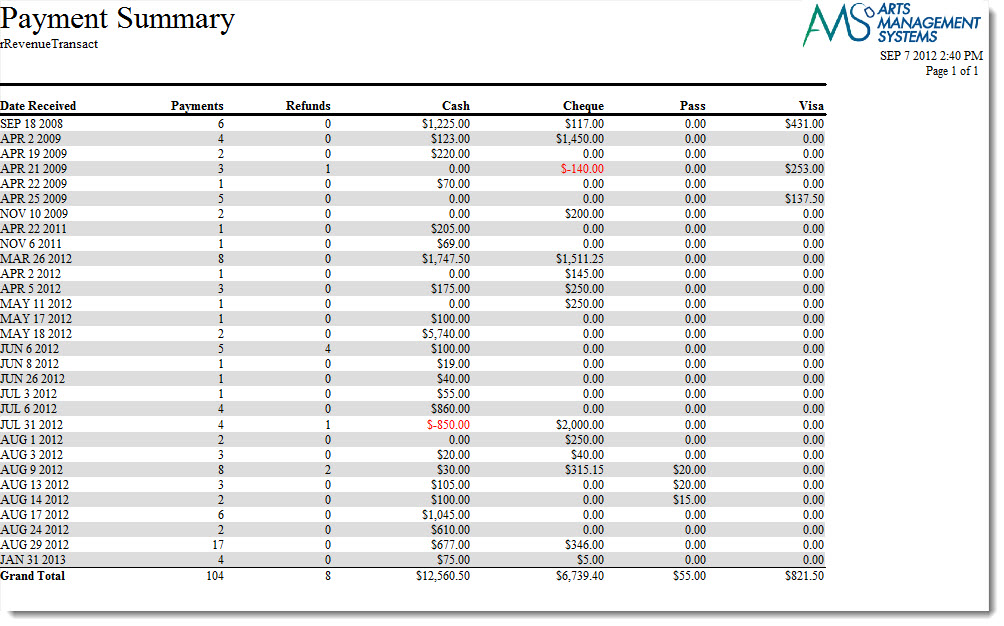
Click here for information on generating a report. Click here for information on the Finished Report window.
Purpose of the Report
This report generates a quick listing of all payment totals for a date.
Departments Who Benefit From This Report
| Box Office | Use this report to see a total of all payments for a specific day. |
Criteria Hints
It is recommended that this report be run with a specific date rangeas the criteria.
| Parameter Field | Condition | Value |
| G/L Header Date - Posted | between | (Date) and (Date) |
Receivables - As Of Specific Date
Receivables - As Of Specific Date
The Receivables - As Of Specific Date report can be found under the Order and Payments category. Below the image are detailed notes to help you in using the report.
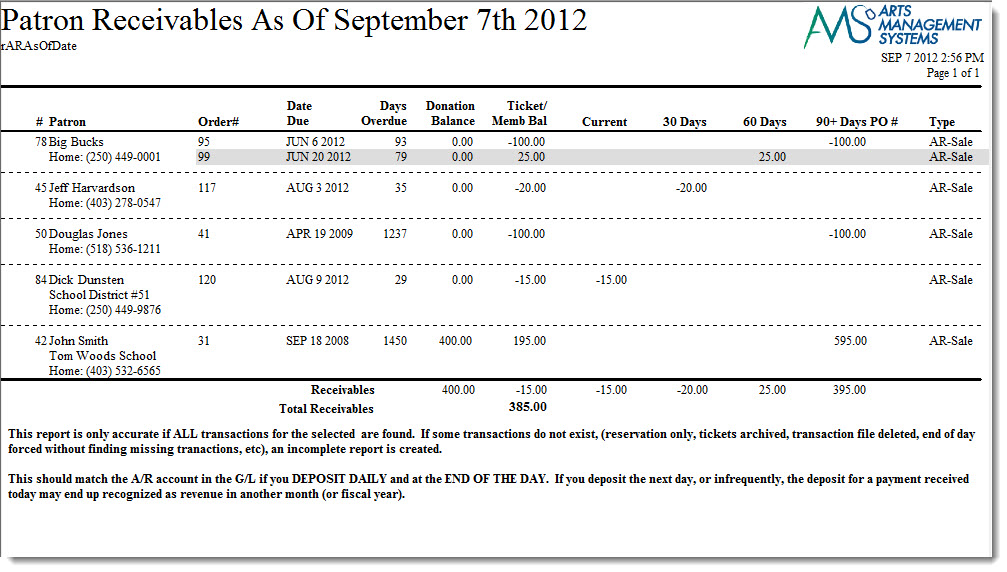
Click here for information on generating a report. Click here for information on the Finished Report window.
Purpose of the Report
You use the Receivables - As Of Specific Date to compute the A/R as of a specific date (e.g. Year End) by reading the transaction history and ignoring transactions after the specified date.
|
This report may be inaccurate if transactions are missing or dated incorrectly around the date in question. Most venues delay creation of transactions for web purchases till the next EOD - so if the date in question is over a weekend and and EOD was not done daily, you may see some orders displayed which reflect the delay in posting. |

Departments Who Benefit From This Report
| Box Office | Use this report to see which orders currently have outstanding balances and the aging of those balances. |
Criteria Hints
It is recommended that this report be run with only the receivables date as criteria.
Receivables - Based on Order Balances
Receivables - Based on Order Balances
The Receivables Based on Order Balances report can be found under the Order and Payments category. Below the image are detailed notes to help you in using the report.
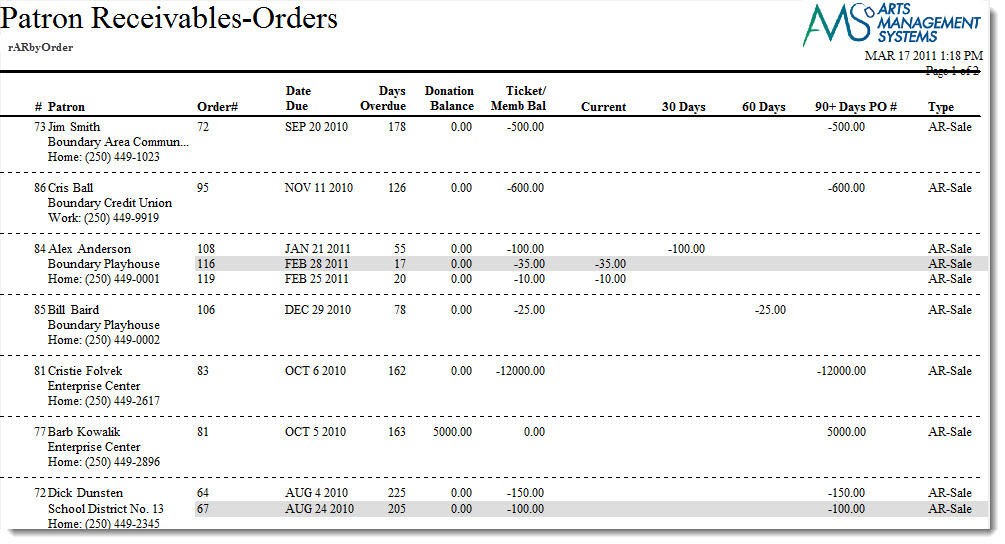
Click here for information on generating a report. Click here for information on the Finished Report window.
Purpose of the Report
This report generates a listing of all orders that have outstanding balances.
Departments Who Benefit From This Report
| Box Office | Use this report to see which orders currently have outstanding balances and the aging of those balances. |
Criteria Hints
It is recommended that this report be run without criteria.
Receivables - Based on Order Balances by Play
Receivables - Based on Order Balances by Play
The Receivables - Based on Order Balances by Play report can be found under the Order and Payments category. Below the image are detailed notes to help you in using the report.
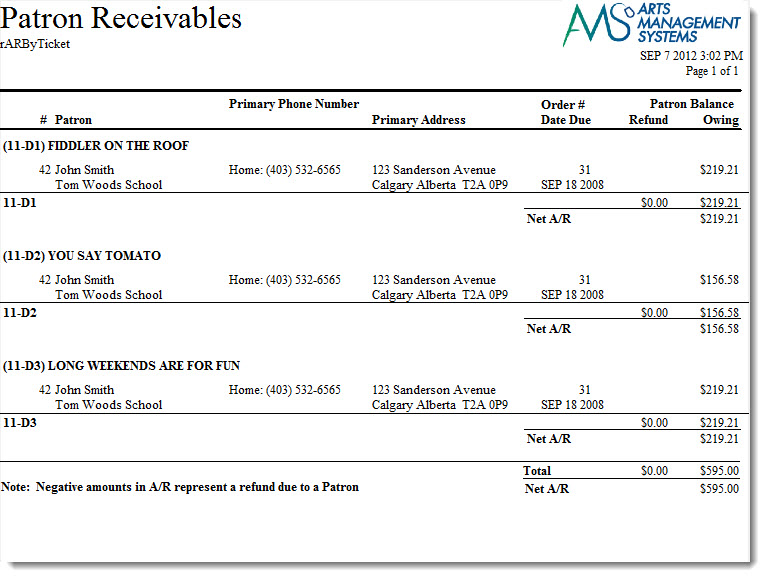
Click here for information on generating a report. Click here for information on the Finished Report window.
Purpose of the Report
This report generates a listing of all orders that have outstanding balances by event.
Departments Who Benefit From This Report
| Box Office | Use this report to see outstanding order balances by each event along with contact information on the patron. |
Criteria Hints
It is recommended that this report be run without criteria or for a specific event.
| Parameter Field | Condition | Value |
| Event # | is one of | (Event) |
Use the SHIFT key to select a series of events, or the OPTION key (Mac) or CTRL key (Windows) to select multiple individual events.
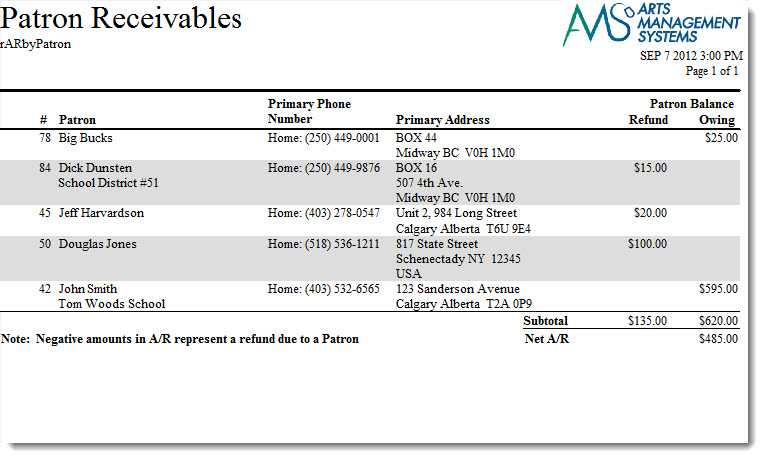
Receivables - Based on Patron Balances
Receivables - Based on Patron Balances
The Receivables - Based on Patron Balances report can be found under the Order and Payments category. Below the image are detailed notes to help you in using the report.
Click here for information on generating a report. Click here for information on the Finished Report window.
Purpose of the Report
This report generates a listing of all patrons that have an outstanding balance and the accumulated totals.
Departments Who Benefit From This Report
| Box Office | Use this report to see all patrons that have an outstanding balance and the accumulated total for the balance. |
Criteria Hints
It is recommended that this report be run without criteria.