Director Config for Web Server
Director Config for Web Server
 |
If you enter the URL http://127.0.0.1:3012/configure and do not see the 'Director' screen, you may need to:
|
Configuring as a Web Server
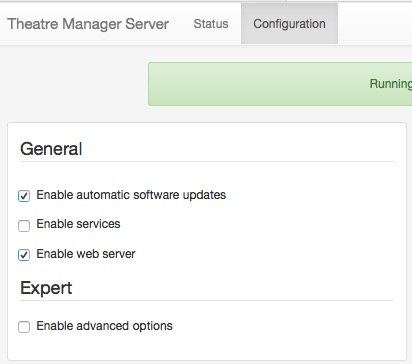 This section describes how to configure the Theatre Manager server as an NGINX web server on a machine in the DMZ. This computer should have at least 4 gigs of ram and a fast dual core processor.
Connect to Theatre Manager server using your browser and enter the URL http://127.0.0.1:3012/configure. You will see a web page like the one to the right. It will help you configure the machine for its appropriate purpose.
Auto Update
Theatre Manager Server is designed to auto update when a new version is released. If you wish to disable the feature, make sure to disable it on all machines. If it is enabled, make sure it is enabled on all machines. Components auto-updated by the server are:
- TM Server
- NGINX web server
- TLS upgrades
- Default Web Pages (customized changes are never touched)
- Theatre Manager
Data stored by Arts Management as part of auto-update
Checking for auto-updates shares some of your information with Arts Management. Data is transmitted securely and SHA-384 checksummed for safety and the values retained by AMS are:
- Theatre Manager version number
- TM Listener version number
- Postgres version number
- NGINX version number
- Timestamp of last backup
- Timestamp of last check for an update
Data retrieved from AMS and stored in your database is: number of user and scanner licences, latest version of Theatre Manager for auto deployment to workstations.
Enable Web Server
Click the 'Enable Web Server Button' to use this machine as an NGINX web server. When clicked, a panel appears allowing you to enter the configuration parameters for the web server.