AMS Private Cloud Diagram for PCI A, B, or C
AMS Private Cloud Diagram for PCI A, B, or C
AMS cloud allows a merchant to target the possible compliance levels to Schedule 'A', 'B', or 'C'. Since most venues have face-to-face or phone orders, the default is Schedule 'C' but you may wish to reduce the number of machines in scope to the minimum. If can take all machine out of scope in the office environment using dial up or IP pinpads, you may be able to achieve Schedule 'B' (very much dependent on your bank).
Possibilities for PCI compliance
- Schedule A for merchants using only e-commerce transactions and Moneris Hosted Payment Page. All e-commerce authorizations occur at Moneris, and card data never enters the network
- Schedule B Merchants using only: Imprint machines with no electronic cardholder data storage; and/or Standalone, dial-out terminals with no electronic cardholder data storage. Not applicable to e-commerce channels
- Schedule B-IP for Merchants using only standalone, PTS-approved payment terminals with an IP connection to the payment processor, with no electronic cardholder data storage (Moneris P400). Not applicable to e-commerce channels.
- Schedule 'C' Merchants with payment application systems connected to the Internet, no electronic cardholder data storage. Not applicable to e-commerce channels. All Merchant Providers
- Schedule 'A-EP' Merchants using hosted payments for web sales like Moneris
|
Even if you take all machines out of scope and use only dial up or IP terminals, if you are part of a large university or municipality, your Bank may force you to be schedule 'D'. This can happen if the Bank chooses to consider all your other merchant activities outside the venue (eg bookstore, admissions, dog tag sales, etc as part of the overall business). One way around that might be e-commerce and Moneris hosted payment page. |

PCI Scope Diagram - AMS Cloud
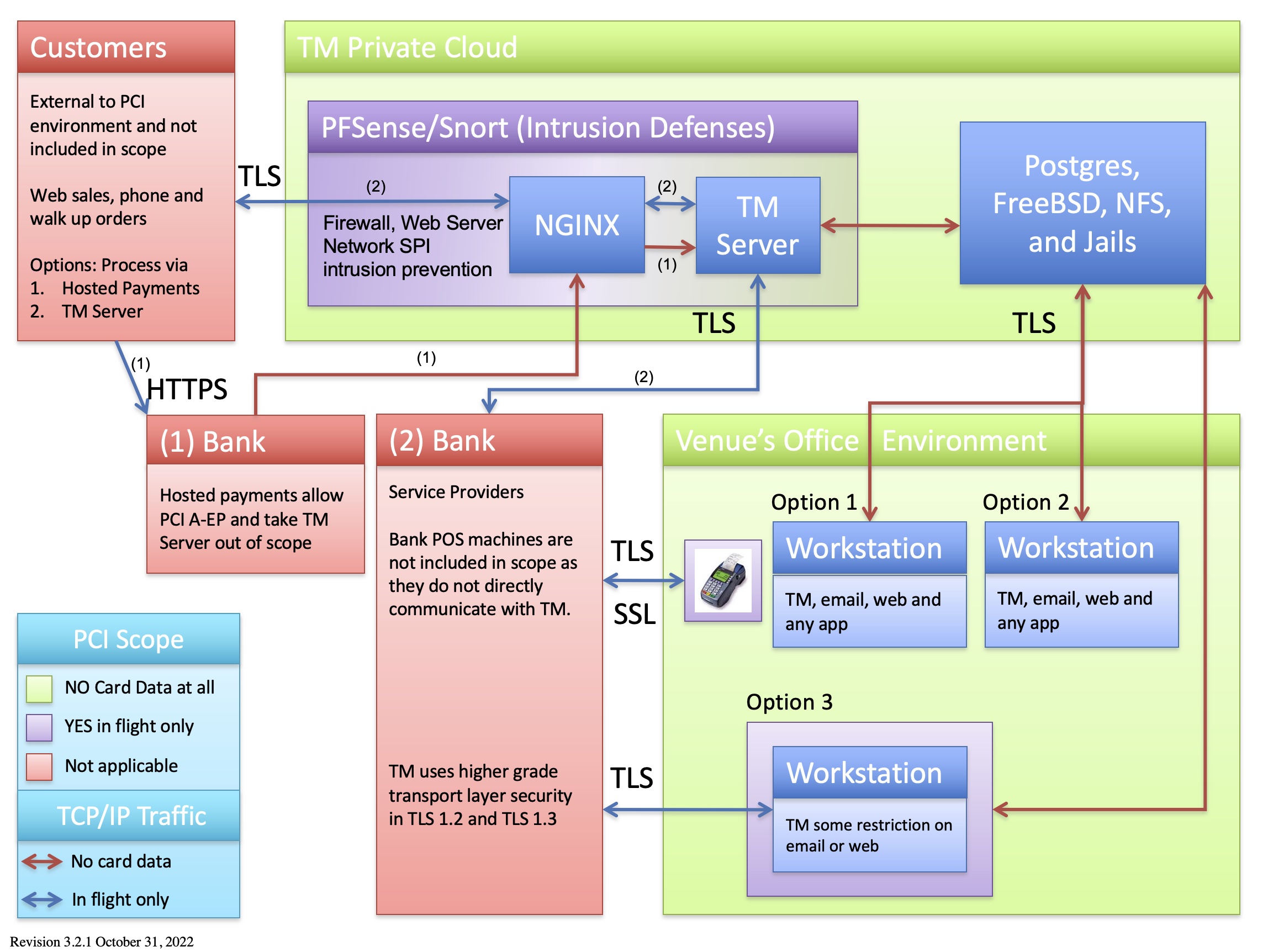
The legend shows machines and network segments:
- Organizational Areas:
- that will never see credit cards (GREEN)
- where a credit card passes through the machine while in flight to the bank during an authorization and is immediately gone (PURPLE). Cards in these zones are:
- transmitted via TLS 1.2 and higher, and
- live for an instant in time, and
- are NEVER stored in a database.
- where the card data is outside the boundaries of the organization. Examples are in the customer's hands (or wallet) or at your bank or service provider (who are required to perform their own PCI compliance) (RED)
- TCP/IP Traffic
- RED ARROWS - traffic where there is absolutely NO card data ever transmitted
- BLUE ARROWS - traffic where card data travels (encrypted and via TLS) while it is IN FLIGHT for an authorization. This means that a message is sent for credit card authorization and the card resides only in memory (and is never stored in any disk file)
Components
Local Workstations
There are three options for workstations within a venue's physical environment.
| Option | Goal | Steps | Pro | Possible PCI Levels |
| 1 | WORKSTATION OUT OF SCOPE and use a POS pin pad device
This takes a workstation out of PCI scope and allows the workstation to use any software on it that can reach the internet (eg email and web browsing). Credit Card authorization is via a P2PE pin-pad using
|
|
|
'B' 'B-IP' 'C' |
| 2 | WORKSTATION OUT OF SCOPE and no credit card authorization at all
This option should definitely be used for all non-box office computers or computers used primarily for setup, reporting, and analysis. |
|
|
'B' |
| 3 | DEFINED WORKSTATIONS IN SCOPE The workstation is defined as one of those that may accept credit cards entered into the system so that it does |
|
|
'C' |
| 4 | TM Servers NGINX and TM Server can be in or out of scope depending on processor choices |
To take the servers out of scope, you will need a merchant provider for Moneris Hosted Payment Page. The advantages are no data enters the network and you can be PCI A compliant. Disadvantages come with the inability to use post dated payments, and perhaps processing refunds. |
Under Moneris hosted payment page processing, TM does not see any card data - just the authorization, allowing for PCI A.
Hosted payments do not support the feature of post dated payments online. |
'C' or 'A' |
AMS Private Cloud
Credit card data can never be stored on the AMS Cloud, taking the database server out of scope.
Credit card data can pass through the firewalls and security appliances on the way to your Service Provider for authorization. It is transferred via TLS 1.2 and is subject to SPI (Stateful Packet Inspection), DOS detection, rate limitation, etc. to ensure security and privacy.
Bank/Service Provider
This is the merchant provider you selected out of those supported by Theatre Manager. The bank is not in scope of your PCI compliance requirements.
Risk Profile
Theatre Manager, the AMS Cloud, and POS terminals offer a very low PCI risk profile (almost negligible) for the following reasons:
- Card data never enters your network - no risk
- Cards are authorized using standalone pin pad terminals sold by the bank. This represents a negligible risk as only the physical device, sold and certified by the bank, could ever be compromised. Even if it were, it is not part of your network and has no communication with TM
- Card data is never stored on disk. Having no card data in the database means no risk and no PCI exposure even if the entire database was given into the wrong hands. There simply is no card data in it.
- Card data is transmitted from the user to the bank via TLS 1.2 (transport layer security) which is the highest form of security for sending data on the web.
- Card data lives on the AMS network only for that instant in time needed to get to the service provider. TLS 1.2 cannot be sniffed by bad guys - very low risk
- The TLS certificate can be reissued as often as you want to ensure that your key strings are secure. Google signaled intent to re-sign certificates every few months as additional cautions for commerce.