Coding Practices
Coding Styles/Methodology
Encapsulation
Encapsulation
- Generally any specific SQL commands should be placed in PGSQLDAM or any other DAM that is being used. Avoid using direct SQL where possible. Exceptions can be made where performance is a concern.
- Put most ‘work’ methods in the main table classes so that they are accessible from all parts of Theatre Manager (Windows, Web, Reports, Future Features). If a query/table class requires the functionality it should inherit from the main table class and add appropriate fields to do so. For example, a method that calculates subscription prices is stored in tF_SUBSCRIPTION because that is the database table that stores the subscription.
Looping
Looping
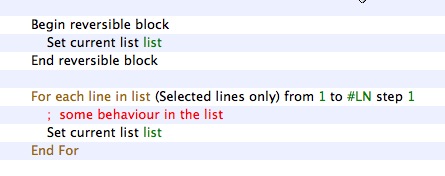
- The For list.$line to list.$linecount step 1 form is generally preferred for loops for the best blend of efficiency and readability. While…End While and Repeat…Until are slower and should only be used when required. In performance sensitive areas the construct below is preferred.
If using this construct, at the end of the loop, you must do a 'set current list' as a guard action and the setting of the list must be in a reversible block.
- Any long running loops should be nominated for conversion or re-factoring into SQL stored procedures if they perform any database access.
Method coding and placement
Method coding and placement
- One should avoid, where possible, putting behavior code in events under objects on a window. It is preferred to have a public or private method in the window class that an event calls, rather then putting the code directly under an event. This allows for encapsulated functionality and allows the behavior to be called for other purposes. For example, a button that opens the patron window should have the same code whether it opens from a toolbar button, or a push button -- This would be located in $clickBtnOpenPatronWindow of the class and called from both the push button $event and the toolbar button $event.
- Avoid writing code in window methods where possible. Window method code should only contain interface and interaction. If and code deals with database, the approach to be used is:
- to put that code into a table class
- invoke it from the window class by doing 'do list.$doMyMethod(parameters)'
- A comment in all methods is essential. At the very least a comment section should include what the method is expected to do based on what inputs.
- When altering existing code within a method, the developer should put a comment indicating what version the code was altered in as well as the initials of the developer altering it. E.g. ; V90000 DM (Version 9.00.00 [D]avid [M]cKeone)
Parameter Passing
Parameter Passing
- Throughout TM, the TMObjs.$makeparamrow() and TMObj.$loadparamvars() functions are used for passing parameters between objects. This method is favoured over passing individual parameters to a top-level class, especially when a large number of the parameters are optional. See wModeless.$construct for an example.
- When over-riding any method:
- always put the parameters in place that the superclass has:
- in the same order (verify the order always)
- document with the same parameter definitions
- copy whatever documentation from the superclass and augment with why you are over-riding the class if it is not obvious
- always put the parameters in place that the superclass has:
- All parameters are to have an initial value specified for default case. 0, kTrue, Kfalse or #NULL is acceptable if no value is wanted
Table Classes (SQL database)
Table Classes (SQL database)
- All foreign key relationships should be in $buildChildRecordList of the appropriate main table class. E.g. All relationships for the F_CLIENT database table are in the tF_CLIENT table class.
- All F_APPLICATION replaceable variables (indicated by a ‘g’ prefix). Should be specified in the $getReplacementSelectNames. Use $getReplacementSelectNames where possible:
- To avoid setting values in the omnis list - for performance reasons
- To add functions to replace gVars, especially where there may be multiple parent records to a relationship (eg sold by, changed by, printed by all connect to employee)
- To obtain key customer data like Primary Phone, email address and other data that varies depending on the outlet (department) of the employee who is logged in. Example: the primary address for patron 1 made be different for outlet A and B
- In reports so that there is limited record looping in the detail section of report (again for performance)
- Any validation on a table should be done in $verifyRecord of the main table class for that database table.
Tidying Up Code
Tidying Up Code
- Remove unused variables from the Local variables
- Remove unused variables from the Instance Variables. If a variable is not used in a superclass class, but is used in a number of subclasses, then in the superclass, in the construct, after the quit method, calculate the variable as itself so it will not show up as unreferenced.
- Check the class variables and see if they are used and remove if not
In Code Documentation
Class Documentation
Class Documentation
Method Documentation
Method Documentation
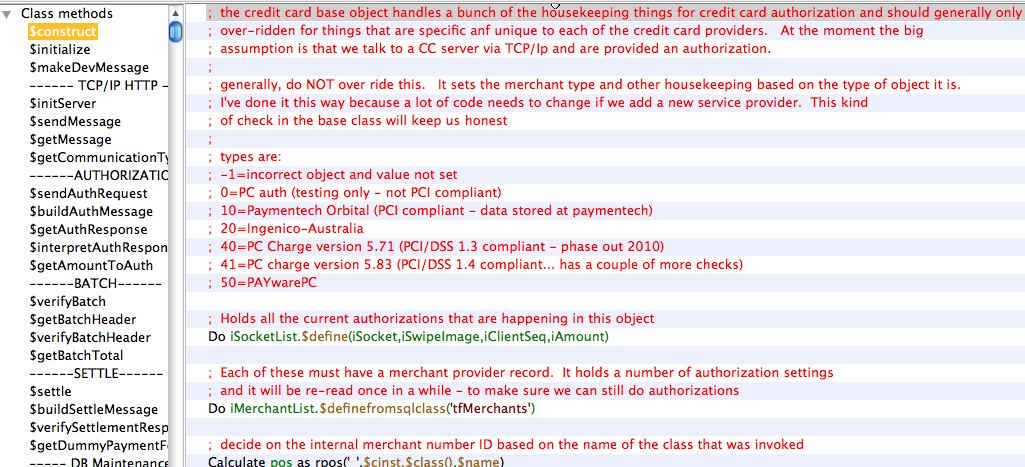
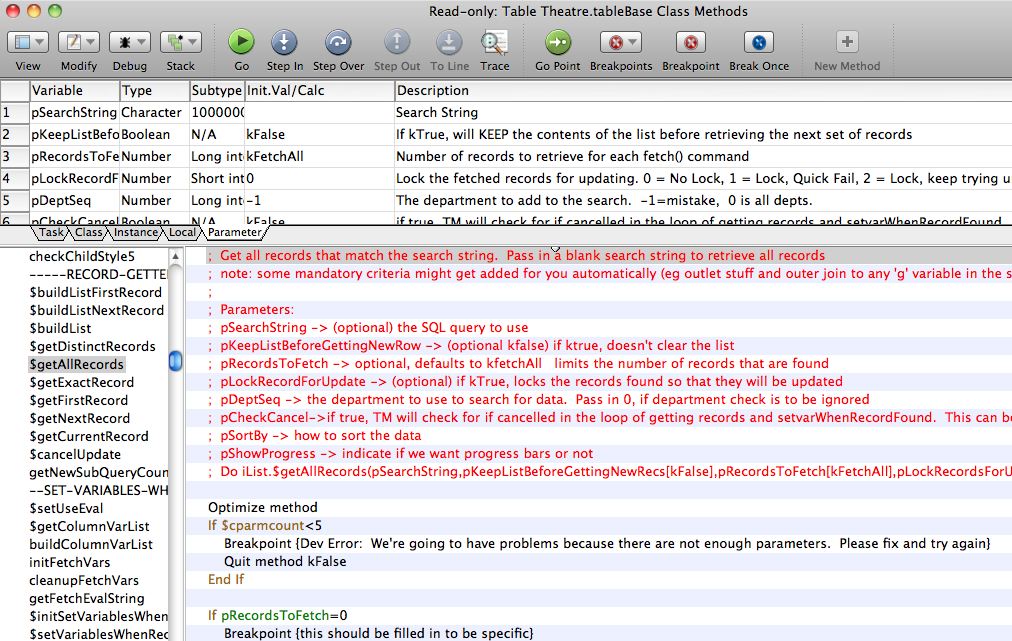
- a description for each parameter must be entered in the upper area
- In the method, at the top, is a description of the purpose of the method
- The parameters are repeated in text format as part of the method so that when a method is over-ridden, the parameter description will be copied into the over-ridden method.
- If there is an expected return value, document those at the top of the method
Also indicate if this method should never be over-ridden except in rare cases, could be overridden, or should be overridden.
Schema Documentation
Schema Documentation
This is one of the most important setup steps when creating new data base fields.
Schemas are to be documented in three places.
File Class
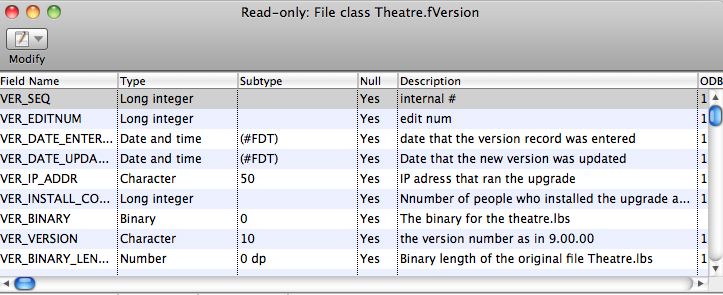
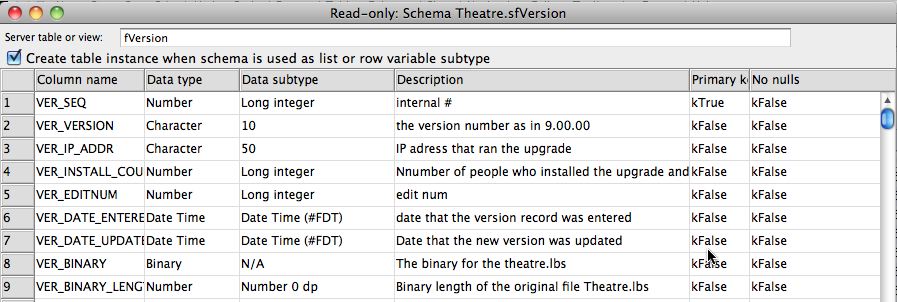
First, all database schemas will have a Studio ‘File’ class like the example below. The description in this area is for programmer assistance. It will show as tooltips to describe the field when looking it up for coding purposes.
Schema Class
Most file classes have a corresponding schema class. The schema class is what actually is used to describe the database fields and interact with the database. The field names, types, subtypes, and descriptions should be copied from the file class. This is also for programmer tool-tip quick documentation
Data Dictionary
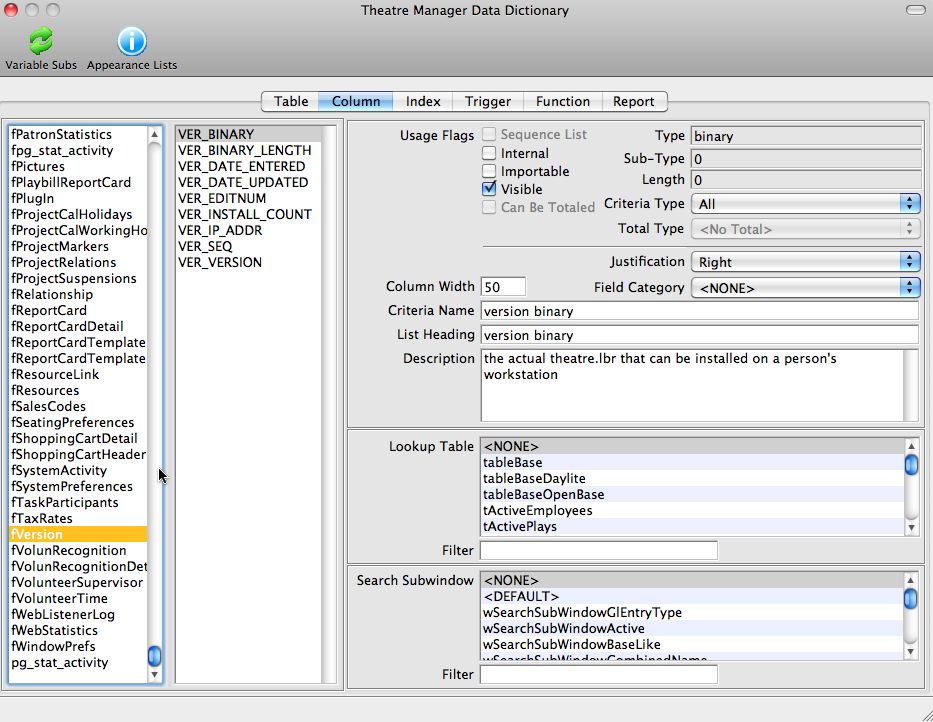
Once the file and schema classes have been defined, customer friendly field names are to be placed into the data dictionary. This is accessed off the Developer Menu->Data Dictionary.
Customer friendly descriptions are to be defined, along with a number of other data attributes as follows:
- Criteria Name (medium length name of the field for help)
- List Heading (short description of the field for the top of list columns wherever the field is used)
- Description (the tool tip to be displayed for the user when they hover over the field on any window)
- Usage flags for visibility and other options in Theatre Manager
- Justification for columns in lists
- Criteria level for use as a search field in reports and mail lists
- Lookup table - if the field is an enumerated data type and the user is to select 'is one of' the values from the list
- Search Sub Window which defines the sub window class to be used in list windows when this variable is used a search field
Enumerated Type Documentation (codetables)
Enumerated Type Documentation (codetables)
- FC_SEQ is the lookup number stored in a SEQ key in the database
- FC_RESULT1_NAME is the description displayed to the user
- FC_DEFAULT set to true for the item that is the default entry field
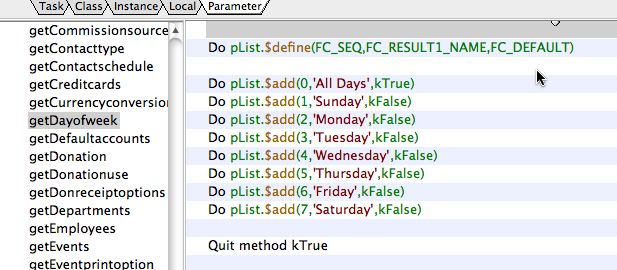
Within the 'oCodetables' class, there are a number of getters that will load up any one of the tables into your object.
Naming Conventions
Class Naming Conventions
Class Naming Conventions
| Class Type | Prefix | Notes |
| Code | c |
|
| File | f or F |
|
| Menu | m |
|
| Object | o |
|
| Query* | q |
|
| Remote Task | rt | |
| Report | r | |
| Schema | s |
|
| Table* | t |
|
| Task | none |
|
| Toolbar | T_ | |
| Window | w |
|
*Query class names should match the corresponding table class. E.g. tClient and qClient.
Data Dictionary
Data Dictionary
- All file classes (database tables) used for the Theatre Manager database must be assigned a unique prefix in the Data Dictionary. For example, F_CLIENT uses C_, F_PLAYSEATS uses PS_. There are several essential parts of Theatre Manager that rely on this naming convention for automatic foreign key determination.
- All primary key records are named with the prefix for the file class (database table) followed by SEQ. The primary key for F_CLIENT (C) is C_SEQ.
- All foreign key records require the use of the unique prefix within the name, as well as the suffix _SEQ. For example the F_CLIENT (C) foreign key on the F_PLAYSEATS (PS) record is PS_C_SEQ.
- If the user should not ever see a column, then it should be marked as internal. It is not required to enter a description for internal fields.
Method Naming Conventions
Method Naming Conventions
- Methods are named with camel case beginning with a lower-case letter. E.g. $myMethod
- A method used for a button behavior should begin with $clickBtn. E.g. $clickBtnBuyTicket
- getter methods should start with $get (eg $getCurrentColour)
- setter methods should start with $set (eg $setCurrentColour)
- group similar function methods under a dummy header method with a name that starts with some ---- eg '---- Window Open Methods ----'
Variable Naming Conventions
Variable Naming Conventions
However, if is a parameter, local, or instance var that is meant to track a cope of a database SEQ key, then call it what it is. eg pM_SEQ means that the parameter we expect is an M_SEQ key. This helps with variable assignment.
All database names will be named using underscores and in UPPER_CASE to make an obvious differentiation between the database and other task/class/instance/local variables.
Scope / Type |
Prefix | Convention |
Task |
t |
|
Class |
c |
|
Instance |
i |
|
Local |
none | Developer preference, prefer myVariable rather than MyVariable. |
Parameter |
p |
|
Constant |
k |
|
Proctected Classes
Proctected Classes
The architects will monitor the VCS activity on these classes by running checkin/checkout reports for any violations of this policy.
Credit Card Processing
Credit Card Processing
Developers should be aware if they are modifying anything that can impact or change what we do with sensitive customer data, a senior developer must review it. Keep the PA-DSS guidelines in mind when developing in these areas is key, and you can review the Theatre Manager install documentation under PCI compliance.
The following classes in the VCS are under the protection of the Senior Architect any potential changes to these classes need to be run by them first. These are the key base classes that affect credit card sales, refunds, exchanges, or storage of the credit card data.
- Any class with a name that starts with oCCAuthorize
- Any changes to the tfCreditCard table class that stores and encrypts data in the database.
- Any file, schema and table classes for ‘Merchant Setup’ such as fMerchant, sfMerchant, and tfMerchant
- Any changes to the wMerchant window
External Components
External Components
- Theatre Map - for displaying pictures on the screen. Changes to this library are handled through a test library that exposes all functions and methods.
- TMObjs - to improve performance on a small number of string related functions. Changes to this code are tested through an automated test library. See the systems architect.
- oWrite - a word processor purchased from Brainy Data. oGantt - the gantt chart display tool purchased from Brainy Data.
When a new eternal component is available, all developers will use the latest version on their test platform while coding to uncover adverse effects for sufficient enough time as determined by the senior architect. Regression testing will also be performed prior to release by SQA.
Superclass objects
Superclass objects
- tableBase – the base table class for all database i/o
- any class that starts with ‘wModeless’ (wModeless, wModelessList, wModelessEntry, etc) – these are the 4 or 5 key windows that control and manage all GUI interaction and record i/o.
- any class that starts with ‘reportBase’ as they look after reports
- the oQuery and oQueryGroup objects as they are used to pass around an SQL query between objects.
- oStringFields - which handles specialized string manipulation
- oEditCheck - which handles special validation for certain kinds of data
- the oSecurity object that handles the Role Based Access Control
Web Listener Objects
Web Listener Objects
The object pertinent to web listeners are:
- Anything that starts with 'oWebCom' - each of which represents a unique API to the database from the web
- wWebSales - which is the GUI interface to the web component
- rtWebSales - which is the remote task started every time an end user sends a URL to the apache server.

The web sales listener can only respond to traffic sent to it via the nginx module. - cWebSales - the broker for transferring messages to/from the interface and any instance of a web object that was created
Sensitive information in Code
Sensitive information in Code
- When the sensitive data is stored in the database (like user ids for logging in, or credit card numbers), it will use high encryption such as AES256 or better. Any seeds or salted keys will also be encrypted using some such mechanism and stored as a static variable inside the database or application.
- Any data to be transmitted from one machine to another:
- shall use the most recent high encryption transport technology (currently TLS 1.2 or 1.3) and
- shall not use any encryption found to have been compromised (SSL1 through TLS1.1 etc)
- Any key, user id, or encryption salt that must, by necessity, be stored in the application shall also be encrypted as a static variable and decrypted before use during each run of the application and/or of that method so that keys rarely exist even in memory in unencrypted form.
- Any un-encrypted key should be in local variables so that they are destructed automatically at the end of the method. This constant decryption and discarding of keys, salts, logins, and credit card data should minimize the possibility that it may exist in real memory, or even in virtual memory
- Never use real credit cards to test credit card processes in the test environment. Use the supplied test cards and accounts that are provided by the test merchants.
Upgrade Methodology
Upgrade Methodology
- Each version has a Steps and Update method.
- E.g. For version 8.24.xx there are methods called “Steps 8.24.xx” and “Update 8.24.xx”.
- It is expected that each upgrade performed in Update has a matching step in Steps.
- There is also a method called 'versionUpdates' that adds the update step to a list. This must be set for the upgrade to be invoked
- All changes to the file fSystemPreferences must be made in 'addSystemPreferencesFields' as these particular fields are sensitive and must be set up prior to login or creating other upgrade steps
- All other new fields or tables are established in 'addAllNewDBFields' which is done before any of the update steps are run. This ensures the database consistency before any steps begin
Vulnerability Awareness/Training
Vulnerability Awareness/Training
If any site reports a threat that may affect security, a project will be created in Fogbugz to deal with testing where it impacts Theatre Manager.

- postgresql Always check for the current production version of postgres and see if there is a new release. Releases typically are about once per quarter. When there is a new version, then make sure to read the release notes to see if there are
- bug fixes beneficial to Arts Management
- and fix that specifies some security vulnerability
- Developers are always expected to be at the latest release for testing
- Nginx. The web server processes are dependant upon Nginx and PCI compliance scans generally identify old or outdated versions of Nginx. Check monthly to see if there are any new stable releases available. We do not use Alpha or Beta releases of Nginx, only mainline releases.
- Omnis Studio Check for an new releases or patches to the devlopment tool. Of special interest are bug fixes and/or any release that implements additional security in other areas like TLS, etc.
- macnn is a newsnet style mac based web site. It can usually be relied upon to report both mac and PC news (especially if it is negative)
- Credit Card processors such as
- Orbital regarding notices about Paymentech Orbital
- Refer to supported merchant processor page for other links
- OWASP - to review emerging internet vulnerabilities at least semi annually.
- per PCI requirement 2.2, periodically check NIST for reported security vulnerabilities and record pertinent ones in the vulnerability assessment for each component we use.