
Arts Management Systems

Main menu

  • AMS Cloud Status
  • Product Info
  • Community
  • Contact Us
  • Mailing List / RSS Feed
  • Privacy Policy
  • Installing Theatre Manager
  • Upgrading Theatre Manager
  • Quick Reference Guides
  • Self-Guided Demo Tutorial
  • Theatre Manager Online Help
  • Form Letters and EBlasts
  • Facility Management
    • Definitions
    • Facility Management Set Up
    • Calendars
    • Tasks
    • Projects
    • Gantt Chart and Treelist Project Viewing
      • Project Toolbar / Ribbon Bar
        • Normal View
        • Detail View
        • Participant View
        • Printing the Chart
        • Graph View
      • Project Treelist
      • Project Gantt Chart
      • Detail Editing Subwindow
      • Buttons and Dragging
      • Right Click Context Menus
    • Billing and Accounting
    • Notifications
    • Manage Volunteers
  • Reports
  • Reveal Dashboards
  • REST API Overview
  • Web Page Documentation
  • Frequently Asked Questions
  • Theatre Manager: Responding to COVID 19
  • Newsletters
  • AMS Cloud Status
  • Product Info
  • Community
  • Contact Us
  • Mailing List / RSS Feed
  • Privacy Policy

You are here

Home › Facility Management › Gantt Chart and Treelist Project Viewing › Project Toolbar / Ribbon Bar

Participant View

Subscribe to Syndicate

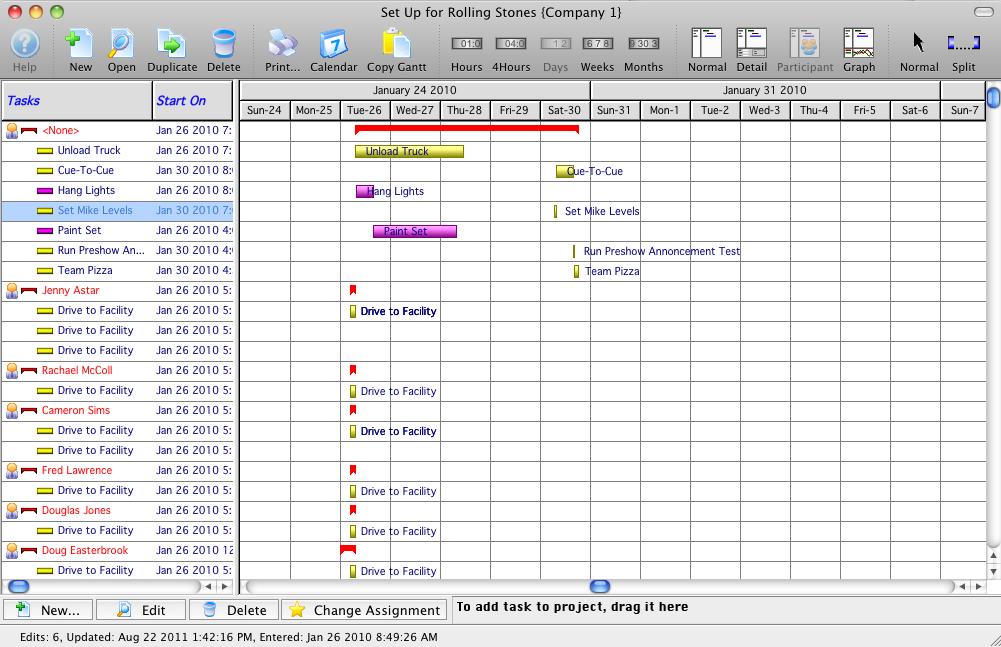
In the Gantt Participant view, each participant is displayed on the treelist side of the window with each of their tasks underneath. This may cause some tasks to display multiple times... once under each person who is a participant in this task. At the top may be a participant called "<None>", indicating tasks without any participants.
Book navigation

‹ Detail View up Printing the Chart ›
  • Printer-friendly version