Entry Requirements (such as Proof of Vaccination)
Entry Requirements (such as Proof of Vaccination)
- Rules varies from place to place and change by the day.
- Please be aware your your local requirements and edit the following web pages as appropriate.
 |
Theatre Manager does not support uploading vaccination status. Most rules we have seen require proof at the door to avoid issues such as people buying tickets for others. |
|
Adding Covid 19 related instructions for entry to the venue including those Provinces or States that require vaccine proof or passports means adding text to some fields in web options in Theatre Manager Company Preferences. |
|
These instructions assume you have not customized the following pages:
|
If you want to let your patrons know that they are subject to some specific requirements, editing one or more of the following web pages are things you can do right now:
| Warning before purchase |
 There are three note/warning/danger text areas you can add to the event list in the Event list in the purchasing tab in the Web options on the company preferences window. You can make your event list look like the one to the right be editing the Warning and Danger tabs as per the images below. Note: that the example uses markup to achieve bold, underline and bullet points -- without having to know HTML. |
|
Sample Warning Note in Markup
Sample danger Note in Markup
|
|
| Explicit acknowledgement at time of payment |

These are:
Acknowledgement Please be sure to enable the Acknowledge Terms and Conditions checkbox to see this warning. If enabled, the user will be required to acknowledge they have read the terms and conditions. This acknowledgement is stored for each cart. The requirement for acknowledgement of terms and conditions must be enabled in company preferences. We suggest only saying that you have a policy and add a link so that they can read the policy on your main web site. |
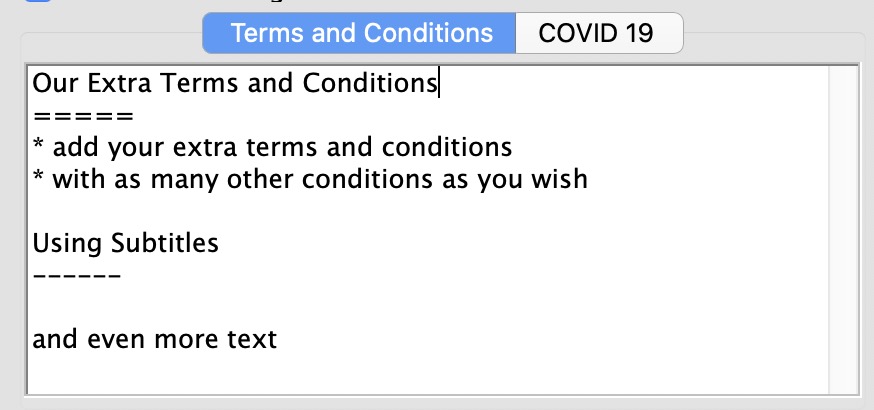
Terms and ConditionsAdd your extra terms and conditions that will show when they are enabled on the checkout window.
|
|
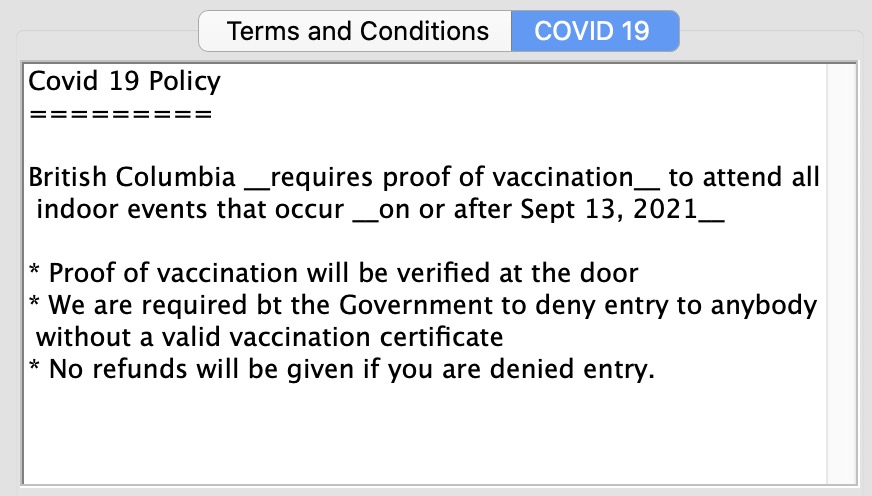
Covid 19Enter your Covid 19 policy in plain text, HTML or markup language and it will appear in the web site automatically. Adding words to covid 19 tab are what causes the 'accept terms and conditions' checkbox on the web site to say that there are Covid 19 conditions per the instructions above.
|


 There are two notes that pertain to terms and conditions that you can change on the
Payment Acknowledgement Page
Payment Acknowledgement Page
 The edits for this consist of manipulating the following files in the TMtemplates as follows
- editing tmCheckoutRefundExchangePolicy.html
- editing tmtermsandconditionsmodal.html
- duplicating
- tmtermsandconditionsAccessibleSeating.html
- and calling it tmtermsandconditionsCovid19.html
- Copying and Editing a new tmtermsandconditionsCovid19.html
Copy tmBoxOfficePolicyCovid19Modal.html
Copy tmBoxOfficePolicyCovid19Modal.html
|
The instructions assume you have downloaded the latest pages so you can customize them. Please download if you have not done so. |
- Copy the file tmBoxOfficePolicyCovid19Modal.html from the sample webpages tmFee folder and put it into the same place in your website
- The file look like the code below - you do not need to make any changes
|
<div aria-labelledby="AccountModalDialog" class="modal fade" id="Covid19Policy" role="dialog" tabindex="-1"> <div class="modal-dialog" role="document"> <div class="modal-content"> <div class="modal-header"> <button aria-label="Close" class="close" data-dismiss="modal" type="button"> <span aria-hidden="true"> × </span> </button> <h3 class="modal-title modal-info"> Box Office Policies </h3> <div class="modal-body"> <!--#include virtual="tmFee/tmBoxOfficePolicyCovid19.html" --> </div> <div class="modal-footer"> <button class="btn btn-info" data-dismiss="modal" type="button"> Close </button> </div> </div> </div> </div> </div> |
Edit tmBoxOfficePolicy.html
Edit tmBoxOfficePolicy.html
|
The instructions assume you have downloaded the latest pages so you can customize them. Please download if you have not done so. |
- Copy the file tmBoxOfficePolicy.html from the sample webpages tmFees folder and put it into the same place in your website
- Edit the file which will look like the code below
- Add in the new line highlighted in yellow. You can copy and paste it
- If the line looks like it is already there, remove the comment: in it to make it the same as below
- Save the File
|
<!DOCTYPE html> <html lang="en"> <head> <base href="<field>F_HTML_IMAGE_SERVER</field>"/> <title> <field>D_COMPANY_LONG</field> | Box Office Policies </title> <!--#include virtual="tmScripts/styles.html" --> <!--#include virtual="tmScripts/pleaseWaitMessageFunction.html" --> <!--#include virtual="tmScripts/googleHeader.html" --> </head> <body class="backgroundPopup"> <div class="container"> <div id="content"> <h3> Box Office Policies </h3> |
|
<!--#include virtual="tmFee/tmBoxOfficePolicyCovid19.html" --> |
|
<!--#include virtual="tmFee/tmBoxOfficePolicyTickets.html" --> <!--#include virtual="tmFee/tmBoxOfficePolicyExchanges.html" --> <!--#include virtual="tmFee/tmBoxOfficePolicyLostTickets.html" --> <!--#include virtual="tmFee/tmBoxOfficePolicyOrderFees.html" --> <!--#include virtual="tmFee/tmBoxOfficePolicyMailingFees.html" --> <!--#include virtual="TMtemplates/tmContactHours.html" --> </div> </div> <!--#include virtual="TMtemplates/tmFooter.html" --> </body> </html> |
Edit tmBoxOfficePolicyCovid19
Edit tmBoxOfficePolicyCovid19
|
The instructions assume you have downloaded the latest pages so you can customize them. Please download if you have not done so. |
- Find the file called tmBoxOfficePolicyCovid19.html in the sample web site tmFee folder
- Copy it to your web site tmFee folder
- This file has sample wording in it about covid 19 policies
- Find the code in yellow and DELETE it from your web page
- Make any wording changes you might need to make to suit your Province or State's specific rules
- Save the File
| <!-- comment: remove this line and the last line to add a covid 19 policy and then change wording as appropriate |
|
<h4> Covid 19 Policy </h4> <div class="alert alert-warning fade in"> <!--#include virtual="TMtemplates/tmMessageDismiss.html" --> British Columbia <b> requires proof of vaccination </b> to attend all indoor events that occur <b> on or after September 13, 3021 </b> <p> </p> <ul> <li> Proof of vaccination will be verified at the door. </li> <li> We are required by the Government to deny entry to anybody without a valid vaccination certificate. </li> <li> No refunds will be given if you are denied entry. </li> </ul> </div> |
| remove this last line --> |
Edit tmCheckoutCovid19Policy
Edit tmCheckoutCovid19Policy
|
The instructions assume you have downloaded the latest pages so you can customize them. Please download if you have not done so. |
- Copy the file tmCheckoutCovid19Policy.html from the sample webpages tmTemplates folder and put it into the same place in your website
- Edit the file which should look like the code below to make it suitable for your needs
- Save the File
|
<field>pick(SCH_TIX_QUANTITY+SCH_PASS_QUANTITY,'<!-- comment: if more than donations, show covid19 policy')</field> <br/> <br/> By clicking the checkbox, I also agree to the <!-- button trigger modal --> <button class="btn btn-link btn-xs" data-target="#Covid19Policy" data-toggle="modal" type="button"> Covid 19 Vaccination Requirements for entry </button> policy <!--#include virtual="tmFee/tmBoxOfficePolicyCovid19Modal.html" --> <field>pick(SCH_TIX_QUANTITY+SCH_PASS_QUANTITY,'-->')</field> |
Edit tmCheckoutTermsAndConditionsAcceptance.html
Edit tmCheckoutTermsAndConditionsAcceptance.html
|
The instructions assume you have downloaded the latest pages so you can customize them. Please download if you have not done so. |
- Copy the file tmCheckoutTermsAndConditionsAcceptance.html from the sample webpages TMtemplates folder and put it into the same place in your website
- Edit the file which will look like the code below
- Add in the new line highlighted in yellow. You can copy and paste it
- Save the File
| <field>pick(D_REQD_ACKNOWLEDGE_CRITERIA,'<!-- comment:')</field> <div class="form-group"> <div class="col-sm-offset-3 col-sm-9"> <div class="checkbox"> <div class="alert alert-warning"> <label for="conditions"> <input id="conditions" name="ORD_ACKNOWLEDGED_CONDITIONS" type="checkbox" value="1" <field>pick(SCH_ACKNOWLEDGED_CONDITIONS,'','checked')</field>/> I have read and accept all <!-- button trigger modal --> <button class="btn btn-link btn-xs" data-target="#termsConditions" data-toggle="modal" type="button"> Terms and Conditions of Sale </button> and clicking the checkbox affirms my valid electronic signature for this purchase. |
|
<!--#include virtual="TMTemplates/tmCheckoutCovid19Policy.html" --> |
|
<!--#include virtual="TMtemplates/tmCheckoutRefundExchangePolicy.html" --> </label> <!--#include virtual="TMtemplates/tmtermsandconditionsModal.html" --> </div> </div> </div> </div> <field>pick(D_REQD_ACKNOWLEDGE_CRITERIA,'-->')</field> |
Edit tmtermsandconditionsSpecialAnnouncements.html
Edit tmtermsandconditionsSpecialAnnouncements.html
|
The instructions assume you have downloaded the latest pages so you can customize them. Please download if you have not done so. |
- Copy the file tmtermsandconditionsSpecialAnnouncements.html from the sample webpages TMtemplates folder and put it into the same place in your website
- Edit the file which will look like the code below
- Add in the new line highlighted in yellow. You can copy and paste it
- Save the File
|
<!--#include virtual="tmFee/tmBoxOfficePolicyCovid19.html" --> |
|
<!-- comment: place any special/topical announcements/policies here. Eg: Covid 19 <h4> Special Announcements </h4> <div class="alert alert-warning fade in"> <!--#include virtual="TMtemplates/tmMessageDismiss.html" --> Watch this space for any special policies. </div> --> |