Payment Method Credit Card (Linked Refund)
Payment Method Credit Card (Linked Refund)
There are two types of credit refunds:
- Linked Refunds: preferred by credit card providers to avert fraud as it only refunds to the card used on the original order
- Independent Refunds: return money to any card you wish. You may need permission from the credit card provider to use this type
Linked Refunds - Always attempt these First
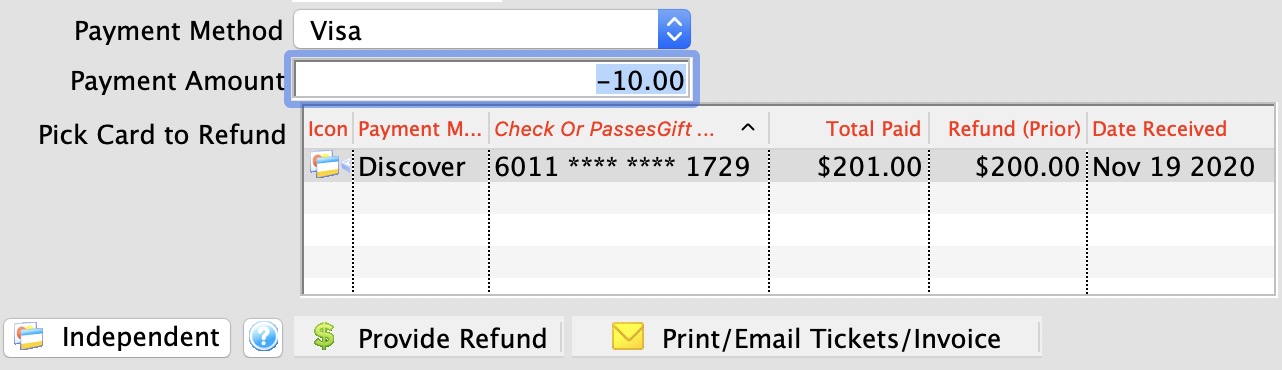
The system assumes that all credit card refunds are linked. The process of doing a refund occurs when the payment amount for a credit card is negative. Theatre Manager:
- displays the list of prior cards showing original authorized amount and refunded amount so far
- allows you to select a card for the refund. The amount you refund should be no more than the original authorization less any prior refunds. For example, if the original authorization is $100 and there are cumulative refunds of $75, then the maximum refund should be $25 for that card
- allows you to pick another card or another authorization to refund if there is more than one card option
Independent Refunds - Attempt Last
What if you need to refund to a completely different card from one in the list? If your merchant provider setup allows independent refunds, then the Independent Refund Button appears.
Click the button, the screen will change, and you will be able to refund to any card that you enter, or if using EMV device, put into the system.
 |
Only credit cards authorized within the TIME limit set in your merchant setup will show up in the list.
The time limit should match that given by your credit card provider (typically between 120 and 400 days, depending on provider). Only extend the limit to see older cards after contacting your merchant provider. |
|
If you are working in an outlet situation, you cannot do linked refund to a credit acrd taken at another outlet. You can only refund to credit cards your outlet has taken |
|
If the Refund Payment is disabled, check the error message at the bottom of the window. Likely the card has not been deposited yet. That means you must either:
|
|
If you get a weird message from your merchant provider or still cannot refund after contacting them to adjust the limit, you can:
|