Device-Ticket Printer
Device-Ticket Printer
A thermal ticket printer is configured up by selecting Ticket Printer as the device type and entering the information below.
The selection of the printer port (above) affects what is shown on the IP Address/Port below.
IP Address
IP address of printer if using ethernet printer. The field is not displayed for Serial or LPT printers.
Port Parameters
This field will appear for serial printers. Enter the baud rate and handshake information. Typically it is 9600,n,8,1,X, meaning:
IP Port Number
IP port of printer if using ethernet printer . The field is not displayed for LPT or serial printers.
Print Delay
Allows for a printer buffer to clear before printing the next ticket. This delay is hardware specific. If tickets are being printed on top of one another, tickets are not printed correctly, or if tickets are skipped during the printing process the print delay should be increased.
Ticket Cutting Options
If printer supports ticket cutting, there are three options to choose from: Cut each ticket, Cut after last tickets for patron, or Do not cut tickets
 |
NOTE: NEVER install any software printer drivers for any ticket printer.
Theatre Manager does not use them and installing the printer drivers may affect the ability to print tickets and other reports. |
|
Theatre Manager supports several commercial ticket printers. They must have the FGL language installed in them and one of ethernet, serial, or parallel ports. (USB is currently not supported).
|
This preference is used to setup a ticket printer that can be associated with a workstation - meaning you can set difference preferences for each machine you use.
Refer to ticket face setup if you want to print different events to different printers or ticket stock.
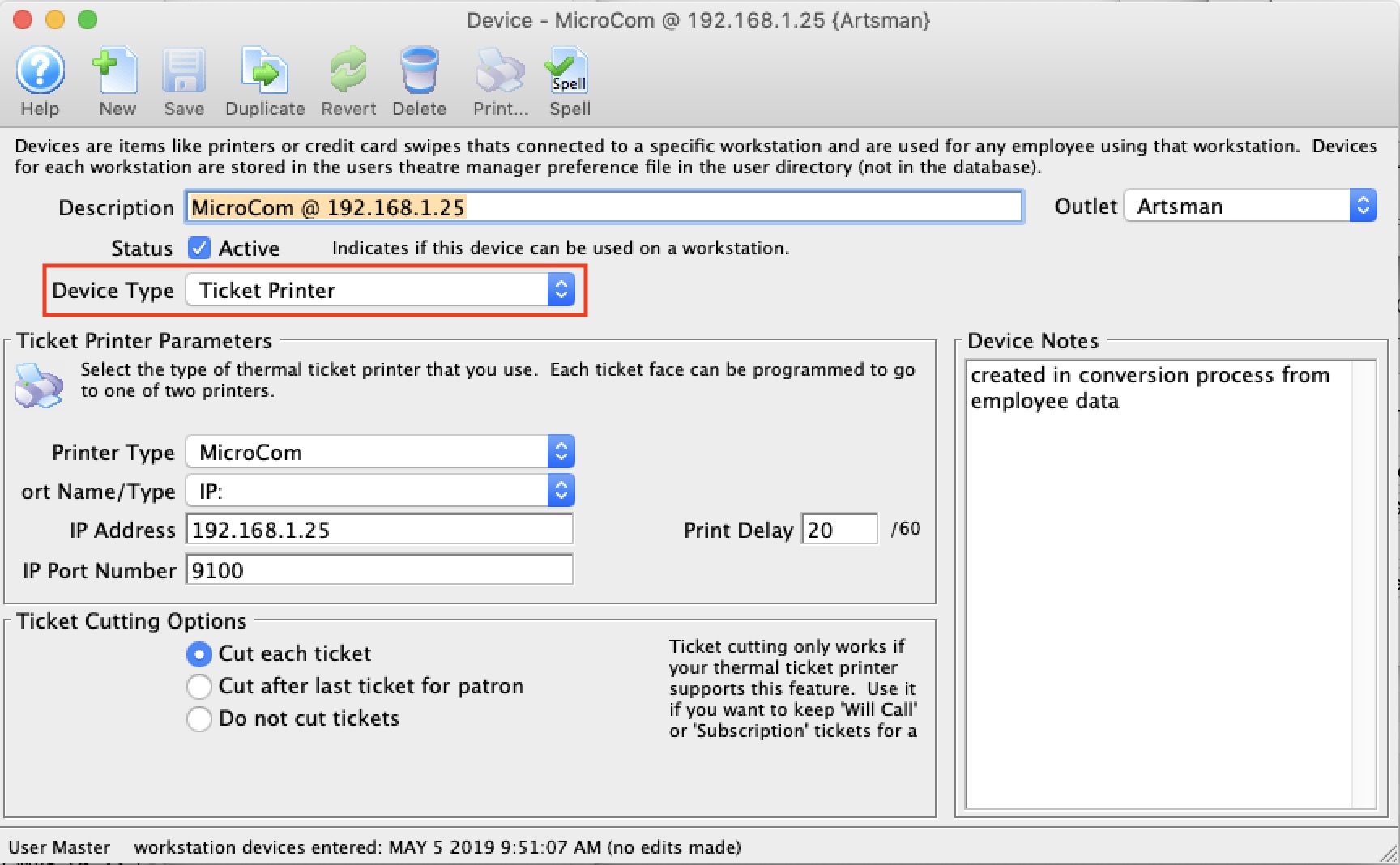
Parts of the Ticket Printers Tab
Ticket Printer Configuration |
|||
| Printer Type | Tickets can be printed to any one of the following printers (as long as it has FGL language support in it):
Note that there are some differences in the ports, handshakes and FGL capabilities in each printer so it is important to select the right one. |
||
| Port Name | The port the primary ticket printer is attached to. Note that there are choices here that affect other fields on the screen. You can select:
|
||
|
If you have a Practical Automation ethernet printer, you can find the IP address by printing the system status report
|
- 9600 - for 9600 baud. This must match your physical printer otherwise nothing will happen. 9600 is the most common value.
- n - n mean no parity. this is also a typical value
- 8 - means 8 data bits. This is a typical value. Sometimes 7 is used.
- 1 - means 1 stop bit. This is typical.
- X - means Xon/Xoff protocol.
- Practical Automation printers ship with the default port 10001 (which can be changed).
- Boca Lemur printers ship with the default port 9100 (which cannot be changed)
- Microcom printers ship with the default port 9100 (which can be changed).