Modifying a Donation
Modifying a Donation
Typical things to change are:
- Increasing the donation amount or modifying any other data on the donation.
- Decreasing the donation amount after it has been receipted
- Modifying one or more program and/or tax receipt names en masse for donations for the patron.
Increasing the Donation Amount
Increasing the Donation Amount
You may wish to modify a donation for various reasons. To add notes, make payments on pledges ect. Modifying a donation is preformed quickly through the Donation Detail Window.
- Open the Patron Record.
For details on locating a Patron Record click here.
- Click the Donation
 tab.
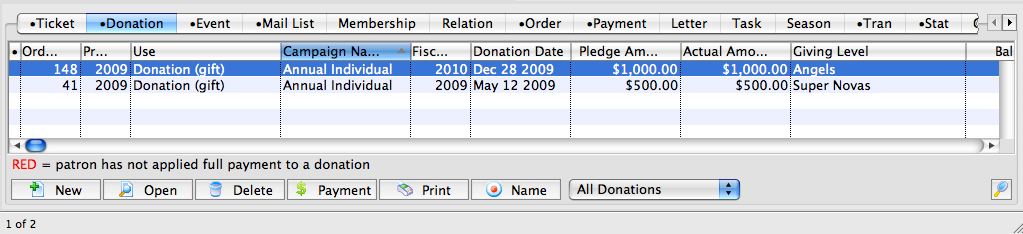
- Select the Donation to edit.
Single click on a donation to select it.
- Click the Open
 button.
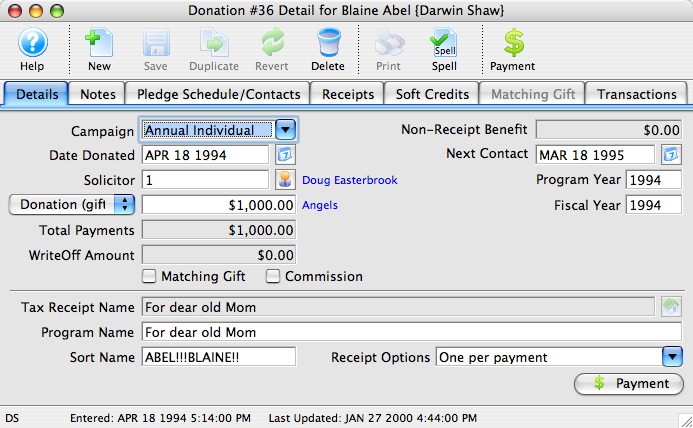
- Change data as needed.

If a receipt has been printed for the donation you will not be able to edit the Tax Receipt Name Field.
- Click the Save
 button.
The changes have now been made to the donation.
- Close the detail window.
Decreasing the Donation Amount
Decreasing the Donation Amount
Donations - Set Donation Name
Donations - Set Donation Name
 button.
The Set Donation name dialog opens.
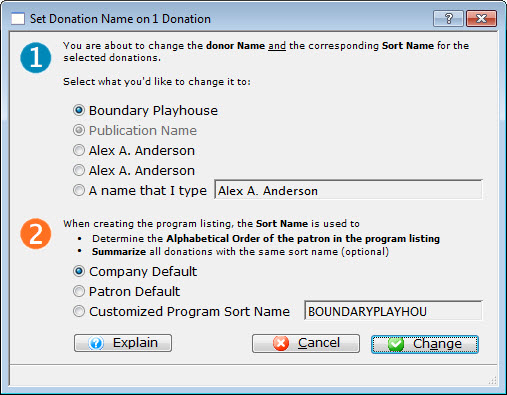
Step 1. You are about to change the donor Name and the corresponding Sort name for the selected donation. Select the name you want to change it to.
 |
You are given a number of choices and the option to enter another name. However, please read about Canada's Tax Receipt Name Implications if you want to type something other than the patron's name. |
Step 2. When creating a program listing, the Sort Name is used to determine the aplhabetical order of the patron in the program listing and to summarize all donations with the same sort name. Select the Name you want to change to.
Again you are offered a list you can select from and the option to enter your own Customized Sort Name.
Once you have made your selections, press the Change  button.
You are returned to the Donations tab.