Order Currently Being Sold
Order Currently Being Sold
The Orders Currently Being Sold function can be used to release orders considered to be currently in use by another user. You may need to use this if you get the message order being modified.
This may help resolve issues where:
- the End of Day seems to be out of balance or
- if a workstation crashes or is forced quit in the middle of working on an order.
 |
NOTE: is an order is in use, users generally cannot see the order in the 'order tab' on the patron window. That is so that nobody attempts to edit, change, or rebuild it. |  |
You should only clear orders where you are absolutely sure nobody is actually working in them.
For any order that is current, please check with any other users to ensure they are not working with that order. |
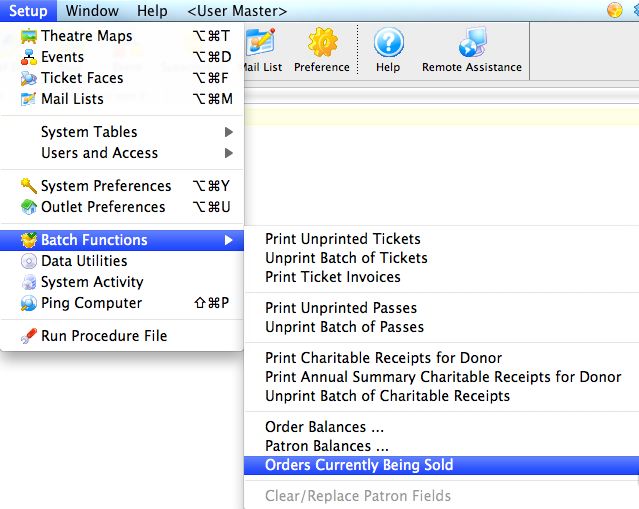
- From the main menu bar, go to Setup >> Batch Functions >> Orders Currently Being Sold.
The Order Currently Being Sold window opens.
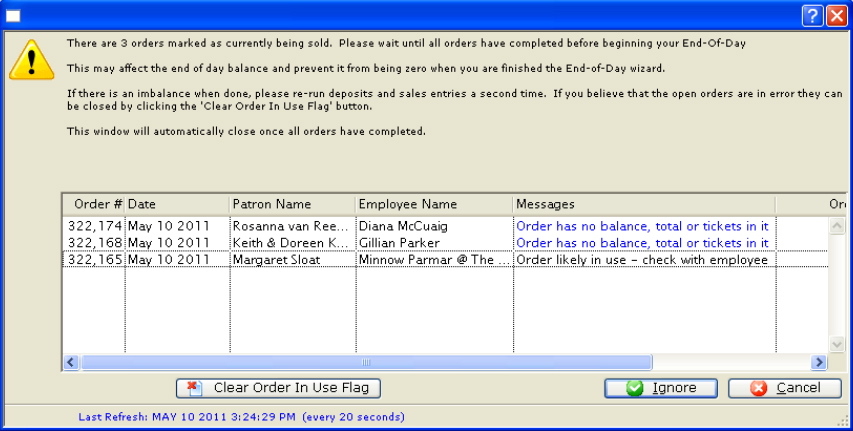
- Select the order you want to clear the 'being sold' flag, by single clicking on it.
You should only clear old orders or those where you are sure nobody is actually working in them. For any order that is current, please check with any other users to ensure they are not working with that order.
- Click the Clear Order In Use Flag
 button.
This will clear the order and allow the order to be accessed again.