Direct Donation Add Link (quick add)
Direct Donation Add Link (quick add)
https://tickets.yourvenue.org/TheatreManager/1/login?donationquick=xx&amount=100.00
[&DD_FLD1_FC_SEQ=pp][& DD_FLD2_FC_SEQ=qq][& DD_FLD3_FC_SEQ =rr][&frequency=0][¶m=altbtn=btnCheckout][&tmsource=zzzzz]
This link allows you to add a donation to the shopping cart with minimal interaction. It means you can put it anywhere on any web page. The user does not get any choices. If you wish choices like Donate $10 or Donate $50, you will need to put multiple buttons on the page.
 |
This URL supports quickly adding a donation to a cart from ANY web page including:
|
Sample web flow using this link
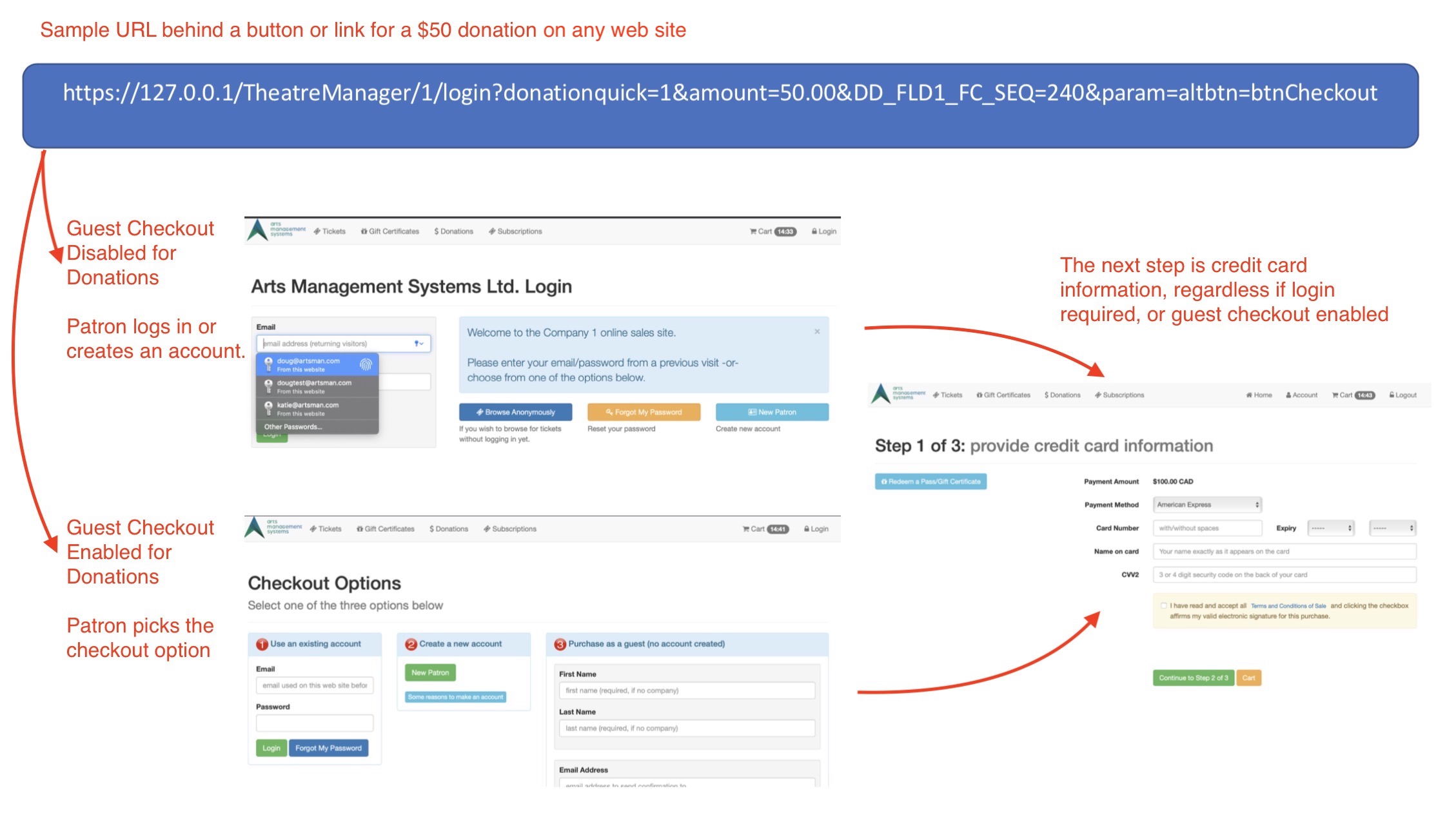
In the image above, the URL to quickly add a donation can be on any page. If it contains the minimum data needed, the diagram shows the flow that occurs for regular patron checkout and for guest checkout.
Parameters on the URL
The following parameters can be added after the tickets.yourvenue.org/TheatreManager/1/login?
- donationquick=xx where xx represents the Campaign # from within Theatre Manager.
- amount=100.00 is required and sets the amount of the donation.
-
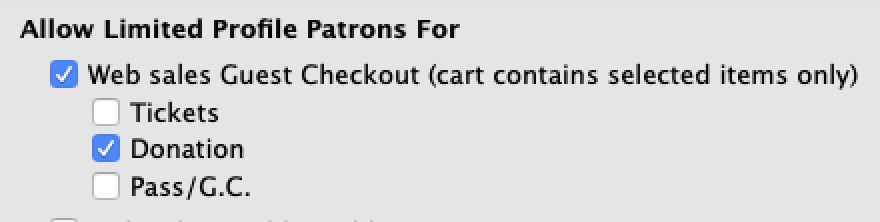 param=altbtn=btnCheckout (optional). After the donation is added, the user is typically taken to the shopping cart.
Use the param features if you want the patron to go directly to the checkout page. Patrons will:
- need to log in to their account, -or-
- if you allow use of the limited profile patron feature (AKA guest checkout) for donations, the patron can make an account that meets minimum data required for a patron.
- DD_FLD1_FC_SEQ=pp (optional). If specified, pp must be a valid, active value from the Donor#1 Popup code table. Invalid values will result in rejection.
Note: If any donor popup is mandatory in company preferences, you must specify this parameter and a value for it in the URL. - DD_FLD2_FC_SEQ=qq (optional). If specified, qq must be a valid, active value from the Donor#2 Popup code table
- DD_FLD3_FC_SEQ =rr (optional). If specified, rr must be a valid, active value from the Donor#3 Popup code table
- frequency=0 (optional) and suggests the frequency for recurring donations. The default is 0, for a single, one-time donation.
Values of frequency are:
- 0 - one time gift (the default)
- 1 - monthly recurring gift
- 2 - A Gift Every 2 Weeks
- 3 - A Gift Every 3 Months (each Quarter)
- 4 - Annual Gift
- 5 - Daily Gift
- 6 - Weekly Gift
- 7 - A Gift Every 2nd Month
- tmsource=yyyyyy (optional) where yyyyyy is a tracking code that is placed on any cart for tracking the source of the referral.
Example donation quicklink in form letters
Example donation quicklink in form letters
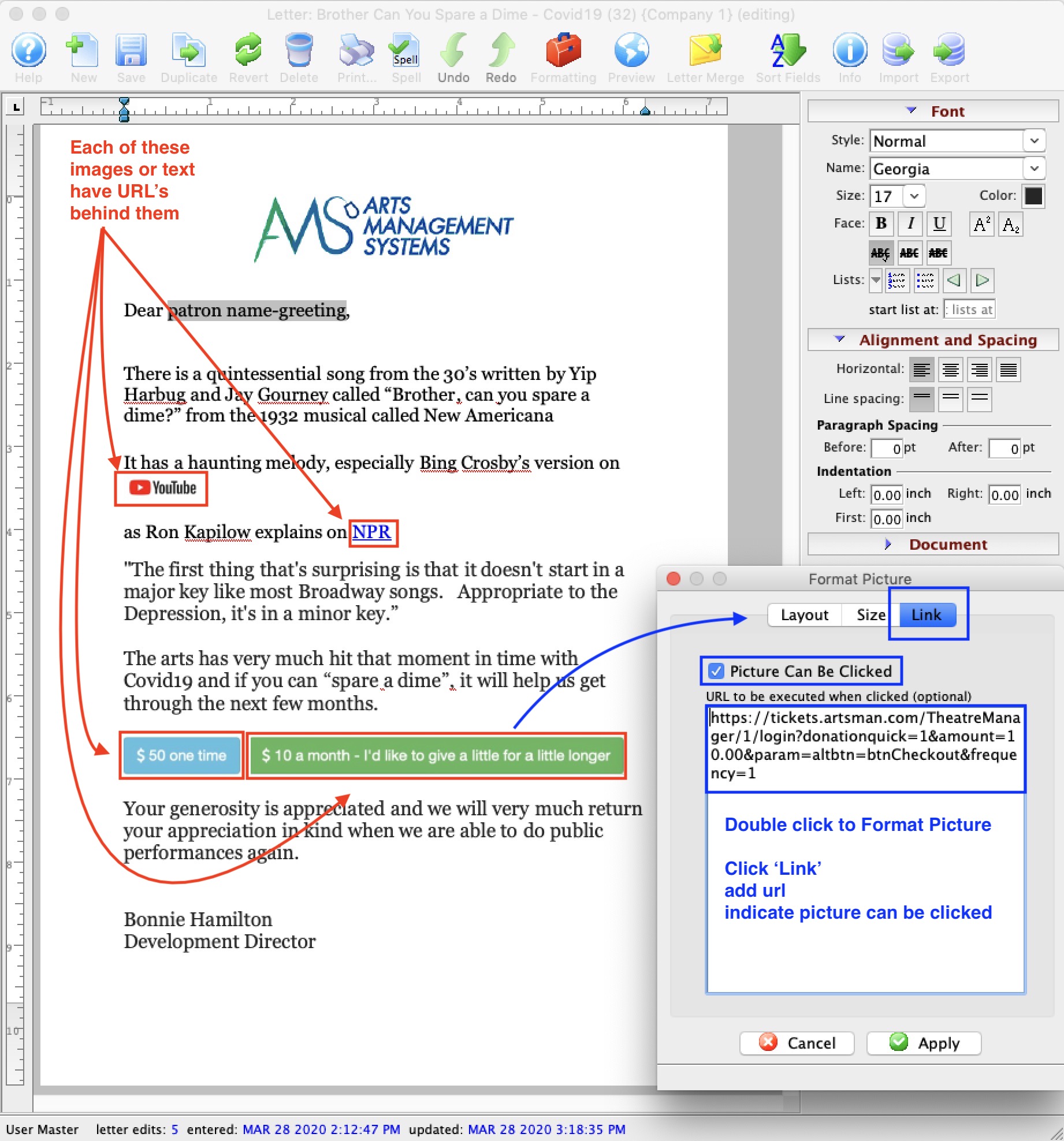
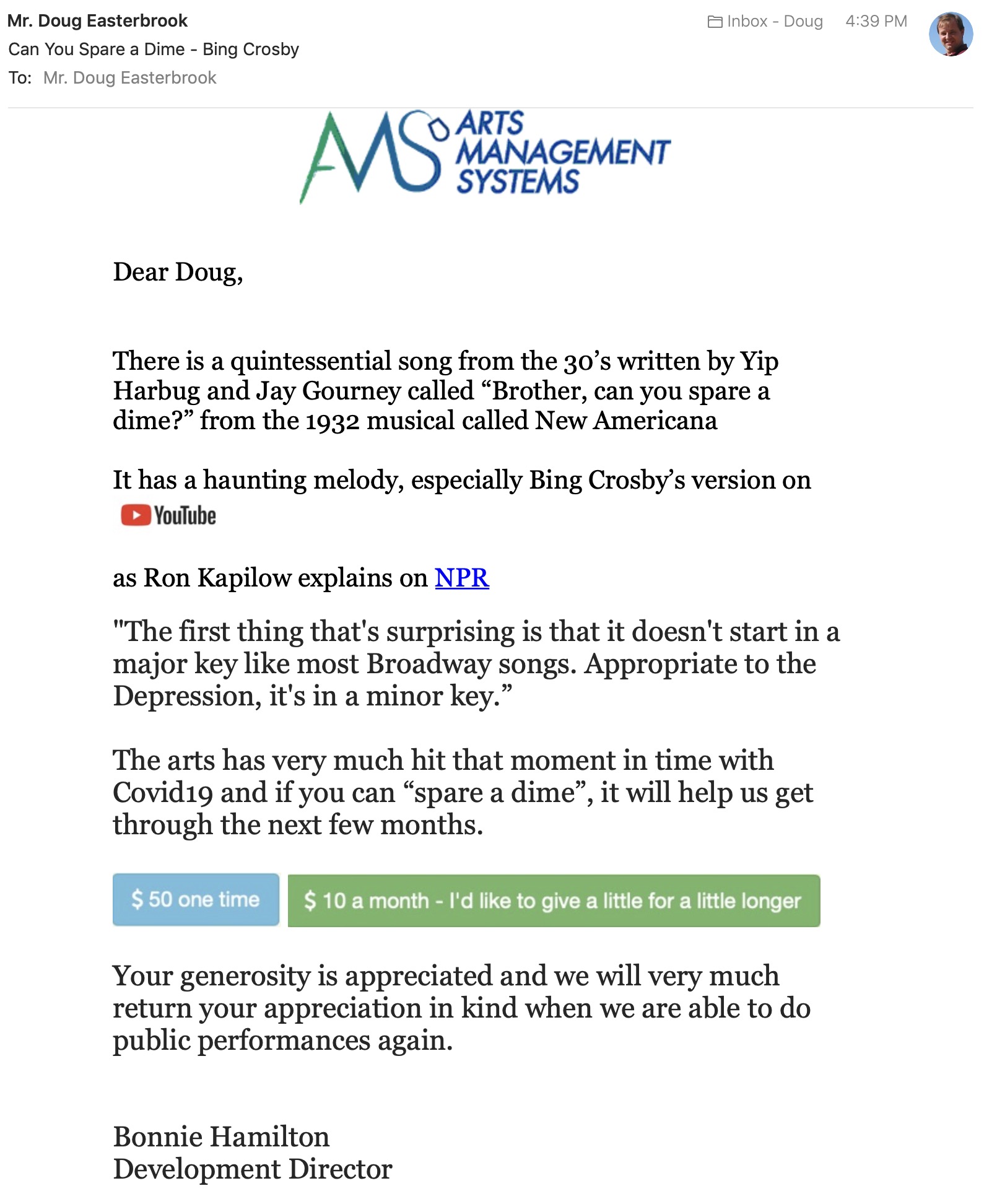
In this example, there are 4 actual links:
- one behind the youtube button to take the user to listen to Bing Cosby's version of Brother Can you spare a dime? from the 1932 musical revuew New Americana
- a traditional text link behind NPR (National Public Radio) to give background on Ron Kapilow's notes on the song
- A button to give $50 one time with a donation quicklink to our sample web site
- A button to give $10 a month - I'd like to give a little for a little longer as a quicklink to a monthly recurring donation.
Making the sample form letter
The links (above) are part of this sample fundraising form letter created in Theatre Manager with the purpose of emailing to ask people to donate. It is based on patrons so that I could use a mail list to determine the people to send to - meaning it could be volunteers plus donors in past year, plus ticket buyers with cancelled shows, etc.
 The general steps to create the letter were:
- Type the content
- Add merge field for the patron's name to make it feel personal
-
Add the images by:
- Clicking the cursor where I wanted an image to be placed
- Drag the images onto the document from the desktop (company logo, youtube logo, $50 one time, $10 a month)
- If you get the image in thr wrong spot, you can cut/paste it, or drag it.
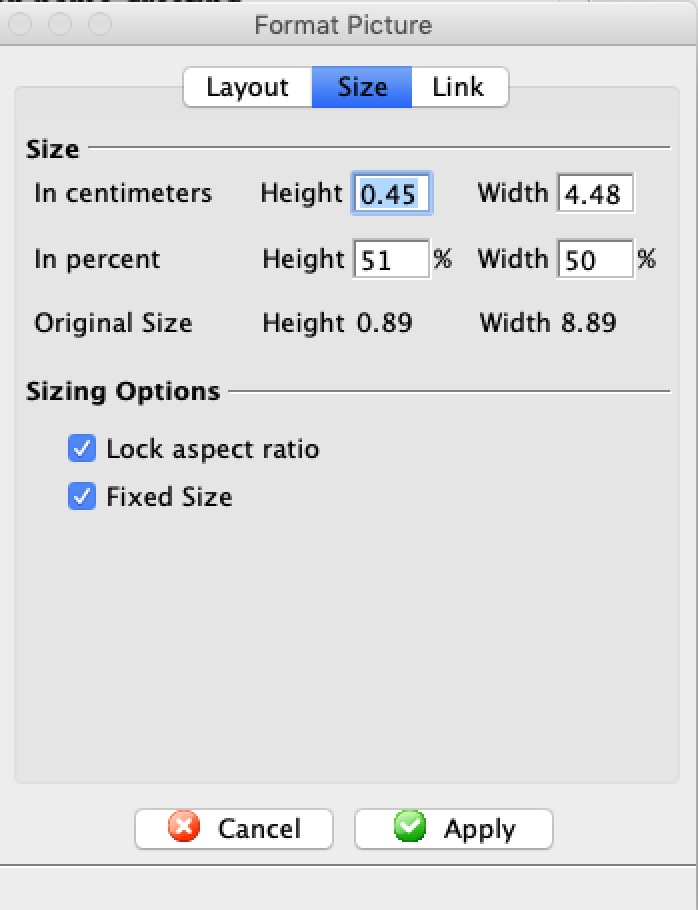
- If the image is too big, DOUBLE CLICK on it, click the size tab and indicate how you want it scaled (refer to the image to the right)
- once you have the document looking like you want it, you add a URL one of two ways:
- for images (see sample instructions in the full document above)
- double click on the image again
- click on the link tab
- Click on picture can be clicked - if you don't do this, then the image will not respond top clicks in the users mail client when sent as an email
- Paste the URL into the area for the URL. NOTE: make sure you try the URL in a browser before pasting it here
-
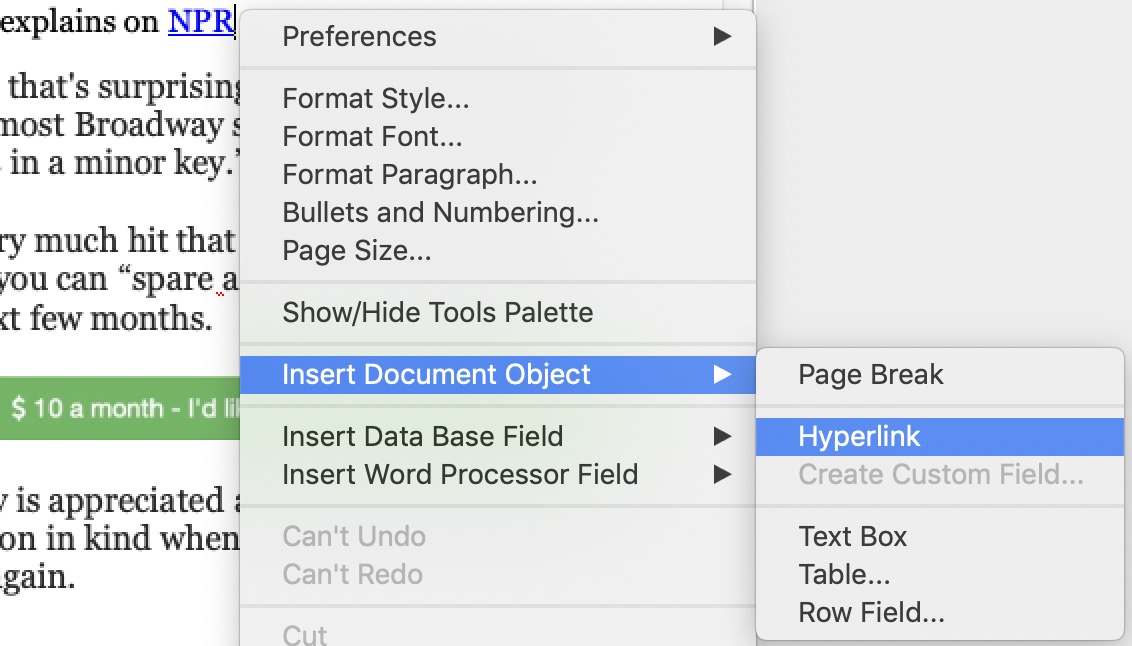 for text links:
- Highlight the text that you want the link to be behind
- Right click to get the context menu
- Select Insert Document Object
- Select Hyperlink from the sub menu
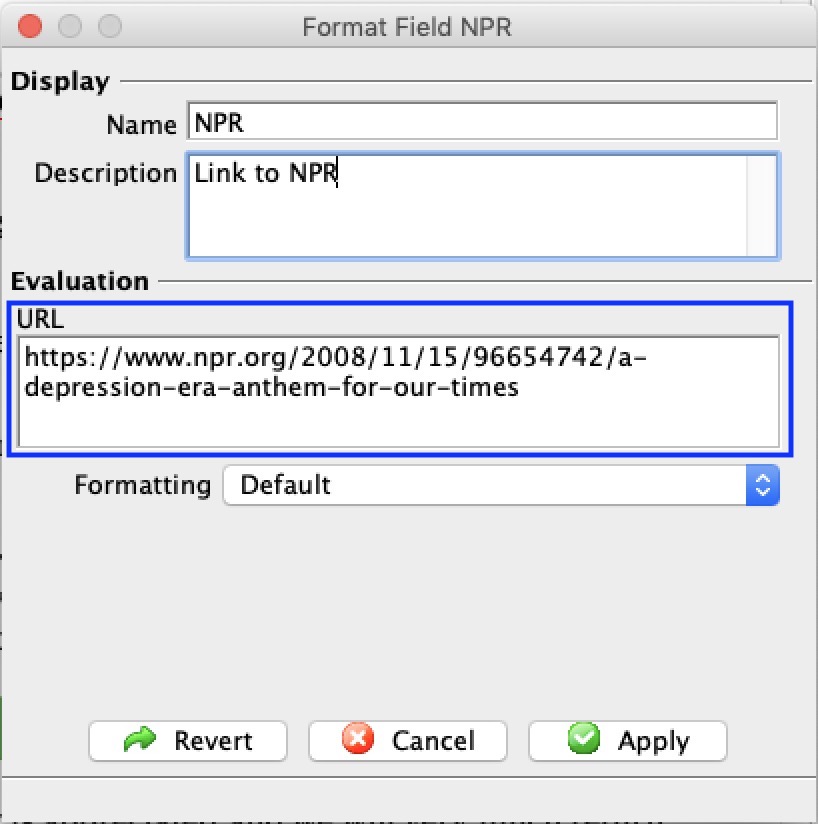
- The text hyperlink window opens
NOTE: make sure to put the URL into the right field
- for images (see sample instructions in the full document above)
What does the eblast look like?
It looks like a regular email sent to people. Theatre Manager tracks
- who you sent the email to
- and if they opened it or not
What does clicking on the donation buttons do
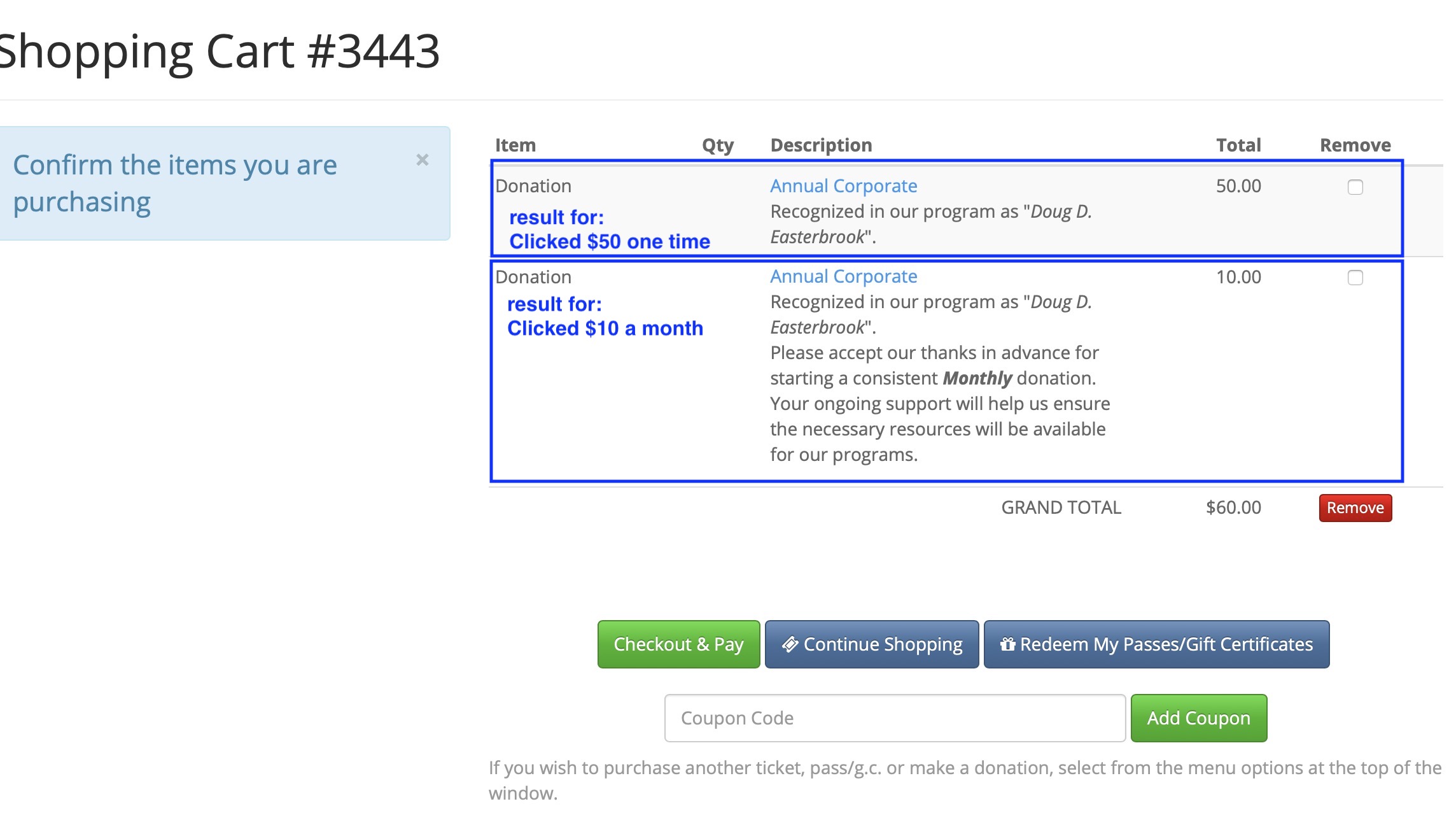
In the sample letter, I clicked on both buttons to show the effect and logged in. Because I clicked on them one at a time, both donations got added to a shopping cart as per the image below. The buttons below are included and active in case you want to try them.


This illustrates an e-blast with a one button donation ask for specific amounts. All the user would need to do is log in (or create an anonymous profile that you can merge later) and pay. A donation can be done in 3 button clicks.
Example donation quicklink within TM
Example donation quicklink within TM
The example code is below the image
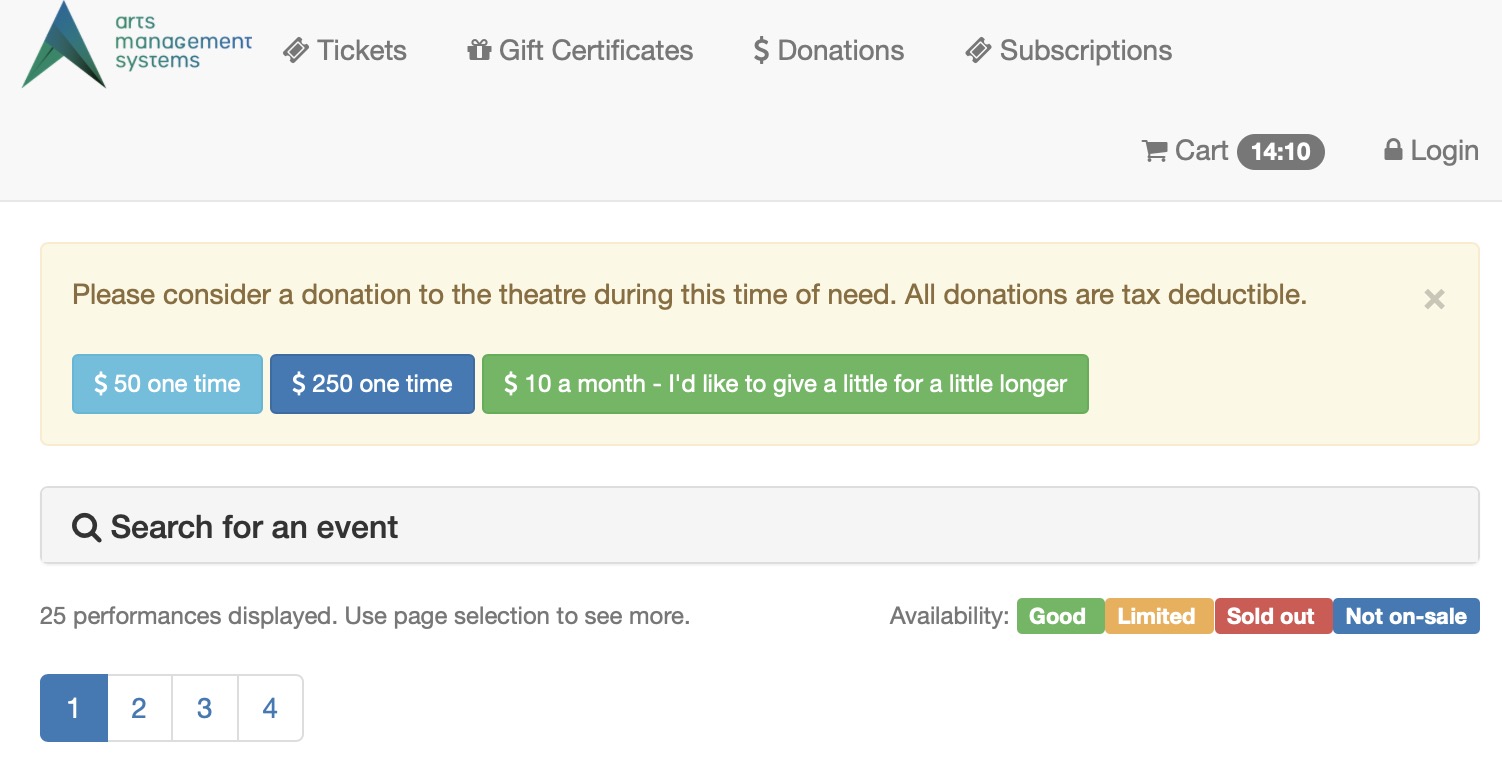
Sample code placed in tmTicketCustomPatronInstructions.html
While the code below could be placed anywhere in an appropriate web page file in Theatre Managers 'WePages' folder, the following was added to TMtemplates/tmTicketCustomPatronInstructions.html as an existing convenient way to place buttons at the top of the event list. Other good places to add donation buttons are:
- TMtemplates/tmCheckoutExtraMessagesEmail.html which is used by the confirmation email and typically has nothing in it.
- TMtemplates/tmCartEmpty.html which is displayed when the shopping cart is empty. For this situation, we'd suggest leaving the destination page as the cart.
- TMtemplates/rowCartDonationSuggestion.html which is displayed on the cart window suggesting that people make a donation - and in this case, you could add some 'quickdonation' options to make it easier for the patron. For this situation, we'd suggest leaving the destination page as the cart.
The TMtemplates/tmTicketCustomPatronInstructions.html file is used in all event lists and normally has nothing in it.
|
<div class="alert alert-warning fade in"> <!--#include virtual="TMtemplates/tmMessageDismiss.html" --> Please consider a donation to the theatre during this time of need. All donations are tax deductible. <br/> <br/> <a class="btn btn-info btn-sm" href="<field>F_HTML_FIREWALL</field>login?donationquick=1&amount=50.00¶m=altbtn=btnCheckout&tmsource=sometag"> <i class="fa fa-usd"> </i> 50 one time </a> <a class="btn btn-primary btn-sm" href="<field>F_HTML_FIREWALL</field>login?donationquick=1&amount=250.00¶m=altbtn=btnCheckout&tmsource=sometag"> <i class="fa fa-usd"> </i> 250 one time </a> <a class="btn btn-success btn-sm" href="<field>F_HTML_FIREWALL</field>login?donationquick=1&amount=10.00¶m=altbtn=btnCheckout&frequency=1&has tmsource=sometag"> <i class="fa fa-usd"> </i> 10 a month - I'd like to give a little for a little longer </a> </div> |
Example donation quicklink outside TM commerce pages
Example donation quicklink outside TM commerce pages
Three sample links are shown below that you can click on followed by the example web page in yellow.
|
Note: the web page looks very plain because all stylesheet information has been removed for clarity. You may need to add your own style sheets to create buttons like the example code within Theatre Managers event list |
Sample code placed a web page
The code below is a complete web page - including the head and body tags. You would only want to copy the links to place them into any of your existing web code such as facebook or wordpess sites
|
<!DOCTYPE html> <html lang="en"> <head> <title> Asking for a donation on a simple web page </title> </head> <body> Sample web page snippet asking for a donation. The links below have not been enhanced with any stylesheet themes <br/> <a href="https:∕∕tickets.artsman.com/TheatreManager/1/login?donationquick=1&amount=50.00¶m=altbtn=btnCheckout&morning&tmsource=mysourcetag" target="_blank"> Donate $50 one time </a> <br/> <a href="https:∕∕tickets.artsman.com/TheatreManager/1/login?donationquick=1&amount=250.00¶m=altbtn=btnCheckout&tmsource=mysourcetag" target="_blank"> Donate $250 one time </a> <br/> <a href="https:∕∕tickets.artsman.com/TheatreManager/1/login?donationquick=1&amount=10.00¶m=altbtn=btnCheckout&frequency=1&tmsource=mysourcetag" target="_blank"> Donate $10 a month - a little for a lot </a> </body> </html> |