REST API Querying for Specific Results
REST API Querying for Specific Results
- the Unique iD which allows you to access a specific record in any table using it's unique ID number.
- A Query which can contain multiple search parameters which provide restrictions that limit the rows of data that are returned.
- the page=xx parameter to provide a limited subset of data of approximately 25 lines. The data does not come back in any particular order unless a sort parameter is also given.
REST API Accessing a Specific Record using ID
REST API Accessing a Specific Record using ID
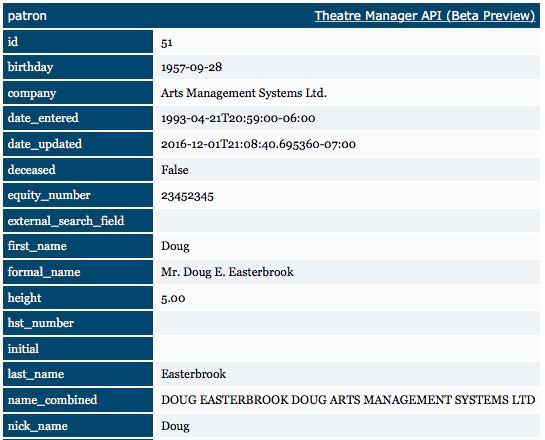
Some examples of accessing a specific record are:
- https://127.0.0.1/api/v1/patrons/51 - will show you data for patron 51 from the patrons table (see example to the right)
- https://127.0.0.1/api/v1/patrons/51.json - will show you data for patron 51 from the patrons table (in json format)
- https://127.0.0.1/api/v1/events/85 - will show you data for event 85 from the events table.
REST API Query Parameter
REST API Query Parameter
- a condition which is a field name followed by a ':', followed by the search value, with or without quotes.
- multiple conditions can be used by putting a '+' between each of them
- single or double quotes are required if the value contains a space
Format
q=first_name:john+last_name:smith+-company:ibm
You can:
- add multiple search conditions, separated by a '+' as long as the fields are recognized for the endpoint
- where each each search condition is generally in the form field:value
- negate any query by prefacing the field name with a '-'. Example a <= search, when negated, becomes >
- put () around searches if you want to set the order of precedence. Example: (field1:value1+field2:value2)|(field3:value3+field4:value4)
Search Parameters by Variable Type
Conditions used in queries vary based on variable type. The following is a generalized list:
| Variable Type | parameter in URL | Meaning |
| Numeric | field:value | field equals value (null can be used as value) |
| field:>value | field greater than value | |
| field:>=value | field greater than or equal to value | |
| field:<value | field less than value | |
| field:<=value | field less than or equal to value | |
| field:value1..value2 | field must be between value1 and value2 | |
| field:[value1, value2, value3] | field must be one of value1, value2 or value3
No space is required because fields are numeric |
|
| Character | field:=value | field equals value using case sensitive match (null can be used as value).
eg first_name:=Bob will find Bob, but not bob |
| field:='value' | field equals value using case sensitive match and where value can have spaces
eg first_name:='Bob and Betty' will find Bob and Betty, but not bob And Betty |
|
| field:*value* | field contains value where * is a wildcard that marches any characters (case insensitive) before and/or after value.
eg first_name:*bob* will find Bob, bob, bobby, and bebob |
|
| field:value | field is like the value using case insensitive search
eg first_name:bob will find Bob, bob but not bobby |
|
| field:'value' | field is like the value using case insensitive search where value can have spaces
eg first_name:'bob 5' will find Bob 5, bob 5 but not bobby |
|
| field:[value1, value2, value3] | field is one of value1 or value2, or value3 (case insensitive).
eg first_name:[bob, ted, alice] will find bob, Bob, ted, tED, AliCe note: a space is required after each comma |
|
| field:[value1*, value2*, value3] | field is one of value1 or value2, or value3* (case insensitive and value3 starts with)
eg first_name:[bob, ted, ale*] will find bob, Bob, ted, alex, alecia, alexandra note: a space is required after each comma |
|
| field:=[value1, value2, value3] | field is one of value1 or value2, or value3 (case sensitive).
eg first_name:=[Bob, Ted, alice] will find Bob, Ted, Alice, bur not bob, ted or alice |
|
| field:[value1, value2, value3] | field is like one value1, value2, or value3 (case insensitive). This uses postgres 'ilike' comparator
eg first_name:[Bob, Ted, alice] will find Bob, Ted, Alice, bob, ted, alice, teddy, bobbie, boBBie, fested ... note: a space is required after each comma |
|
| search:["value1", "value2"] | does a postgres text search on the data in the endpoint.
eg search:["Bob", "art"] will find Bob, Bobbie, Art and Arts Management Systems (searches in all name and company fields"). |
|
| Boolean | field:value | field equals, which is either true, false or null |
| Date | field:value | field equals value, value specifed in yyyy-mm-dd format, or null |
| field:>value | field greater than value in yyyy-mm-dd format | |
| field:>=value | field greater than or equal to value in yyyy-mm-dd format | |
| field:<value | field less than value in yyyy-mm-dd format | |
| field:<=value | field less than or equal to value in yyyy-mm-dd format | |
| field:value1..value2 | field must be between value1 (yyyy-mm-dd format) and value2 (yyyy-mm-dd format) | |
| field:[value1, value2, value3] | field must be one of value1 (yyyy-mm-dd format), value2 (yyyy-mm-dd format) or value3 (yyyy-mm-dd format) |
Packed Seq Fields/Packed Lists
These are special de-normalized lists of record connections. Examples of these fields are 'bought for plays', 'belongs to mail lists', 'associated with tags' where the specific record can be associated with multiple other records. A patron can belong to many mail lists. A play, donation campaign, or patron can be associated with many tags and searching for records with these markers can provide access to an arbitrary group of data, such as searching for all events with a tag.
| Packed Lists | field:[value1, value2, value3] | field is one of value1, value2 or value3 where all values are internal record numbers that you would have found by some other means.
eg tag_ids:[5,6,7] will find all records with tag ids of 5, 6 or 7 |
| field:=[value1, value2, value3] | field contains all seq #s of value1, value2 or value3 where all values are internal record numbers that you would have found by some other means.
eg tag_ids:=[5,6,7] will find all records marked with tag ids of 5, 6 and 7 |
Some Examples using the q= parameter are:
REST API Using Pagination
REST API Using Pagination
A quick way to see a sample of data is to use page=1. When you display a page, you will have next and previous on the html page so that you can navigate to next or previous pages easily.
There are some parameters that you can use to limit the amount of data:
- page=XX - will show the XXth page of data, based on a default page size of 25 rows of data per page. For example, page=2 will show rows 26 to 50 data
- page_size=YY - alters the page size from 25 rows of data per page to YY rows of data per page. It can be used in con with the page=XX parameter.
- page_size=all - removes any page size limit for this query when displaying via html
- split_size=ZZ -
- page_size=all&stream=1 - is a very special combination of parameters that creates a continuous stream of all data and returns it from the API as fast as it can. Any program requesting data using this parameter needs be be able to parse the data in real time, as fast as it can because it could return a rather large set of data. It should not be used for viewing data.
Examples using pagination to limit results:
- https://127.0.0.1/api/v1/patrons?page=1
page 1 of the patron table, rows 1 to 25 - https://127.0.0.1/api/v1/events?page=2
page 2 of the event listing, which is rows 26 to 50 of the data - https://127.0.0.1/api/v1/events?page=2&page_size=10
return page 3 of the event data, paginated at 10 rows per page (effectively this is record 21 to 30) -
https://127.0.0.1/api/v1/patrons/pages?include_first&include_last&sort=last_name+first_name&only=page+page_rows+row+page_url+first_name+last_name
sort the patron table by last name/first name and then, in a summary table, show the first and last person in each page group.